Choosing a wide-format printer requires weighing size, versatility, and print quality. This guide highlights five prominent choices that fit American workflows, from high-volume CAD posters to vibrant photo posters and professional documents. Each option supports wide media and multi-function capabilities, making them suitable for design studios, architectural firms, and large-format printing tasks. Explore detailed specs, practical use cases, and buying considerations to help you pick a model that aligns with your workload and budget.
| Product | Brand | Best For | Media Width |
|---|---|---|---|
| Epson EcoTank Photo ET-8550 | Epson | All-in-one photo and color prints with wide-format capability | Up to 13 x 19 inches |
| HP DesignJet T210 24-Inch | HP | Technical drawings, CAD posters, professional posters | Up to 24 inches wide |
| Canon imagePROGRAF TC-21 | Canon | Bright posters, graphics on roll or sheet media | Up to 24 inches |
| Canon imagePROGRAF TC-21M | Canon | Multifunction large-format printing and scanning | Up to 24 inches |
| HP OfficeJet Pro 7720 | HP | Wide-format color prints, office-grade posters | Up to 11 x 17 inches |
Epson EcoTank Photo ET-8550 Wide-Format All-in-One

Epson’s EcoTank Photo ET-8550 is an all-in-one wide-format printer that emphasizes cartridge-free ink from bottles, enabling economical color printing for photos, worksheets, brochures, and informational flyers. It supports wireless printing, Ethernet, and USB connections, with a 4.3-inch color touchscreen for easy operation. The device is designed for mobile workflows and cloud-enabled tasks via Epson Connect Solutions, making it feasible to print from almost anywhere and to scan to the cloud or email print from a smartphone.
HP DesignJet T210 Large Format 24-Inch Plotter

The HP DesignJet T210 is a reliable 24-inch-wide plotter designed for easy wide-format CAD and poster prints. It includes a two-year extended warranty with onsite and remote support, covering HP parts and service. This model is favored by architects, engineers, and construction professionals for technical line drawings, maps, and indoor signage. Media handling supports large-format rolls and sheets (up to 24 inches wide) with optional feeder options for efficiency.
Canon imagePROGRAF TC-21 24″ Large Format Printer

This 24-inch desktop printer delivers high-quality text and vibrant images for posters on both cut sheet and roll media. It ships with a full 280 ml ink set, offering substantial ink content for longer print runs. The TC-21 supports automatic feeding from both roll media and sheets, enabling flexible workflows for posters and graphics projects.
HP DesignJet T210 24-Inch (8AG32D)
Another variant of the HP DesignJet T210 line emphasizes precision for technical drawings and posters. It supports 24-inch wide media rolls and optional sheet feeder accessories, enabling versatile workflow configurations. The printer is well-suited for maps and sewing pattern prints, offering reliable line quality and accurate color output for professional-grade documents.
Canon Pro 2100 24″ Wide-Format Fine Art Printer
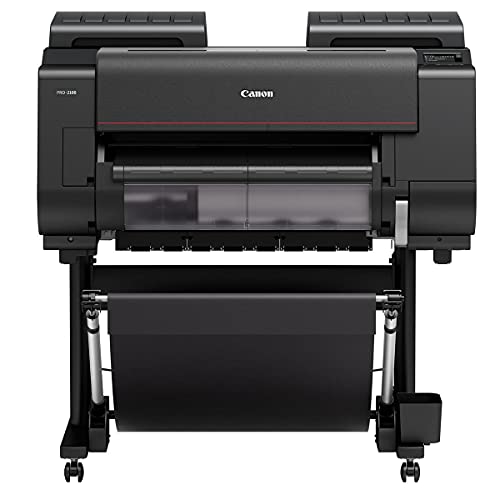
The Canon Pro 2100 is a dedicated wide-format fine-art printer designed for high-end color output. It emphasizes color accuracy and rich tones suitable for gallery-quality posters and fine-art prints. The device is backed by Canon’s Platinum Reseller program and includes a one-year on-site warranty, ensuring reliable service for professional print shops and studios.
Canon imagePROGRAF TC-21M Multifunction 24″

The TC-21M expands the TC-21 line with multifunction capabilities, including a tiltable 2.7-inch touchscreen for easy operation and simplified job management. It also features USB flash drive printing for large-format projects and supports enlargements from a letter flatbed scan for quick revisions, making it a practical option for studios needing flexible workflow integration.
HP OfficeJet Pro 7720 Wide Format

The HP OfficeJet Pro 7720 brings wide-format color printing to office environments, supporting up to 11 x 17 inches. It enables wireless printing from mobile devices and delivers professional color for brochures, posters, and office communications. The printer is designed for high-volume workloads with robust wireless integration, making it a practical choice for office-based large-format needs.
Buying Guide: Key Considerations For Wide-Format Printers
- Print width and media: Confirm the maximum media width and support for roll and sheet media. If you regularly print posters or technical drawings, ensure media handling aligns with your typical sizes.
- Ink system and cost per page: Evaluate cartridge-free or traditional ink systems. Eco-tank or bottle-based systems can reduce ongoing ink costs, while standard cartridges may offer simpler replacement and maintenance.
- Connectivity and workflow: Wireless, ethernet, USB, and cloud printing options matter for modern offices. Look for compatibility with mobile devices and cloud-based print services.
- Color accuracy and media versatility: For posters and fine art, color fidelity and the ability to handle gloss, satin, and matte media are important. Look for ICC profiles or driver options that optimize color output.
- Maintenance and warranty: Long warranties and accessible support reduce downtime. Consider models with on-site service if you run critical print jobs.
- Scalability and future proofing: If your needs could expand, assess models with optional feeders, extra memory, or upgradeable components to accommodate larger formats or higher volumes.
- Two-in-one or multifunction capabilities: If you require scanning, copying, or cloud-based features, prioritize devices with robust scanning efficiency and network-friendly features.
- Footprint and budget: Larger formats can demand substantial space. Balance footprint with budget, considering total cost of ownership over 3–5 years.
When selecting a wide-format printer, align the model’s strengths with your typical tasks—technical drawings, posters, photographs, or fine-art prints—and consider how well the device integrates into your existing workflow and IT environment. The options reviewed here cover a range of use cases, from CAD-heavy operations to photo-centric production, helping you identify a model that meets your performance needs and business requirements.