The right wide-angle conferencing camera can transform team collaboration, especially in multi-person meetings and huddle spaces. This guide highlights five top options that balance field of view, image quality, and smart features like AI framing and noise cancellation. Explore each product’s strengths, compare their capabilities, and find the best fit for your meeting room or home office setup.
| Product | Brand | Field Of View | Highlighted Feature |
|---|---|---|---|
| Shcngqio 1080P HD Webcam | Shcngqio | 1080p HD, wide-angle lens | Noise-canceling mic and auto light correction |
| Wide Angle Webcam 920 Pro | Spedal | 120° FOV | 360° rotation with up to 180° vertical tilt |
| WYRESTORM 4K Webcam | WYRESTORM | 120° FOV | AI framing and tracking for presenters |
| Innex C831 180° Panoramic | Innex | 180° panoramic | AI facial tracking and customizable presets |
| Angetube Wide Angle 4K Webcam | Angetube | 120° FOV | AI noise cancellation and 4K/1080p options |
Note: The following sections present objective overviews of each product, focusing on setup, design, video quality, audio performance, and usability in typical conference scenarios.
Shcngqio 1080P HD Webcam With Wide-Angle Lens

The Shcngqio TWC29 delivers 1080p Full HD clarity with a wide-angle lens designed to capture more participants in a single frame. At 30 frames per second, it provides smooth video ideal for online teaching, webinars, and livestreams. The built-in microphone uses noise-reduction technology to improve vocal clarity in busy environments, and automatic light correction helps maintain consistent image brightness in varied lighting. Plug-and-play USB setup minimizes downtime, making it suitable for laptops, desktops, and conferencing apps like Zoom or Skype. Its privacy cover adds a simple privacy safeguard when needed.
Key points:
– 1080p resolution with a wide-angle field of view
– Noise-reducing microphone optimizes voice pickup
– Auto light correction for variable lighting
– Plug-and-play USB connection
Spedal 120 Degree Wide-Angle 920 Pro

The Spedal 920 Pro is designed for team rooms and multi-person calls with a 120-degree wide-angle view. It supports full HD 1080p video and features a built-in noise-canceling microphone optimized for clear conversations in group settings. The webcam rotates a full 360 degrees, plus a vertical tilt, enabling flexible positioning for boardrooms or huddle spaces. A new flexible gimbal base and easy plug-and-play installation allow quick deployment with laptops, desktops, or monitors. It integrates with common conferencing apps such as Zoom and Skype without requiring driver downloads.
Key points:
– 120° wide-angle with 360° rotation
– Built-in noise-canceling microphone
– Plug-and-play for quick setup
– Compatibility with major conferencing software
WYRESTORM 4K Webcam With AI Tracking

The WYRESTORM Focus 210 offers true 4K video for high-detail meetings, supporting up to 30fps for natural motion. AI framing automatically centers all participants within the frame, and presenter tracking follows the speaker to maintain focus. The 120° wide-angle view ensures broad coverage of larger rooms, which helps reduce the need for multiple cameras. This camera is designed for professional environments and teams that require accurate framing and dependable performance in video conferences or live streams.
Key points:
– Real 4K resolution with AI framing and presenter tracking
– 120° wide-angle field of view
– Smooth 30fps video for clear conferencing
– Suitable for Microsoft Teams and similar platforms
Innex C831 180° Panoramic 4K Webcam

The Innex C831 delivers a panoramic 180° view, capturing all participants in a single frame with stitched 4K imagery. It includes AI facial tracking and auto-zoom features via Innex Studio software, enabling dynamic layouts for meetings, hybrid classrooms, or large huddle spaces. Five preset view angles provide quick adjustments to fit various room configurations. This camera focuses on inclusivity in group calls by guaranteeing broad coverage and intelligent framing for active discussions.
Key points:
– 180° panoramic coverage with 4K clarity
– AI facial tracking and auto-zoom via software
– Multiple preset angles for flexible setups
– Ideal for conference rooms and classrooms
Angetube Wide Angle 4K Webcam
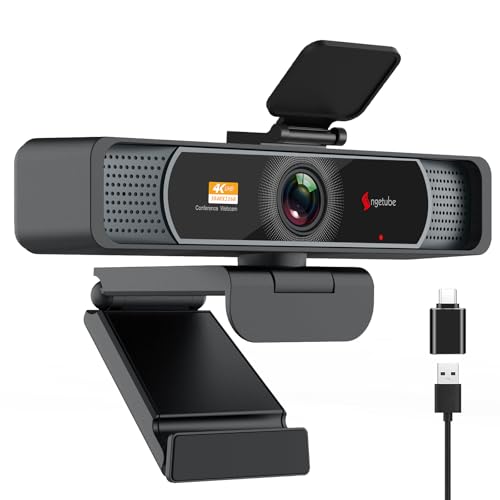
The Angetube 4K webcam captures expansive scenes with a 120° wide-angle lens and offers 4K resolution at 30fps, plus 1080p at 60fps in supported configurations. Dual AI-enabled noise-canceling microphones improve audio quality, ensuring voices are clear even in busy environments. It supports flexible USB-C or USB-A connections and provides auto light correction for consistent visuals. This camera balances ultra-high resolution with practical usability for business calls, remote learning, and streaming.
Key points:
– 4K resolution (up to 30fps) with 120° FOV
– AI noise cancellation for clear voice pickup
– USB-C or USB-A compatibility
– Auto light correction for variable lighting
Buying Guide: How To Choose The Right Wide-Angle Conferencing Camera
- Field of view versus room size: A 120° to 180° FOV suits medium to large conference rooms, while smaller spaces benefit from adjustable or narrower views to avoid distortion.
- Resolution and frame rate: 4K cameras deliver sharper detail, but 1080p is sufficient for most meetings. For fast movement and presenter tracking, a consistent 30fps is generally adequate.
- Autofocus and AI features: PDAF or CAF (continuous autofocus) helps maintain sharpness as participants move. AI framing and facial tracking reduce manual camera adjustments.
- Audio performance: Built-in noise-canceling microphones improve intelligibility in busy rooms. Check whether the camera supports multiple input modes or external mics for larger rooms.
- Ease of setup and compatibility: USB plug-and-play remains the simplest option. Verify compatibility with your preferred platforms (Zoom, Teams, Skype, OBS) and whether software is required for AI features.
- Mounting and flexibility: Consider cameras with 360-degree rotation, vertical tilt, or wall-mount options for optimal panoramic coverage. A stable tripod mount helps in shared spaces.
- Privacy and security: Look for a physical privacy cover and robust driver support to minimize potential vulnerabilities when the camera is not in use.
- Budget and total cost of ownership: While 4K and AI features add cost, evaluate total value based on room size, usage frequency, and required audio quality.
These criteria help compare options across the five featured products, balancing image fidelity, voice clarity, and room coverage. When selecting, prioritize real-world meeting needs—room dimensions, typical participant count, and whether the camera will serve as a single-camera solution or as part of a multi-camera setup.