The best wall digital picture frame depends on how large you want your photos to appear and how you plan to add them. For a wall-mountable option with a touchscreen, consider the Pastigio 15.6-inch Frameo frame. For a larger display, compare the two 21.5-inch Uhale models; one has a matte screen, while the other supports dual-band Wi-Fi. The BIGASUO and Nixplay frames are alternatives for shoppers who prioritize storage or app-based sharing, respectively. Check each model’s mounting details before choosing a permanent wall location.
| Frame | Best For | Standout Feature |
|---|---|---|
| Pastigio Frameo 15.6-inch | Wall mounting and touch controls | Wall-mountable design, 32GB storage |
| WONNIE Uhale 21.5-inch | Large rooms and broad viewing angles | Dual-band Wi-Fi, 64GB storage |
| FANGOR Uhale 21.5-inch | Artwork and reduced screen glare | Matte display, app and web sharing |
| BIGASUO Frameo 15.6-inch | Large photo libraries | 64GB storage, Frameo app |
| Nixplay 10.1-inch | Simple family photo sharing | App and email sharing |
Pastigio Frameo 15.6-Inch Digital Frame

Best for: Buyers seeking a wall-mountable digital frame with a large touchscreen. This model is explicitly described as wall-mountable, making it the clearest fit in this selection for shoppers focused on wall display. Its 15.6-inch IPS screen has Full HD 1920 × 1080 resolution and touch controls.
Photos and videos up to 15 seconds can be shared over Wi-Fi through the Frameo app. The frame includes 32GB of built-in storage and supports up to 32GB of external storage. It also accepts transfers through external storage or a computer without Wi-Fi. Supported image formats include JPG, JPEG, BMP, and PNG; MP4 is listed for video.
Consideration: Video sharing through the app is limited to clips up to 15 seconds. Confirm the wall-mounting arrangement and available power access for your intended location before installation.
WONNIE Uhale 21.5-Inch Wi-Fi Frame
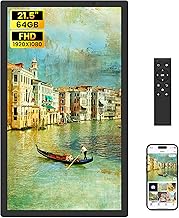
Best for: People who want an extra-large display and flexible wireless connectivity. The 21.5-inch IPS screen has Full HD resolution and a stated 178-degree viewing angle, useful when viewers approach the display from different positions. The listing describes 2.4GHz and 5GHz Wi-Fi and sharing through the Uhale app for iOS and Android.
Its 64GB of built-in memory is listed as holding more than 50,000 photos. USB flash drives and SD cards can be used for transfers, backups, and playback, with expansion supported up to 128GB for each type. It displays JPG, JPEG, BMP, and PNG images, along with MP4 video.
Consideration: The supplied details do not specify wall-mounting hardware or installation. Check the mounting method separately if you plan to hang this large frame.
FANGOR Uhale 21.5-Inch Matte Frame

Best for: Buyers displaying artwork or photos in a bright room who prefer a matte screen. The 21.5-inch Full HD display is described as anti-glare, and the frame can receive photos, videos, and live photos through the Uhale app. The app supports sending up to 100 photos at a time and videos up to two minutes; the Uhale website can send up to 500 photos at once.
The frame has 64GB of built-in storage, with the listing stating capacity for over 160,000 photos. An SD card slot and USB port support transfers and backups. The product details say all sharing features are free of subscription fees.
Consideration: App transfer limits apply. For SD cards and USB drives, the listing recommends capacities up to 32GB and FAT32 formatting; larger drives may not work properly.
BIGASUO Frameo 15.6-Inch Digital Frame

Best for: Shoppers who want a 15.6-inch Full HD touchscreen and more built-in storage than the Pastigio model. BIGASUO lists 64GB of memory and an approximate capacity of 100,000 photos. The 178-degree IPS viewing angle may suit a display watched from several positions.
Family and friends can share photos and videos up to 15 seconds through the Frameo app. The frame supports 2.4GHz Wi-Fi, and SD cards or USB flash drives can be used to import, export, and back up files. Supported formats include JPG, JPEG, BMP, PNG, and MP4.
Consideration: This model supports only 2.4GHz Wi-Fi, not 5GHz. The listing recommends FAT32 formatting and storage devices up to 32GB for compatibility; its USB port does not transfer photos directly from a computer.
Nixplay 10.1-Inch Wi-Fi Digital Frame

Best for: Buyers who value app-based family sharing and a smaller display over a large wall-filling screen. Nixplay describes setup through its app and on-screen steps, with Wi-Fi and multi-user access for uploading photos from different people. The listing also describes sharing through email or the app and managing multiple frames in one app.
The frame can be preloaded with photos, videos, and a personalized message before gifting. An auto-rotation feature is included, according to the product name and listing.
Consideration: At 10.1 inches, this is substantially smaller than the 15.6-inch and 21.5-inch options. The supplied details do not confirm that it is wall-mountable, so check mounting specifications before planning a wall installation.
Buying Guide: How to Choose a Wall Digital Picture Frame
What screen size works on your wall?
A 21.5-inch frame gives photos greater visual prominence and is worth comparing for larger rooms or artwork displays. A 15.6-inch model takes up less wall space while still offering a sizable screen. The 10.1-inch Nixplay is the smallest option here. Measure your intended space and account for nearby outlets before deciding.
Is wall mounting confirmed?
Among these listings, the Pastigio frame is specifically described as wall-mountable. The other product details do not establish mounting support, so verify the frame’s mounting method and hardware before buying for a wall. Also consider whether the chosen location allows convenient access to power.
How will you send photos?
Frameo models use the Frameo app for wireless sharing, while the Uhale models use the Uhale app. The FANGOR listing also describes sending photos through the Uhale website. For offline transfers, compare the stated USB and SD-card options, formatting requirements, and supported capacities.
How much storage do you need?
Built-in capacity ranges from 32GB on the Pastigio model to 64GB on the other listed frames. Photo capacity estimates come from product listings and can vary with file sizes. If you have a large library, compare built-in memory as well as external storage support and any device-capacity limits.
Will the frame suit your room’s lighting?
The FANGOR model specifically lists an anti-glare matte screen. The WONNIE and BIGASUO listings specify IPS panels and 178-degree viewing angles. Compare these details with your room’s light and typical viewing positions rather than assuming every screen handles glare in the same way.
Frequently Asked Questions
Which listed digital frame is explicitly wall-mountable?
The Pastigio 15.6-inch Frameo digital picture frame is explicitly described as wall-mountable in its product details.
Which frame has the largest display?
The WONNIE and FANGOR Uhale models both have 21.5-inch displays, the largest listed in this selection.
Which frame has a matte screen?
The FANGOR Uhale 21.5-inch model is listed with an anti-glare matte display.
Do these frames require Wi-Fi to show photos?
Wi-Fi enables app-based sharing on the listed connected frames. Some models also support transfers or playback through USB drives or SD cards, but check each model’s file-transfer details.
Can I send long videos through the apps?
Video limits differ. The Frameo listings specify app videos up to 15 seconds, while the FANGOR Uhale listing allows app videos up to two minutes. Check the product’s transfer method for any additional limits.