Vertical GPU mounts let you showcase your graphics card while optimizing airflow in compatible cases. This guide highlights five top options that balance rigidity, cooling, and compatibility for American builders seeking a tidy, performance-focused setup. Each product section links directly to Amazon for quick reference and purchase.
| Product | Brand | Key Benefit | Riser Type |
|---|---|---|---|
| Lian Li VG4v4 White | Lian Li | Three height adjustments; improved GPU clearance | Gen 5 PCIe 5.0 x16 |
| Lian Li VG4v4 Black | Lian Li | Three height adjustments; adjustable tilt for airflow | Gen 5 PCIe 5.0 x16 |
| NZXT AB-RH175-B1 White | NZXT | Sturdy steel bracket; fits NZXT H7 series | PCIe 4.0 x16 Riser |
| EZDIY-FAB Vertical Mount | EZDIY-FAB | Optimized for 7 open PCI slots; compact 115mm riser | PCIe 4.0 x16 |
| BTBcoin Vertical Mount | BTBcoin | Heavy-duty aluminum; 200mm Gen4 riser | PCIe 4.0 x16 |
The following sections profile each option, outlining compatibility, installation considerations, and performance notes to help you decide which vertical GPU mount best fits your case and cooling goals.
Lian Li VG4v4 White – Premium Gen 5 Riser Cable

The Lian Li VG4v4 White enables precise vertical GPU mounting with three height adjustments to maximize clearance around I/O cutouts and cables. The design reduces interference with HDMI and DisplayPort connectors, allowing you to tilt the GPU slightly forward for improved airflow or backward to enhance visuals. A high-speed PCIe 5.0 x16 riser cable of 200mm supports bandwidth up to 32 Gbps, doubling the capability of PCIe 4.0. This makes it suitable for modern GPUs while maintaining compatibility with older platforms.
Installation notes emphasize minimizing cable clutter and ensuring a clear path for airflow. The bracket is shaped to accommodate larger GPUs without obstructing other components. For cases that support Gen 5 risers, this kit can help achieve a balanced aesthetic with robust thermal performance. Suitable for mid-tower to full-tower builds with compatible PCIe slots and mounting points.
Lian Li VG4v4 Black – Premium Gen 5 Riser Cable

The black VG4v4 variant mirrors the white kit’s adjustable height and dual-angle tilt features, with a sleek black finish to match darker builds. The improved GPU I/O clearance and broader access to cables reduce interference during installation. The included PCIe 5.0 riser cable maintains high data transfer rates, enabling stable performance for demanding graphics cards. Users can tailor the tilt to optimize either airflow or presentation depending on cooling setup and aesthetic preferences.
Like the white version, this kit is designed for cases that support vertical mounting with adequate PCIe expansion slots and motherboard clearance. Its robust construction aims to prevent sag and to maintain alignment during transport or gaming sessions. Consider this variant if you want a uniform look with the rest of a blacked-out build.
NZXT AB-RH175-B1 – 175mm PCIe 4.0 Riser Kit

This NZXT kit uses a sturdy steel bracket paired with a PCIe 4.0 riser cable designed to minimize GPU sag and maximize compatibility within NZXT H7 series cases. The kit enables secure vertical mounting while maintaining ample air circulation for cooling fans and AIO radiators. It’s a practical choice for builders who want reliable support and easy integration within NZXT ecosystems, and it helps ensure sufficient clearance for adjacent components.
Compatibility considerations include ensuring your case is designed to accept the bracket and that the riser cable routing does not interfere with water cooling loops or intake paths. The kit’s robust build supports heavier GPUs, making it suitable for expansion cards that push performance without compromising stability.
NZXT AB-RH175-W1 – White Vertical GPU Mount

The white variant delivers the same sturdy steel construction and PCIe 4.0 riser cable as its black counterpart, with a bright white finish to complement white or light-themed builds. It provides reliable vertical support and compatibility with NZXT H7-series cases, ensuring adequate clearance for air and AIO cooling. This kit is well-suited for systems where aesthetics are part of the priority, as well as performance.
When planning installation, consider cable length and routing to prevent tension on the riser or motherboard connectors. The kit’s design prioritizes stable vertical orientation, reducing risk of gpu sag and ensuring a clean, professional appearance in the final build.
Cooler Master V3 Vertical GPU Holder – 165mm Riser

Cooler Master’s V3 kit focuses on versatile PCIe compatibility across E-ATX, ATX, and mATX cases, with an emphasis on airflow and easy installation. The kit supports GPUs up to three slots wide and includes a modular design with a removable GPU panel for simplified upgrades or maintenance. A 165mm riser cable is included to deliver reliable PCIe 4.0 performance and stable vertical mounting, making it a strong option for a wide range of builds where space and cooling are balanced considerations.
Performance notes center on airflow flow-through potential and the kit’s capacity to fit multiple motherboard layouts. If your chassis has tight clearance near the motherboard, this option’s adjustable features can help you optimize alignment and reduce interference with RAM or PCIe slots.
EZDIY-FAB Vertical Mount – 115mm Riser with ARGB

EZDIY-FAB’s solution targets full-open PCI slots and RTX 40-series GPUs with a precise 115mm riser cable. The kit includes an ARGB module for lighting enhancement and a 90-degree connector to reduce cable strain while providing a clean vertical presentation. It’s tailored for cases with seven open PCIe slots, making it a practical fit for many mid-tower builds. The design emphasizes careful engineering to minimize risk of bending or crimping motherboard connectors during installation.
Consider the space needed for ARGB wiring and the case’s internal layout to avoid obstructing memory modules or cooling pathways. This kit is a good option for builders who want both aesthetic appeal and reliable PCIe performance in a compact package.
BTBcoin Vertical GPU Mount – 200mm Gen4 Riser
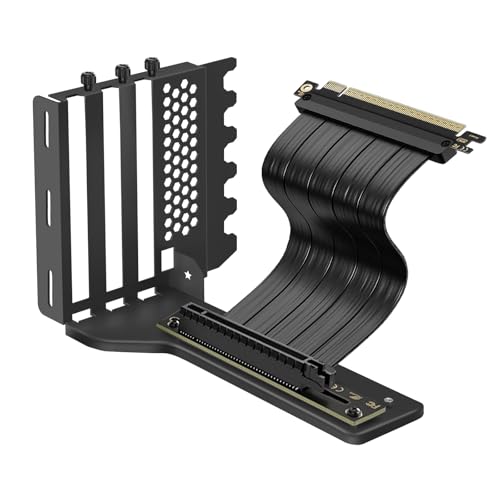
BTBcoin’s vertical mount kit includes a premium 200mm PCIe 4.0 X16 Gen4 riser cable, designed to deliver stable 64GB/s bidirectional bandwidth. The aluminum holder is described as heavy-duty, capable of supporting GPUs up to 5 kg (11 lbs) to prevent sag. The kit is compatible with ATX, MATX, and EATX cases and supports both 2-slot and 3-slot GPUs, making it suitable for a broad range of flagship graphics cards.
Key considerations include the weight of your card, case rigidity, and cable routing to ensure the riser remains straight and secure. This option is ideal for high-end builds that emphasize a showcase vertical GPU without compromising stability or performance.
Buying Guide: Key Purchase Considerations And Comparisons
- Case compatibility: Confirm that your chassis supports vertical mounting and has adequate PCIe slots, I/O clearance, and radiator/cooler space for your chosen GPU orientation.
- Riser cable quality and length: Higher bandwidth (PCIe 4.0/5.0) improves data transfer and future-proofing. Common lengths range from 115mm to 200mm; shorter cables reduce bending risk in tight spaces.
- Weight handling and stability: Heavy GPUs require sturdy brackets and solid brackets (steel or aluminum) to prevent sag and movement during transport or gaming sessions.
- Airflow and cooling: Dual-angle tilt and strategic GPU orientation can influence intake and exhaust flow. Consider how the tilted GPU interacts with case fans and radiator positioning.
- Aesthetics vs. practicality: If the goal is a premium showcase, prioritize clean cable routing, minimal interference with memory or PCIe slots, and a finish that matches your build’s color scheme.
- Customer support and compatibility notes: Some kits are designed for specific case brands (e.g., NZXT H-series). Verify that the bracket, riser, and mounting hardware suit your motherboard form factor and overall layout.
- Installation effort and tools: Some kits are tool-free or tool-light, while others may require basic screwdrivers and careful cable management to achieve optimal alignment.
- Future readiness: If you plan to upgrade GPUs or switch to different cases, prefer modular brackets and risers with good reusability and documented compatibility.
- Noise considerations: Some GIFs and brackets promote better airflow or reduced turbulence, which can influence fan noise in certain builds. Factor this into your cooling plan.