The best UV DTF printer with a laminator depends on whether you prioritize an integrated print-and-laminate workflow, batch production, or the ability to print directly on objects as well as make transfers. The DXZ A3 is a fit for streamlined sticker production, while the INKSONIC A3+ emphasizes batch printing and a dense white underbase. The DXZ bundle suits buyers seeking direct printing and transfers, and the indhnx model highlights roll-to-roll production. Compare the listed features below, then confirm operating requirements and included accessories with the manufacturer before buying.
| Printer | Best For | Listed Standout |
|---|---|---|
| DXZ A3 UV DTF | Integrated sticker workflow | Automatic A-film printing and B-film laminating |
| INKSONIC A3+ | Small-batch orders | A3+ area and dense white underbase |
| DXZ 3047 Pro bundle | Transfers and direct printing | Includes laminator and A and B films |
| indhnx A3+ | Roll-to-roll production | Automated feeding and cleaning |
| SYLCYS A3+ | Buyers considering touch-screen controls | Automatic laminating and cleaning |
DXZ A3 UV DTF Printer With Laminator

This DXZ model combines UV DTF printing and laminating in one unit. It prints onto A film and automatically laminates with B film, so the listed workflow does not require manual film transfer. Dual XP600 printheads and 12-channel CMYKWV output are described as supporting high-speed, detailed, colorful production.
Best for: Small businesses and makers who want an integrated sticker workflow for designs intended for materials such as metal, wood, plastic, glass, and leather. It was selected because its features directly address the search for a UV DTF printer with a laminator.
Limitation: The listing does not specify print speed figures, so compare production estimates with your expected order volume.
INKSONIC A3+ UV DTF Printer
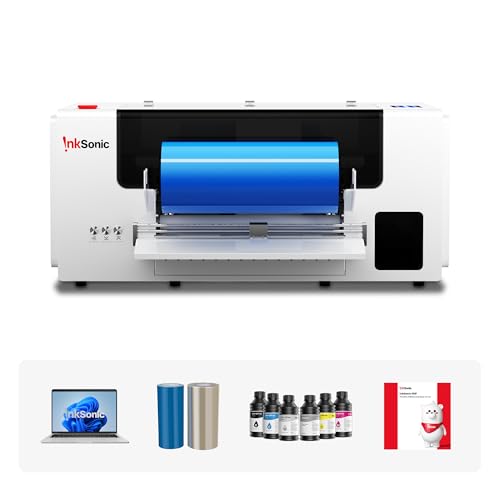
The INKSONIC VF13 combines UV DTF printing and automatic laminating, with cutting support also listed. Its A3+ print area is intended for larger designs or multiple stickers in one run. Dual XP600 printheads and a dense white underbase are highlighted for color coverage, including on dark, colored, or transparent surfaces.
Best for: Custom-gift sellers and small shops handling batches of logos, labels, decals, or personalized crystal stickers. Choose it if print-area flexibility and white-ink coverage matter to your work.
Limitation: The provided features do not give a measured print speed or detailed cutting specifications. Verify those requirements before planning production.
DXZ 3047 Pro Printer And Laminator Bundle

This DXZ bundle is described as supporting UV DTF transfers and direct printing onto objects such as phone cases and mugs. It includes a professional laminator and A and B laminating films. Dual XP600 printheads and 12-channel CMYKWV output are listed for work across materials including metal, glass, acrylic, leather, and wood.
Best for: Buyers who want one machine for transfers and direct-to-object customization, with laminating equipment and films included in the stated package. It offers a broader listed application range than a transfer-only workflow.
Limitation: Confirm the exact bundle contents and the steps for switching between direct printing and transfer production before purchase.
indhnx A3+ Roll-To-Roll UV DTF Printer

The indhnx A3+ lists automatic laminating, roll-to-roll feeding, automated cleaning routines, and white ink circulation. Its DX7189 industrial printhead is described as designed for stable output and sharp detail. Continuous transfer printing is positioned for batch orders and small-business production runs.
Best for: Buyers focused on ongoing transfer production who value roll feeding and automated maintenance features. It was selected for its combination of laminating and workflow automation.
Limitation: The provided description does not state print speed, printhead configuration beyond the listed DX7189, or the included film supply.
SYLCYS A3+ Crystal Label Printer

The SYLCYS A3+ is listed with automatic laminating and automatic cleaning. Its features also identify USB connectivity, inkjet printing, a touch screen, and color output. The product description names glass, metal, and leather among the materials it is intended to support.
Best for: Buyers comparing an A3+ UV DTF printer that lists both automatic laminating and cleaning, along with a touch screen. It adds an option for shoppers who want those controls stated in the product features.
Limitation: The listing gives a maximum color and monochrome speed of 2.5 ppm, but does not explain the measurement conditions or provide further workflow details. Ask the seller how that figure applies to UV DTF jobs.
Buying Guide: How To Choose A UV DTF Printer With A Laminator
Do you need a built-in laminator or a bundle?
An integrated system can reduce manual handling between printing on A film and laminating with B film. A bundle may be preferable when the product explicitly includes a separate laminator and films. Check what is included and whether laminating is automatic, since those details vary by listing.
Will you print transfers, directly onto objects, or both?
UV DTF printers create transfers, while some listed models also describe direct printing on objects. If you need both workflows, compare the DXZ bundle’s stated applications with your intended products. Do not assume that every material or object shape is supported simply because a listing names several surfaces.
How much production capacity do you need?
Compare the print area, feeding method, printhead details, and any stated speed information. A3+ area can help with larger layouts or multiple designs, while roll-to-roll feeding is listed as supporting continuous production. Ask sellers for job-specific speed estimates if throughput is essential.
What maintenance and color features matter?
Automatic cleaning, white ink circulation, or white ink stirring may be relevant if your work relies on white ink or frequent use. Check which features are explicitly included on the model you choose. Also confirm software, setup, supplies, and operating requirements directly with the seller.
Frequently Asked Questions
What does a UV DTF laminator do?
In the listed workflows, the printer prints a design onto A film and laminates it with B film to produce a transfer. Automatic laminating can reduce manual handling between those steps.
Can UV DTF transfers be used on curved products?
Some product listings mention curved surfaces or items such as cups and bottles. Confirm suitability for your specific item, dimensions, and surface before buying.
Is an A3+ printer better for batch work?
An A3+ print area can accommodate larger designs or multiple stickers in one run, as described for the INKSONIC model. Actual output also depends on layout and job requirements.
Should I choose a printer with direct-print capability?
Choose that feature if you need to print directly on objects as well as create transfers. If your work is limited to transfer stickers, compare the printer’s laminating workflow and production features instead.
What should I confirm before ordering?
Verify included films and accessories, software and setup requirements, material suitability, operating instructions, and realistic job speeds with the seller. Product descriptions do not establish compatibility with every material or workflow.