Discover reliable USB printer sharing switches that let two computers share a single printer, scanner, or other USB devices without constantly swapping cables. This guide highlights five solid options, outlining key features, compatibility, and what to consider when choosing. Whether you work from a laptop, desktop, or a mixed hardware setup, these switches help boost efficiency and protect port longevity.
Product Snapshot
- RIIEYOCA USB Printer Sharing KVM Switch — Desktop controller and panel button switching
- QIANRENON USB2.0 Printer Sharer — 2 computers, 1 printer, includes 2 × 1.5 m cables
- IOGEAR 2 Port USB 2.0 Switch — Auto or manual switching with LED indicators
- BENFEI USB 3.0 Switch — 2 in, 4 out with high-speed USB 3.0
- UGREEN USB 3.0 Switch 2 in 2 Out — Flexible ports with 2 USB3.0 cables
RIIEYOCA USB Printer Sharing KVM Switch

The RIIEYOCA USB sharing switch provides two switching modes for flexible control. Desktop controller enables remote switching with a 1.5-meter cable, while a panel button offers quick, on-device switching. It supports sharing printers, scanners, keyboards, USB drives, Bluetooth devices, and more among two computers. The device claims plug-and-play operation with stable signal transmission and protective switching to extend device life. Its compact form is designed for desks with limited space, and it emphasizes easy, uninterrupted access to shared USB peripherals.
Key features include two switching methods, remote and local, and a robust USB signal path designed to minimize dropouts on 1–5 meter input lines and up to several meters on hub cables. It is suitable for offices or home workspaces needing simple, reliable device sharing without adapter clutter.
QIANRENON USB2.0 Printer Sharer Switcher

The QIANRENON switch allows two computers to share a single printer with a straightforward manual 2-to-1 switch. The package includes two 1.5-meter print cables to connect the two computers to the switch, simplifying setup. Its LED indicators help confirm which computer is actively using the printer. This option is designed for small offices or home setups that favor a simple, cost-conscious approach to shared printing without software drivers or complex configurations.
Users should consider cable length and ease of use when evaluating this model, as the included 1.5-meter cables are a practical fit for standard desk layouts. It is a reliable plug-and-play choice for users who value a traditional switch button experience over automatic switching.
IOGEAR 2 Port USB 2.0 Switch
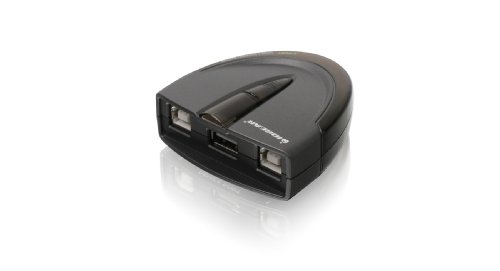
The IOGEAR GUB231 offers both automatic and manual switching with LED indicators. It enables two workstations to share a single USB device, such as a printer or multifunction printer, without requiring software. A downloadable utility helps automate switching based on activity, while the physical switch supports manual control when automation is not desirable. The device emphasizes ease of setup and compatibility with USB 2.0 devices, delivering solid performance for everyday office tasks.
Considerations include whether automatic switching software is compatible with your OS and how crucial real-time switching is for your workflow. This model suits environments that benefit from easy plug-and-play and optional automation.
UGREEN USB 3.0 Switch 2 In 2 Out

UGREEN’s 2-in, 2-out USB 3.0 switch is designed to share a keyboard, mouse, printer, scanner, or webcam across two computers. It includes two USB 3.0 cables and a dedicated controller for easy swapping. The device supports high data transfer speeds up to 5 Gbps and remains backward compatible with USB 2.0 devices. It is a driver-free, plug-and-play solution compatible with Windows, macOS, Linux, and Chrome OS, making it a versatile option for mixed operating environments.
When evaluating this model, users should assess the need for USB-C compatibility, enough power for multiple devices, and whether the included cables meet their desk setup. It is well-suited for users who need fast transfers and seamless cross-device operation without software dependencies.
BENFEI USB 3.0 Switch 2 In 4 Out

The BENFEI USB 3.0 Switch provides two computers with access to four USB devices, including printers, scanners, USB drives, and other peripherals. It emphasizes fast 5 Gbps performance and broad OS compatibility across Windows, Mac OS, Linux, and Chrome OS. A one-click switch with LED indicators offers clear status visibility. It notes compatibility constraints, including a requirement to use a BENFEI USB A-to-USB A cable for operation, which is an important consideration for setup.
This model suits users who frequently use multiple USB peripherals with two computers and desire a compact, single-switch solution that keeps devices organized and easy to switch between.
UGREEN USB Switch 2 Computers Sharing 4 USB Devices

UGREEN’s 2-in, 4-out USB switch shares multiple devices, including printers and scanners, between two PCs. It notes that this is not a KVM switch, so video signals are not transmitted through the same device. The unit is driver-free and supports Windows, macOS, Linux, and Chrome OS. It highlights the need to provide sufficient power when multiple devices draw power simultaneously to prevent disconnections. The package includes two USB-C to USB-A adapters when needed, widening compatibility with newer laptops.
For users who want to maximize device sharing while keeping setup simple, this model offers a straightforward path to sharing essential peripherals without software or network configuration.
Buying Guide: Choosing The Right USB Printer Sharing Switch
When selecting a USB printer sharing switch, consider device count, USB version, and whether you need automatic or manual switching. Important factors include compatibility with your operating systems, power requirements, and the potential need for included cables or adapters. Below are core considerations and practical comparisons from the options above.
- Number of devices and ports: If you only need to share a printer plus a few peripherals, a 2-in/2-out solution may suffice. For more devices, a 2-in/4-out option expands capacity without adding complexity.
- Switching method: Manual switches are simple and reliable, while automatic switching can save time but may depend on software compatibility or device activity. Panel buttons provide quick local control for desk setups.
- Data rate and USB version: USB 3.0/3.1 offers faster data transfer, which is beneficial for printers with large print jobs or for sharing multiple devices concurrently. USB 2.0 is adequate for most standard printers and scanners.
- Power considerations: Some switches suggest powered operation when many USB devices are connected. Consider a model with a dedicated power option if you connect multiple devices.
- Compatibility and drivers: Most models are driver-free and work across Windows, macOS, Linux, and Chrome OS. If your environment uses older hardware or specific software, check compatibility notes.
- Cables and adapters: Some bundles include long cables or USB-A cables; others may require adapters for USB-C devices. Verify that the included cables fit your desk layout and devices.
- Signal stability and distance: Input and hub cable lengths affect signal quality. Longer cables can introduce latency or instability; choose a model with recommended cable lengths for your setup.
- Physical footprint and ergonomics: A compact switch with accessible buttons helps maintain a clean desk and reduces wear on ports through frequent plugging/unplugging.
In summary, select a switch based on your exact device mix, the importance of automatic versus manual switching, and the operating systems you use. For mixed hardware environments, a USB 3.0 Switch with multiple ports and driver-free operation tends to provide the broadest compatibility and best future-proofing. If space is a premium, prioritize compact, panel-button models with clearly labeled indicators. For households or small offices, including cables with the purchase can streamline setup and ensure the system works out of the box.