The best UHS-II SDXC memory card depends on your camera’s speed requirements, recording format, and storage needs. The ProGrade Gold cards are suitable for creators choosing between 128GB and 256GB, while the Lexar Silver PRO offers a V60 option with listed read speeds up to 280MB/s. For higher sustained-write demands, consider the ProGrade Iridium V90. The SanDisk Extreme PRO is aimed at advanced camera users recording high-resolution video.
| Card | Best For | Capacity | Listed Speed or Class |
|---|---|---|---|
| ProGrade Gold | Professional workflows | 128GB | Up to 250MB/s read; 130MB/s write |
| Lexar Silver PRO | 4K and faster transfers | 128GB | Up to 280MB/s read; V60 |
| ProGrade Iridium | Higher sustained-write needs | 128GB | V90; up to 200MB/s write |
| ProGrade Gold | More recording capacity | 256GB | Up to 250MB/s read; 130MB/s write |
| SanDisk Extreme PRO | Advanced video capture | 128GB | V60; up to 300MB/s read |
ProGrade Digital Gold 128GB

Best for: Photographers, videographers, and other creators who want a 128GB UHS-II card with stated read and write speeds. ProGrade lists read speeds up to 250MB/s and write speeds up to 130MB/s. The card is V60, and the manufacturer says each card is inspected and marked with a custom laser-etched serial number.
Choose this option if its capacity and stated speeds fit your camera workflow. It was selected for its clearly specified V60 class and speed figures. Its limitation is capacity: 128GB may be less convenient than a larger card for long shoots or extensive video recording.
Lexar Silver PRO 128GB
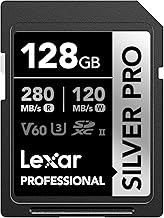
Best for: Users who prioritize a high listed read speed and want a card specified for 4K video. Lexar lists read speeds up to 280MB/s and write speeds up to 120MB/s, along with V60 and U3 classifications. The features also describe support for recording 1080p Full HD and 4K video and a faster transfer workflow.
This is a useful comparison choice against the ProGrade Gold: Lexar lists a higher maximum read speed, while ProGrade lists a higher write speed. These are manufacturer speed figures, not guaranteed results in every camera or reader. Choose it if the 128GB capacity and V60 class match your needs.
ProGrade Digital Iridium V90 128GB

Best for: Shooters whose camera and recording format call for a V90 card. ProGrade lists a minimum sustained write speed of 90MB/s, a maximum write speed of 200MB/s, and read speeds up to 300MB/s. The card is also marked U3. The manufacturer lists compatibility with Canon, Sony, Nikon, Olympus, Panasonic, Fuji, and Samsung equipment.
The V90 rating distinguishes this card from the V60 options in this roundup and makes it the better class choice when a workflow requires V90. ProGrade states that it tests each card and includes a three-year warranty. Avoid choosing it solely for the highest number: confirm that your camera supports the card and that you need its V90 class.
ProGrade Digital Gold 256GB

Best for: Creators who want the ProGrade Gold feature set with more card capacity. The listed speeds are up to 250MB/s read and 130MB/s write, and the card is V60. ProGrade also describes custom laser-etched serial numbers and inspection before shipping.
Compared with the 128GB Gold model, this version provides twice the stated capacity while retaining the same listed speed figures and V60 class. It was selected for longer shoots or users who prefer fewer card changes. A larger capacity does not change the listed speed class, so choose another class if your recording requirements call for V90.
SanDisk Extreme PRO 128GB

Best for: Prosumers and professionals using advanced mirrorless or cinema cameras, as described in the product features. SanDisk lists UHS-II, V60, U3, and Class 10 classifications, with read speeds up to 300MB/s. The features identify cinema-quality 6K recording and standard-to-slow-motion 4K UHD and Full HD video as intended uses.
This card is a strong fit to compare when video capture is a priority and the camera supports UHS-II. The listing gives a maximum read speed, but the supplied features do not state a write-speed figure. Check your camera’s requirements before relying on a card for a particular recording mode.
Buying Guide: How To Choose A UHS-II SDXC Card
Does your camera support UHS-II?
Check the camera manual or manufacturer specifications before buying. A card’s UHS-II interface and speed class matter only when they match the camera’s supported formats and recording requirements. Also check whether the camera requires V60 or V90 for the video mode you plan to use.
Should you choose V60 or V90?
V60 and V90 indicate different minimum sustained-write classes. The ProGrade Iridium listing specifies a minimum sustained write speed of 90MB/s and a V90 rating. The V60 products in this selection include ProGrade Gold, Lexar Silver PRO, and SanDisk Extreme PRO. Select the class required by your camera and recording mode rather than relying only on a maximum speed claim.
How much capacity do you need?
A 128GB card may suit shorter shoots or a workflow that regularly offloads files. A 256GB card can hold more material between transfers, but storage needs vary with file size, resolution, and recording duration. For important work, consider how you will back up files and whether carrying more than one card suits your workflow.
How should you compare speed claims?
Maximum read and write speeds are not the same as minimum sustained performance. Read speed can affect transfers to a computer, while sustained write performance matters during capture. Use the minimum sustained speed and video class when evaluating recording needs, and treat maximum figures as manufacturer-listed limits rather than guaranteed camera results.
Frequently Asked Questions
What does UHS-II mean on an SDXC card?
UHS-II identifies the card’s bus interface generation. Confirm that the camera and card reader support UHS-II to make use of its interface capabilities.
Is V90 better than V60?
V90 has a higher minimum sustained-write class than V60. It is not automatically the better purchase; choose the class your camera and recording mode require.
Can a UHS-II card record 4K video?
Several cards in this selection are described for 4K recording, but suitability depends on the camera, video settings, and required write performance. Check the camera manual before recording.
Is a higher read speed the same as a faster write speed?
No. Read speed describes data retrieval, while write speed describes saving data to the card. Compare both figures with the needs of your camera and file-transfer workflow.