The modern display landscape blends video walls, multi-screen processing, and high-resolution panels to create immersive viewing experiences. This guide highlights top items that help you build a cohesive, reliable multi-screen setup—from video wall processors that split one input into a wall of screens to sturdy mounts and capable monitors. Explore select products, compare their strengths, and learn key considerations for choosing the right components.
Summary of chosen products
| Product | Brand | Core Use | Notable Capability |
|---|---|---|---|
| PORTTA HDMl Video Wall Controller 2×2 | Portta | Video wall processing | 8 display modes; 4K input, 1080p outputs; 180° rotation |
| Yuemona Video Wall Controller 2×2 | Yuemona | Video wall processing | 4K support; 180° rotation; multiple layout options |
| SHERRIVA 4K HDMI Splitter 1 In 4 Out | SHERRIVA | HDMI signal distribution | 4K@60Hz, 1080p@240Hz; auto downscaling; HDR |
| VIVO Pop-Out Steel 2×2 Video Wall Mount | VIVO | Physical wall mounting | Supports 37″-65″ displays; wide VESA range; 616 lb capacity |
| Samsung 27-Inch M5 | Samsung | Single monitor for multi-screen setups | Smart monitor with streaming, gaming hub, multiple ports |
Portta Video Wall Controller 2×2 4K

Portta’s HDMl Video Wall Controller enables one HDMI input to be distributed across four outputs, forming a 2×2 wall. It offers eight display configurations, including 1×2, 1×3, 1×4, 2×2, and 4×1 layouts, with flexible control options via manual, IR remote, or RS232. The processor supports 4K input at 30Hz and outputs 1080p at 60Hz across all outputs, and it includes Toslink and 3.5mm audio extraction. A 180° rotation feature helps align the wall and minimize seams in certain layouts, while edge masking reduces visible gaps between panels.
Key considerations: verify the connected displays’ native resolution and ensure compatibility with 4K input if your wall requires it. If you need a uniform 1080p wall, this device can align outputs to a consistent 1080p60 signal. The included audio extraction allows multi-room audio or external speaker setups without extra gear.
Yuemona 2×2 Video Wall Controller 4K
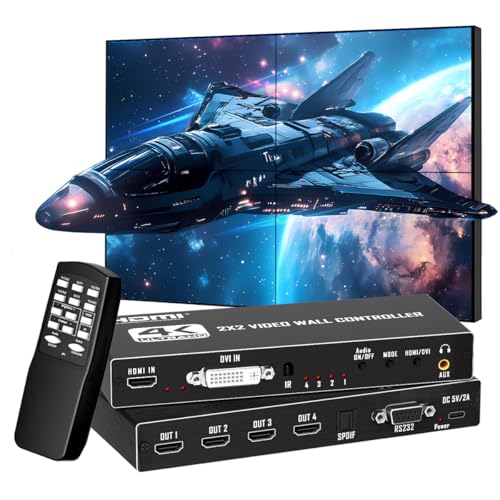
Yuemona’s 2×2 video wall processor distributes one HDMI or DVI input to four HDMI outputs, enabling a full-wall display from a single source. The system supports 4K at 30Hz with HDMI 1.4/HDCP 1.4, while the corresponding 1080p output can reach 60Hz. This model emphasizes flexible audio output, supporting 5.1 channel through optical or 3.5mm interfaces, and it features 180° rotation for two outputs in 2×2 mode. Note that the 180° rotation is mode-specific and may not apply to every layout; maximum output resolution is capped at 1080p60 in some configurations.
Considerations: if you plan to pair this with four displays, confirm each screen’s input capabilities and ensure your source device can push the wall’s target resolution without downscaling. The 180° rotation can help optimize border alignment in a tight wall frame.
Samsung 27-Inch M5 (M50F) Smart Monitor

The Samsung M5 is a 27-inch FHD smart monitor designed for streaming and productivity, with an integrated streaming platform and a Gaming Hub for versatile entertainment. Its built-in speakers and broad port selection support multi-tasking setups in a single-screen context, which can complement a multi-screen wall by providing a central control or auxiliary display in a larger display array. The monitor’s smart TV features keep content access straightforward without requiring a separate streaming box.
Considerations: while not a video wall by itself, a single Samsung M5 can serve as a master node or control panel within a larger multi-display system. If your goal is a wall of screens, pair it with wall processors or multiply-sourced displays to maintain consistent input distribution and align color calibration across panels.
VIVO 2×2 Video Wall Mount
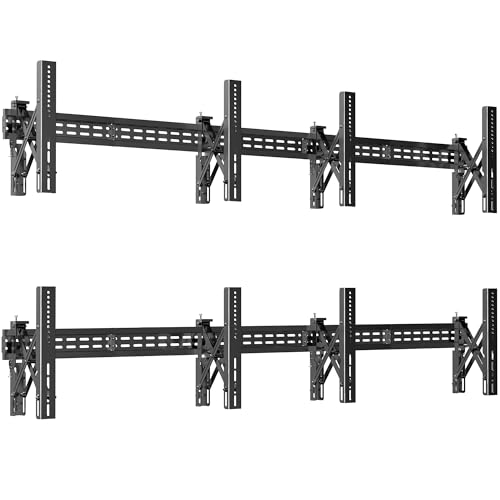
The VIVO MOUNT-VW65-4 is a dedicated 2×2 video wall mounting solution for 37″ to 65″ displays. It provides a sturdy, level 2×2 configuration with a wide VESA range and a high weight rating (up to 616 lbs). The pop-out design simplifies cabling and access behind the screens for maintenance, making it a practical choice for professional environments and home theaters that require clean alignment and easy serviceability. This mount supports both portrait and landscape orientations, enabling flexible wall configurations.
Considerations: ensure all four displays share compatible VESA patterns and similar weight ratings for consistent mounting. Proper wall reinforcement and cable management are essential for long-term stability in multi-screen walls.
Roku Smart TV 2025 – 24-Inch Select Series

The Roku Select Series 24-inch TV brings streaming access in a compact form with a voice-enabled remote and easy-to-navigate apps. While it’s a standalone TV rather than a wall processor, it can augment a multi-screen setup by providing an additional streaming-enabled display in a larger display wall or serving as a dedicated control or content source for synchronized playback in a mixed-screen environment.
Considerations: for a true multi-screen wall, synchronize content across displays using a video wall processor and ensure content sources support multi-output distribution. This Roku option is best used as a supplementary screen rather than the primary wall component.
Buying Guide: Key Purchase Considerations For Multi-Screen Setups
- Display compatibility: verify pixel densities, native resolutions, and input/output capabilities across all screens in the wall to ensure uniformity and avoid downscaling gaps.
- Video wall processing vs. signal splitters: choose a wall controller when you need complex layouts (2×2, 1×3, 1×4, etc.) and synchronized playback. Use HDMI splitters for simpler mirror displays or when all panels share the same content without tiling logic.
- Rotation and edge masking: rotation features help tune border alignment and reduce seams in 2×2 or larger walls. Edge masking minimizes visible gaps between panels for a cleaner wall appearance.
- Audio routing: if audio matters, select devices with built-in or easily integrable audio extraction and multiple output options to support a multi-room or multi-speaker setup.
- Control interfaces: RS232, IR remote, and PC control enable flexible management in kiosk, corporate, or public-display environments. Ensure your control method is compatible with your existing hardware ecosystem.
- Physical mounting considerations: a robust wall mount with wide VESA compatibility supports a range of screens and simplifies maintenance. Ensure weight ratings and mounting pattern align with your displays.
- Future expansion: plan for scalability—consider processors that support additional output channels or layouts if you anticipate adding more screens later.
- Power and cabling: organize power distribution and HDMI/USB cables to minimize interference and simplify service. Use proper cable management to maintain a tidy wall.
These selections provide a mix of video wall processing, signal distribution, and physical mounting options to help you assemble a reliable multi-screen display. When choosing components, balance display resolution, processor capabilities, and installation practicality to match the intended environment—whether a home theater, corporate lobby, or event space.