Choosing a touch screen whiteboard combines learning comfort with collaborative power. This guide highlights five leading models ideal for classrooms, conference rooms, and home offices. Each option blends large-format displays, responsive touch, and built-in or open app ecosystems to support teaching, brainstorming, and remote collaboration. Explore features, connectivity, and performance to find the right fit for your space and workflow.
Summary of Selected Products
| Product | Brand | Screen Size | Key Benefit |
|---|---|---|---|
| COOLHOOD 65″ Smart Board | COOLHOOD | 65″ | Android 13 with 128GB, multi-touch, wireless sharing |
| BIG VUE 65″ Interactive Smart Board | BIG VUE | 65″ | 8GB RAM, 256GB storage, 48MP camera, 8-array mic |
| JAV 65″ Smart Board Pro | JAV | 65″ | Android 14, 8GB+128GB, 48MP camera, AI features |
| KEINONE 55″ 4K Smart Board | KEINONE | 55″ | Android 14, 8GB RAM, 128GB storage, open app ecosystem |
| RAIZEA Smart Board 55″ | RAIZEA | 55″ | Android 11, 20-point touch, multiple connectivity options |
COOLHOOD 65 Inch Smart Board

The COOLHOOD 65-inch 4K interactive whiteboard is designed for modern classrooms and offices. It runs Android 13 on an octa-core processor with 128GB of storage and supports up to 20 touch points for multi-user collaboration. The board enables wireless screen sharing across Mac, Windows, iOS, and Android, and includes tools for presentations, annotation, and time-based tasks. Real-time annotation and voting features help streamline decision-making in meetings and class activities. A wall mount is included, with a separate stand option for varied room layouts.
Key features in context:
– 65-inch 4K touchscreen with robust processing for classroom and office workloads.
– Wireless sharing across major platforms, plus built-in annotation and voting tools.
– QR code file sharing simplifies document distribution, while the wall-mount design saves space.
BIG VUE 65″ Interactive Smart Board

The BIG VUE 65″ model emphasizes high-end hardware for teaching and meetings. It combines 4K UHD touch clarity with 8GB RAM and 256GB storage, supporting a wide range of educational apps and productivity tools. The integrated 48MP camera and eight-array microphone system are tailored for video collaboration, hybrid classrooms, and remote work. The board is designed to handle multi-user interactions, screen sharing, and real-time annotation, making it a strong option for schools and corporate training environments.
Important considerations:
– Large 4K display ensures vivid visuals and legible content for groups.
– Ample RAM and storage support multitasking with heavy software suites.
– High-quality camera and microphone setup enhances video conferencing experiences.
JAV 65″ Smart Board Pro
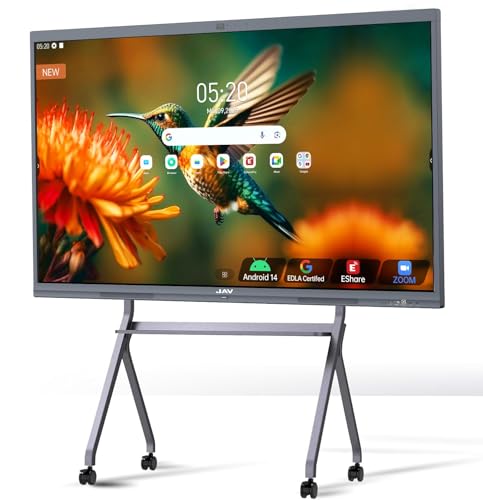
The JAV 65″ Smart Board Pro is a Google EDLA certified system powered by Android 14, featuring 8GB RAM and 128GB storage. The display supports 20-point touch with palm erase and multitouch gestures, enabling simultaneous input from multiple users. It includes features like built-in AI-enabled classroom tools, wireless screen mirroring, and a split-screen mode for teaching and presentations. The device also hosts a 48MP AI camera and a powerful soundbar setup to support hybrid learning and meetings.
Key considerations:
– Google-certified access to Play Store and Google Workspace simplifies app management.
– Advanced multitouch and handwriting support for interactive lessons.
– Integrated video conferencing and screen sharing promote seamless collaboration.
KEINONE 55″ 4K Smart Board

KEINONE offers a 55-inch 4K UHD touchscreen with 20-point touch and Android 14. With 8GB RAM and 128GB storage, it supports multitasking, large files, and a wide array of apps through an open ecosystem. The model emphasizes fast response times (as low as 6 ms), crisp visuals, and built-in speakers for a fuller multimedia experience. The open app ecosystem allows users to tailor the setup with zoom, teams, and other tools, making it adaptable for classrooms, offices, and home theaters alike.
Architectural and user considerations:
– Balanced size suitable for mid-to-large spaces without overwhelming the room.
– Quick response latency supports dynamic teaching and brainstorming.
– Open app ecosystem enables customization for different workflows and teams.
RAIZEA Smart Board 55 Inch

RAIZEA combines Android 11 with 4G RAM and 32GB ROM to deliver a versatile all-in-one smartboard suitable for home, office, and teaching environments. The software supports 20 touch points, quick input, and QR code file transfer for easy sharing. A broad set of connectivity ports (HDMI, VGA, USB, Type-C) ensures compatibility with a wide range of devices, while the included wall mount offers a clean installation option. The device is designed for collaborative projects, writing sessions, and presentational tasks in dynamic spaces.
Practical notes:
– All-in-one design minimizes additional equipment needs.
– Excellent for collaborative work with multi-user touch support.
– Strong connectivity options support diverse device ecosystems.
Buying Guide: Key Purchase Considerations
- Screen size and space fit: Consider the room dimensions and audience size. Larger rooms benefit from 65″ or bigger displays, while smaller spaces may prefer 55″ models.
- Touch capabilities: Look for multi-touch support (20-point or more) for simultaneous collaboration, palm rejection, and accurate stylus input.
- Processing power and storage: Higher RAM and larger internal storage improve performance when running multiple apps, streaming, or annotating in real time.
- Operating system and app ecosystem: Android-based boards provide a broad app library; Google-certified boards give access to Google Workspace; open ecosystems enable third-party tools and custom setups.
- Collaboration features: Wireless screen sharing, built-in annotation, voting, screenshots, timers, and QR file sharing can streamline meetings and classes.
- Audio and video quality: Integrated cameras and microphone arrays improve video conferencing, especially for hybrid learning and remote teams.
- Connectivity: Ensure robust Wi‑Fi, Bluetooth, HDMI/USB/Type-C options, and compatibility with common devices (Mac, Windows, Android, iOS).
- Mounting and installation: Wall-mount availability is common, while some models offer standalone stands. Check space clearance and mounting hardware.
- Future-proofing: Regular OTA updates and ongoing app support help maintain compatibility with new tools and educational software.