The best touch screen tablet PC depends on whether you need Windows software, a sharper display, or an affordable Android device for everyday tasks. The Fusion5 is the Windows option for buyers who want a tablet-style computer with an SSD and stylus. Lenovo’s Idea Tab suits students seeking a higher-resolution screen and included folio case and pen, while the three 10-inch Android models offer different advertised memory and storage configurations for browsing, streaming, and general use.
| Tablet | Best For | Key Listed Details |
|---|---|---|
| Lenovo Idea Tab | Students and note-takers | 11-inch 2.5K, 90Hz display; pen and folio case |
| Fusion5 Windows Tablet | Windows tablet-PC buyers | 12-inch 2K display; 12GB DDR5; 512GB SSD |
| Android 16 20GB Model | Buyers wanting a case and stylus | 10-inch screen; advertised 128GB storage |
| Android 16 24GB Model | Everyday Android use | 10-inch IPS screen; advertised 64GB storage |
| COOPERS Android Tablet | Basic browsing and media | 10-inch IPS; 32GB ROM; 1280 × 800 resolution |
Lenovo Idea Tab For Students
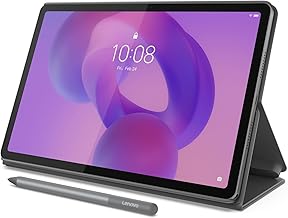
The Lenovo Idea Tab combines an 11-inch 2.5K IPS touchscreen with a 90Hz refresh rate. Its listed configuration includes a MediaTek Dimensity 6300 processor, 4GB of memory, and 128GB of storage. A Tab Pen and folio case are included according to the product name.
Best for: Students and users who want a pen-ready tablet for handwritten notes or on-screen interaction. The sharper 2.5K resolution and included accessories distinguish it from the 10-inch, 1280 × 800 options here.
Limitation: It has 4GB of listed memory, so buyers who prioritize the highest advertised RAM figure should compare the Android alternatives. Confirm that its operating system and available apps meet your needs before choosing it.
Fusion5 Windows Tablet PC
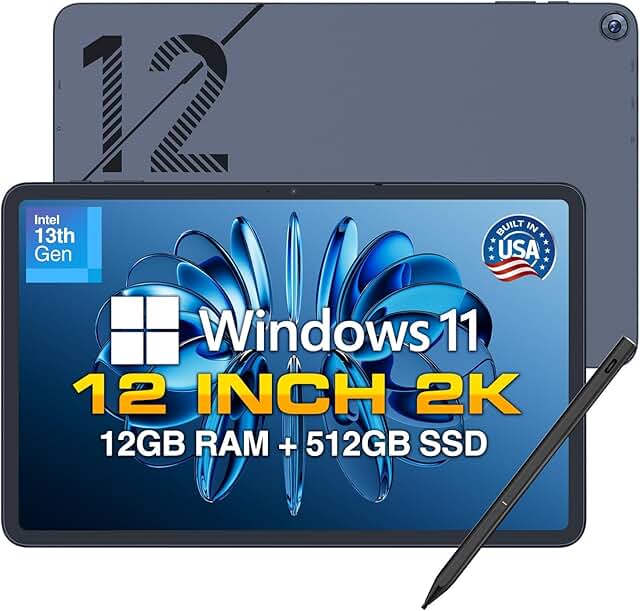
The Fusion5 is the Windows choice in this group. Its listing specifies a 12-inch 2K display, Windows 11, 12GB DDR5 RAM, and a 512GB SSD. It also names a 13th Gen CPU, built-in fan, fast charging, metallic construction, and an included stylus pen.
Best for: Buyers who want a tablet PC running Windows rather than an Android tablet. Its listed SSD capacity and Windows 11 make it the clearest option here for shoppers comparing tablet-form devices with conventional PC software needs.
Limitation: The provided product information does not identify the exact CPU model or battery capacity. Check the listing details for those specifics if processor performance or unplugged use is a deciding factor.
Android 16 Tablet With Case And Stylus

This 10-inch Android 16 tablet advertises 20GB RAM, 128GB ROM, and expansion up to 2TB. The listing also names an octa-core 2.0GHz CPU, 5G Wi-Fi 6, Bluetooth 5.0, a 6000mAh battery, dual cameras, Widevine L1, GMS, a case, and a stylus.
Best for: Android buyers who want a case and stylus included in the listed package, plus expandable storage. Its advertised 128GB internal storage is double the 64GB listed for the other Android 16 model below.
Limitation: The listing does not specify display resolution or the amount of physical versus software-allocated memory behind the 20GB RAM figure. Verify those details if screen sharpness or memory type matters to you.
Android 16 Tablet For Everyday Use

This 10-inch Android 16 tablet lists a 24GB RAM configuration, 64GB ROM, and support for up to 1TB of expansion. Other named features include an HD IPS touchscreen, Wi-Fi 6, Bluetooth 5.4, a 6000mAh battery, and two cameras. The product title also advertises up to 12 hours of battery use.
Best for: Buyers who want an Android tablet with Wi-Fi 6 and a stated 12-hour battery claim for general use. Its listed Bluetooth version is 5.4, compared with Bluetooth 5.0 on the other Android 16 model.
Limitation: Its listed internal storage is 64GB, less than the 128GB offered by the other Android 16 tablet. The product information does not explain how the 24GB RAM figure is allocated, so check the listing before comparing it directly with physical memory specifications.
COOPERS 10-Inch Android Tablet

The COOPERS tablet lists Android 15, a 10-inch 1280 × 800 IPS touchscreen, a quad-core processor, and 32GB of ROM with expansion up to 1TB. Its listed features also include a 6000mAh battery, 2MP front camera, 8MP rear camera, Wi-Fi, and Bluetooth.
Best for: Buyers seeking a straightforward Android tablet for basic browsing and media who want a clearly stated screen resolution and camera specifications. Its 1280 × 800 resolution is useful for comparison with tablets whose listings only say “HD.”
Limitation: The included 32GB ROM is lower than the internal storage listed for the other four products. Choose another option if you need more built-in space for apps and files without relying on expansion.
Buying Guide: How To Choose A Touch Screen Tablet PC
Do you need Windows or Android?
Choose the Fusion5 if Windows 11 is essential to your software plans. The other four products are Android tablets. Check the apps you depend on before buying: an operating system affects which applications and workflows are available, so screen size alone should not determine your choice.
What screen size and resolution fit your use?
The Fusion5 has the largest listed display at 12 inches, and the Lenovo has an 11-inch 2.5K screen with a 90Hz refresh rate. The remaining models are 10 inches. COOPERS gives a specific 1280 × 800 resolution; the other Android listings do not provide a precise resolution in the supplied product information.
How much storage and memory do you need?
Compare built-in storage separately from expandable capacity. The Fusion5 lists a 512GB SSD; Lenovo lists 128GB; the Android 16 models list 128GB and 64GB; and COOPERS lists 32GB. Expansion is advertised on several Android models, but expansion does not change the amount of built-in storage. Confirm what memory figures represent before comparing advertised RAM numbers.
Are a stylus and accessories important?
The Lenovo listing names a Tab Pen and folio case, while the Fusion5 names a stylus pen. One Android 16 model also lists a case and stylus. If you plan to write or draw, verify which accessories are included and whether the device’s software supports your intended tasks.
Frequently Asked Questions
Which tablet in this list runs Windows?
The Fusion5 12-inch tablet is the listed Windows 11 model. The Lenovo, COOPERS, and two 10-inch Android products run Android according to their product names.
Which tablet has the sharpest stated display?
The Lenovo Idea Tab lists a 2.5K resolution on its 11-inch display. Fusion5 lists a 2K display, while COOPERS specifies 1280 × 800.
Which options include a stylus?
The Lenovo Idea Tab lists a Tab Pen, the Fusion5 lists a stylus pen, and one Android 16 model lists a case and stylus. Confirm package contents on the product listing before ordering.
Can these tablets replace a laptop?
The Fusion5 is the most directly positioned as a Windows tablet PC, but suitability depends on your required software and workflow. Android models may fit mobile-app needs; compare operating systems and specifications against your tasks.