The best telescoping ceiling TV mount depends on your screen size, ceiling type, desired drop, and viewing adjustments. The Mount-It! MI-509L is best for a long pole drop and commercial spaces, while the PERLESMITH and AX WABER models suit many mid-size TVs with adjustable height and swivel. VIVO is a better fit for larger, heavier screens. For remote-controlled positioning, consider the motorized monTEK mount.
| Mount | Best For | Screen Size |
|---|---|---|
| Mount-It! MI-509L | Long drop and commercial settings | 32–75 inches |
| PERLESMITH PSCM2 | Mid-size TVs and adjustable viewing | 26–65 inches |
| VIVO MOUNT-VC86-3 | Large screens and sloped ceilings | 43–86 inches |
| monTEK Motorized | Remote-controlled tilt | 37–75 inches |
| AX WABER | Mid-size TVs and included power outlet | 27–65 inches |
Mount-It! MI-509L Long-Drop Ceiling Mount

Best for: Commercial spaces, tall rooms, or setups where the screen needs to hang well below the ceiling. Its pole adjusts from 41.7 to 61.7 inches below the ceiling, a longer reach than the other standard pole mounts in this selection.
The steel mount fits most 32- to 75-inch TVs weighing up to 110 pounds, with VESA patterns from 200 x 200mm to 600 x 400mm. It offers 25 degrees of downward tilt, 360-degree swivel at the TV plate, and up to 60 degrees of base rotation for flat or vaulted ceilings. Those adjustments make it a flexible option for directing a screen toward different viewing areas.
Limitation: The extended pole may hang lower than needed in rooms with standard ceiling heights. Measure the planned screen position before choosing it.
PERLESMITH Adjustable Ceiling TV Mount
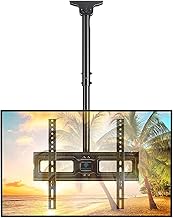
Best for: Buyers with a 26- to 65-inch TV who want a conventional adjustable pole mount with a broad swivel range. The pole positions the TV plate center 20.47 to 29.92 inches from the ceiling.
The mount supports TVs up to 110 pounds and VESA patterns from 100 x 100mm to 400 x 400mm. Its screen tilts from 5 degrees upward to 15 degrees downward, swivels 360 degrees, and can be leveled by plus or minus 3 degrees after installation. It is a practical choice when viewers need to redirect the screen without using a motorized system.
Limitation: The product is not designed to flip or fold the TV up to the ceiling. The supplied information also cautions against installing it on drywall alone; verify that the mounting surface and hardware suit the installation.
VIVO Heavy-Duty Ceiling Mount For Large TVs

Best for: Large-screen owners who need a higher stated weight capacity. The steel-and-aluminum mount is listed for 43- to 86-inch TVs and supports up to 132 pounds.
It accepts several VESA patterns, from 200 x 100mm through 600 x 400mm, and extends the display up to 3 feet from the ceiling. Its mounting bracket tilts up to 90 degrees, with compatibility for flat and sloped or vaulted ceilings. Choose this model when the screen’s size, weight, or ceiling slope makes a standard mid-size mount less suitable.
Limitation: The provided product details do not specify a swivel range or a fine height-adjustment range. Check the listed VESA pattern and the intended viewing direction before selecting it.
monTEK Motorized Ceiling TV Mount

Best for: Buyers who want to adjust the screen using a remote, phone app, or voice control instead of manually repositioning a mount. It supports 37- to 75-inch TVs weighing up to 99 pounds, with VESA patterns from 200 x 100mm to 600 x 400mm.
The motorized mount provides a 0- to 80-degree tilt range and plus-or-minus 2-degree leveling. The listed controls include a physical remote, the Tuya app, and voice control through Amazon Alexa or Google Home. The product is described as suitable for flat and pitched roofs, making it an option for viewers prioritizing powered positioning.
Limitation: Its listed capacity is lower than the 110-pound PERLESMITH and AX WABER mounts and the 132-pound VIVO. Confirm the TV’s weight and mounting pattern before purchase.
AX WABER Ceiling Mount With Power Outlet

Best for: Buyers looking for a mid-size TV pole mount that also lists a power outlet as a feature. It fits most 27- to 65-inch displays, supports up to 110 pounds, and accepts VESA patterns from 100 x 100mm to 400 x 400mm.
The pole places the center of the TV plate 19.8 to 30.8 inches from the ceiling. The screen tilts from 5 degrees upward to 20 degrees downward, swivels 360 degrees, and can be leveled by plus or minus 3 degrees. Compared with the PERLESMITH, it offers a slightly longer stated maximum drop and more downward tilt.
Limitation: The listed VESA range tops out at 400 x 400mm, so it is not the choice for a TV that requires a larger mounting pattern. Do not install on drywall alone.
Buying Guide: How To Choose A Telescoping Ceiling TV Mount
How much drop do you need?
Measure from the ceiling to the desired center of the screen, then compare that distance with the mount’s stated adjustment range. The Mount-It! has the longest listed drop here at 41.7 to 61.7 inches. PERLESMITH and AX WABER list shorter ranges, while VIVO describes extension up to 3 feet.
Will the mount fit your TV?
Check three details before buying: screen size, TV weight, and VESA pattern. The TV must meet all relevant limits, not just the advertised screen-size range. VESA is the spacing between the mounting holes on the back of the TV. Compare that measurement with the mount’s supported patterns.
What ceiling and movement adjustments matter?
Confirm that the product supports your ceiling type, especially if it is vaulted or sloped. Compare tilt and swivel separately: a large tilt range does not necessarily mean a mount swivels. Also consider whether manual adjustment is sufficient or whether powered positioning, such as the monTEK’s remote and app controls, is useful.
What should I check before installation?
Identify the structural mounting surface and follow the manufacturer’s installation directions. The PERLESMITH and AX WABER listings caution against installing on drywall alone. Check that the mounting hardware is appropriate for the ceiling material, and plan cable routing and screen clearance before attaching the TV.
Frequently Asked Questions
What does telescoping mean on a ceiling TV mount?
It refers to an adjustable pole that changes the distance between the ceiling and the TV. The available range varies by mount.
How do I know if a ceiling mount fits my TV?
Match the TV’s screen size, weight, and VESA hole pattern to the mount’s listed specifications. All three must fall within the mount’s supported limits.
Can these mounts work on a vaulted ceiling?
Some listings explicitly describe support for sloped or vaulted ceilings. The Mount-It! allows base rotation for flat or vaulted ceilings, and VIVO lists compatibility with sloped or vaulted ceilings. Check the individual installation instructions.
Is a higher weight capacity always better?
It provides a higher listed limit, but it does not guarantee fit. The TV must still match the mount’s VESA pattern and screen-size range, and the ceiling structure must support the installation.