Parents seek tablets that balance learning with safety, ensuring kids explore content responsibly while staying focused on education. This guide highlights five top options featuring robust parental controls, strong performance, and child-friendly features. Each entry includes key specs, safety tools, and suitability notes to help families choose the right device for G1–G6 students or younger learners transitioning to independent study. Below is a quick overview of the picks to compare at a glance.
| Product | Brand | Display | Kid Controls | Storage / RAM |
|---|---|---|---|---|
| AI Kids Tablet With Parental Control – TalPad T100 (Think Academy) | Think Academy | 11″ Full HD | Thinkie AI Tutor, real-time guidance | 6GB RAM, multiple storage options |
| AI Kids Tablet With Parental Control – TalPad T100 Standard | Think Academy | 11″ Full HD | Thinkie AI Tutor, real-time guidance | 6GB RAM |
| Amazon Fire HD 10 Kids Pro | Amazon | 10.1″ HD | Kids+ subscription, Parent Dashboard | 32GB |
| Amazon Fire 7 Kids | Amazon | 7″ HD | Amazon Kids+, parental controls | 16GB |
| 2025 Kids Tablet 10″ Android with Gemini AI | ZIOVO | 10.1″ HD | Family Link, multi-profile, Safe Learning Zone | Up to 64GB (expandable) |
Note: The table highlights general strengths. Specific features may vary by model and regional availability. All selections support ongoing safety and parental controls suitable for school-aged children.
Think Academy TalPad T100 With AI Tutor
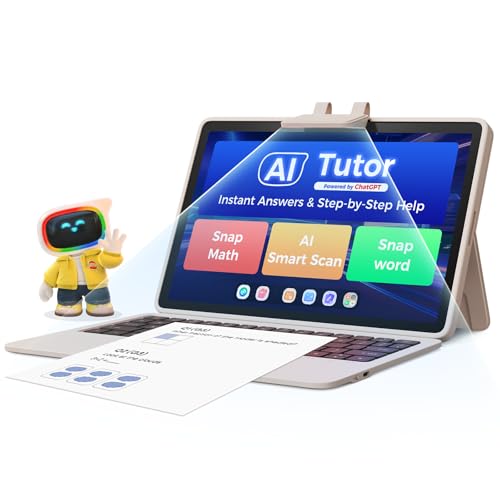
The Thinkie AI-powered tutor is designed to identify learning gaps in real time and provide step-by-step guidance across core subjects such as Math, literacy, and STEM. Its conversational approach helps children stay engaged while mastering concepts. The tablet pairs this tutoring capability with performance, enabling quick switching between apps, video classes, and creative projects thanks to a 2.0GHz Octa-Core CPU and 6GB RAM. An 11″ Full HD IPS display offers sharp visuals for reading, drawing, and video content, with eye-care mode to reduce blue light for extended study sessions. Ideal for homeschoolers or blended learning environments, it supports personalized learning journeys with consistent progress tracking.
Key features include:
- AI Tutor Thinkie for real-time feedback across subjects
- 2.0GHz Octa-Core performance with 6GB RAM
- 11″ Full HD display with eye protection
- Safe, engaging learning experiences through interactive dialogue
Think Academy TalPad T100 (Standard) Tablet

This variant mirrors the Thinkie tutoring experience with the same strong hardware and eye-friendly display. The standard option emphasizes reliable performance for school tasks, homework help, and media consumption under guided controls. The 11″ Full HD screen supports reading and writing tasks, while the AI tutor assists with ELA, math, and STEM concepts, fostering confident independent learning. The device is well-suited for families seeking a robust educational tablet with a clear parental control framework and in-depth, guided practice. It’s a solid choice for classroom-style practice at home.
Key features include:
- AI-powered guidance and practice across core subjects
- High performance to support multitasking
- High-quality display with eye protection mode
- Child-friendly educational software and progress tracking
Amazon Fire HD 10 Kids Pro Tablet

The Fire HD 10 Kids Pro offers a broad safety framework through built-in safeguards and the Amazon Kids Parent Dashboard for remote control of screen time and content. It is recognized for parental controls that help supervise a child’s digital environment, including a one-year Amazon Kids+ subscription that grants access to curated, ad-free content. This model balances classroom-ready apps and entertainment, giving families a practical, shielded platform for long study sessions and creative projects. It’s particularly strong for households already invested in the Amazon ecosystem.
Notable aspects include:
- Parent dashboard with remote control
- Award-winning parental controls and privacy safeguards
- One-year Amazon Kids+ included, with easy renewal options
- Ad-free content and kid-friendly apps
Amazon Fire 7 Kids Tablet
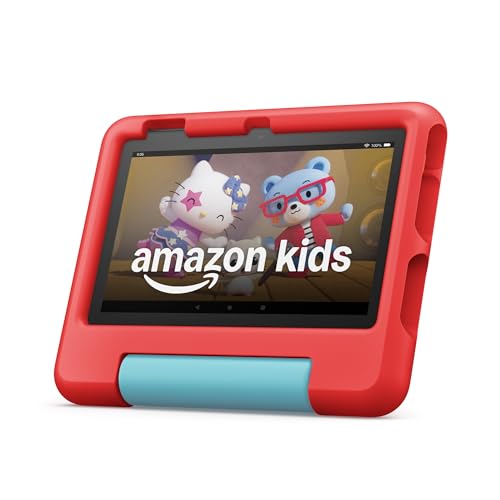
The Fire 7 Kids tablet provides essential safety features with a compact 7″ display and a strong emphasis on parental controls. It includes a one-year Amazon Kids+ subscription and a kid-friendly case, making it an approachable option for younger children or users who prefer a smaller device. The device supports age-appropriate apps and content, with a remote Parents Dashboard for screen time management. While smaller than the Fire HD 10, it remains a capable tool for homework help, reading, and light media consumption, with reliable performance for its class.
Key advantages:
- Kid-friendly content and parental controls
- Compact design for younger children
- One-year Kids+ included
- Streamlined, age-appropriate learning apps
2025 Kids Tablet With Android 15 And Gemini AI

This tablet pairs Android 15 with Gemini AI 2.0 to deliver a personalized learning experience. It emphasizes smart performance, safety, and multi-profile support, enabling families to create separate learning environments for each child. Pre-installed learning apps, parental controls, and eye-friendly display options make it a versatile option for families seeking a future-ready device. It supports remote supervision, time limits, and web filtering, helping maintain a focused study atmosphere while enabling entertaining and educational activities.
Highlights include:
- Android 15 with Gemini AI 2.0 for adaptive learning
- Family Link and multi-profile support
- Eye-friendly HD display and robust parental controls
- Expandable storage and wide app compatibility
Buying Guide: Key Purchase Considerations
- Parental controls depth: Look for configurable screen time, app filtering, content restrictions, and a parent dashboard that works across apps and websites. A solution that grows with your child is ideal.
- Educational content and apps: Prioritize devices that offer curated learning apps, kid-safe browsers, and age-appropriate subscriptions or preloaded content. Check compatibility with your preferred educational ecosystem (e.g., Amazon Kids+, Google Play, or proprietary stores).
- Performance and longevity: A capable processor, sufficient RAM, and reliable battery life matter for sustained study sessions and interactive learning. If homeschooling is common, prioritize multitasking capabilities and robust storage.
- Display and eye comfort: Consider screen size, resolution, and blue-light or eye-care modes. A larger display helps with reading and writing tasks, while eye protection supports long study periods.
- Durability and safety: Kids’ tablets should have sturdy builds, protective cases, and water resistance or spill resistance where possible. Parental controls paired with case protection enhance longevity in active households.
- Content ecosystem and subscriptions: Weigh the value of bundled subscriptions (like Kids+ or education apps) against standalone app purchases. Consider renewal terms and ease of cancellation.
- Storage options and expandability: Decide whether 32GB–64GB suffices or if expandable storage is important for offline content and large apps or media libraries.
- Budget and longevity: Different price ranges reflect features and content access. Choose a model that offers essential safety tools and learning value without overspending on features you won’t use.