The best tablet stand with a lock depends on where you’ll use it and whether you need a desk or floor kiosk. The Secure Desk Tablet Kiosk is best for adjustable commercial counter use, while the woleyi stand offers keyed security and flexible placement. AboveTEK is designed for select larger tablets, Mount-It! adds a literature holder to a floor stand, and monTEK uses a frameless adhesive mounting plate for a broad range of tablet sizes.
| Stand | Best For | Key Detail |
|---|---|---|
| Secure Desk Kiosk | Adjustable counters | 10–14-inch tablets; bolt-down base |
| woleyi Anti-Theft Stand | Flexible desk placement | Keyed lock; 360° swivel |
| AboveTEK Kiosk | Select large tablets | Interchangeable model-specific panels |
| Mount-It! Floor Stand | Public-facing floor displays | Lockable enclosure and literature holder |
| monTEK Frameless Stand | Broad tablet size range | 7–15-inch range; adhesive plate |
Secure Desk Tablet Kiosk Stand

This stand is best for retail, hotel, and other commercial counters where users need to adjust the screen and the installation needs added physical security. Its listed fit range is 10 to 14 inches, with a maximum tablet thickness of 0.39 inches (10 mm). The back panel also has a VESA 75 x 75 mm mounting pattern.
Height adjusts from 10.43 to 15.94 inches. The display rotates 360 degrees and tilts 180 degrees, from -90 to +90 degrees, for different viewing positions. A keyless anti-theft screw system secures the tablet, while pre-drilled holes allow the base to be bolted to a counter.
Choose this if you want a broad stated size range, a bolt-down base, and substantial angle adjustment. Limitation: tablets thicker than 0.39 inches are outside the listed fit specification.
woleyi Lockable Desktop Tablet Stand
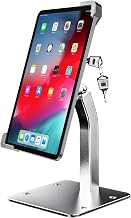
The woleyi stand is best for check-in desks, point-of-sale stations, restaurants, libraries, and similar spaces that need keyed tablet security. The product description identifies a fit range of 9 to 14 inches and describes a keyed bracket that opens for tablet placement and locks after adjustment.
Its screen swivels 360 degrees and flips 270 degrees, allowing the display to be repositioned between staff and customers. The base can be screwed to a tabletop or placed on a table without fastening, giving buyers a choice of installation methods.
Choose this if you need a desktop stand that can be used with or without tabletop screws. Limitation: the supplied information does not specify tablet thickness limits, so confirm your device’s fit before ordering.
AboveTEK Anti-Theft iPad Kiosk Stand

This AboveTEK stand is best for businesses using one of the specifically listed large iPad or Samsung Galaxy tablet models. It includes two interchangeable panels: one for select 12.9- and 13-inch iPad models, and one for select 12.4-inch Galaxy Tab models. The manufacturer lists compatible generations and models, so matching the exact device is important.
A lock-and-key system secures the tablet. The stand rotates 360 degrees and tilts 75 degrees to support portrait or landscape viewing and customer interaction.
Choose this if your tablet appears on the compatibility list and you want a kiosk-style desk display. Limitation: the product is not described as universally compatible; check the listed model names before choosing it.
Mount-It! Lockable Floor Stand With Literature Holder

This floor kiosk is best for public-facing locations that want a tablet and printed brochures or pamphlets at the same touchpoint. Its lockable steel enclosure is designed for public environments, and the floor stand can be bolted down. The built-in literature holder is a distinguishing feature for retail, events, hospitality, and facilities.
It fits specified bare iPad models from generations 7 through 11, including listed iPad Pro and Air sizes, up to 2.2 pounds. Four interchangeable mounting plates accommodate different button and camera-access configurations. The screen rotates 90 degrees and tilts up to 75 degrees.
Choose this if you need a floor-mounted iPad display with printed-material storage. Limitation: it does not fit tablets in cases, and the 12.9-inch iPad Pro is not supported.
monTEK Frameless Anti-Theft Tablet Stand

The monTEK stand is best for buyers seeking a frameless holder with a stated 7- to 15-inch tablet size range. Its security lock prevents tablet removal from the bracket when engaged, and the listing says charging is possible without disassembling the stand.
The mounting plate uses double-sided adhesive. The product description says the plate is single-use: removing it reduces its adhesive strength, so it cannot be reused. It also notes that forcefully removing a locked tablet may damage the device.
Choose this if a frameless design and broad size range are priorities. Limitation: the adhesive plate is not reusable, so consider the placement carefully before attaching it.
Buying Guide: How to Choose a Tablet Stand With a Lock
Does the stand fit your exact tablet?
Start with the tablet’s model, screen size, thickness, and whether it will be used with a case. A stated size range does not guarantee that every tablet within that range fits. Model-specific options such as AboveTEK and Mount-It! require closer compatibility checks, while Mount-It! specifically requires a bare tablet.
Do you need a desk stand or a floor kiosk?
Desk stands suit counters and work surfaces. If the stand will be used in a busy public area, check whether its base can be fastened down. The Secure Desk and Mount-It! listings describe bolt-down options. A floor stand can place the screen at a different point in the space, while a desktop unit may be simpler for an existing counter.
What kind of lock and mounting method do you prefer?
Compare the security approach as well as the tablet enclosure. The listed products use keyed locks, anti-theft screws, or an adhesive-mounted bracket with a security lock. For semi-permanent installations, consider whether you can bolt the base down. For the monTEK adhesive plate, plan the location before applying it because the plate is described as single-use.
How much screen adjustment is useful?
Rotation and tilt help orient a display for checkout, sign-in, menus, or customer interaction. Compare the stated movement ranges rather than assuming all stands adjust equally. Also consider whether staff need to reposition the screen frequently or whether a fixed viewing angle is sufficient.
Frequently Asked Questions
Can a locked tablet stand prevent every kind of theft?
No stand can be assumed to prevent every theft attempt. These products describe locking or mounting features intended to secure a tablet; installation and the specific lock design matter.
Can I use a tablet stand with a protective case?
It depends on the stand. Mount-It! specifies that its enclosure requires a bare tablet and is not compatible with cases. Check the fit details for other models before ordering.
Is a keyless anti-theft system the same as a keyed lock?
No. The Secure Desk listing describes specialized anti-theft screws and a keyless design, while other listed stands specify a lock-and-key system. Compare the opening method with your day-to-day access needs.
Should I bolt a tablet stand to the counter?
Bolting can help secure a stand in a permanent public-facing location when the product supports that installation. Some options also allow tabletop placement without screws, so choose based on your setup and security requirements.