The best restaurant POS system depends on whether you need an all-in-one register, a customer-facing payment screen, or a reference manual. MEETSUN is best for a restaurant seeking a touchscreen register with included hardware and software; A3POS is better suited to restaurants and bars; Clover Station Duo is for buyers who can use its required processing account. The other options include a retail-or-restaurant register and a German-language POS manual.
| Product | Best For | Key Distinction |
|---|---|---|
| MEETSUN POS | Restaurant checkout | Touchscreen, printer, drawer, and software |
| A3POS SET02 | Restaurants and bars | Touchscreen PC and receipt printer |
| Clover Station Duo | Guest-facing checkout | Two screens; specified processor required |
| MSJ POS SET03 | Restaurant or retail checkout | Built-in printer and customer display |
| OrderSprinter 1.0 Manual | German-language reference | Printed POS-system guide, not POS hardware |
MEETSUN Restaurant POS System

Best for: Restaurants looking for a bundled checkout setup with a touchscreen, thermal printer, cash drawer, and restaurant software. It is selected because the listed package combines those core components rather than requiring buyers to source each one separately.
The system includes a 15-inch main screen, an 80 mm thermal printer, a stainless-steel cash drawer, and POS software. Listed software functions include quick checkout, discounts, billing, reports, and taxation. The product information specifies 8 GB RAM and a 128 GB SSD, and describes the software as a one-time purchase with no monthly fees.
Limitation: The listing does not detail advanced restaurant functions such as table management or kitchen-ticket routing. Confirm that the software supports your workflow before choosing it.
A3POS System For Restaurants And Bars

Best for: Restaurant and bar operators who want a touchscreen PC, receipt printer, cash drawer, and POS software in one set. It is a relevant choice for food-service businesses because the listed software is described for restaurants and bars.
The SET02 package includes a 15-inch touchscreen PC, a 3 1/8-inch thermal receipt printer, a stainless-steel cash drawer, and MSJ POS software. The listing specifies a Windows 10 system with an Intel i5 CPU, 8 GB RAM, and 128 GB SSD. Its listed connections include six USB ports, HDMI, VGA, LAN, and two audio outputs.
Limitation: Although the product name refers to a kitchen printer, the supplied feature list specifically identifies a thermal receipt printer. Verify whether a separate kitchen printer is included or supported if kitchen order printing is essential.
Clover Station Duo POS

Best for: Businesses that want a guest-facing screen for order confirmation and payment alongside an operator display. The package is described as including a 14-inch HD display, an 8-inch customer touchscreen, a printer, a cash drawer, and software.
The customer screen is designed to let guests confirm orders, leave a tip, redeem rewards, pay, and request a digital receipt. This two-screen arrangement may suit service counters where customers should interact directly with checkout.
Important limitation: This unit requires a new merchant processing account through Powering POS and cannot be used with a different processor, according to the listing. It is specified for the United States, Puerto Rico, and the U.S. Virgin Islands. Avoid it if you need to keep another payment processor.
MSJ POS System With Built-In Printer
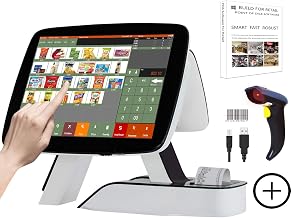
Best for: Buyers comparing restaurant and retail checkout functions in one register package. The listing says the POS software can be selected for restaurant or retail use and includes billing, order, discount, and checkout functions.
The SET03 includes a 15-inch main touchscreen, an 11.6-inch customer display, a built-in 58 mm thermal receipt printer, barcode scanner, and MSJ POS software. Listed software management tools cover invoices, customers, basic data, reports, orders, and promotions. The product information specifies an i5 CPU, 8 GB RAM, and 128 GB SSD.
Limitation: The listing makes restaurant or retail software optional, so confirm which software configuration is supplied. Its built-in 58 mm printer is a different format from the 80 mm and 3 1/8-inch printers listed for the other systems.
OrderSprinter 1.0 Gastronomy Manual

Best for: Readers seeking a printed manual about OrderSprinter 1.0 for food service. It is included as a related reference for people researching restaurant POS systems, not as an operating register or software package.
The supplied product information identifies it as an official user manual for OrderSprinter 1.0, written by Stefan Pichel and offered in paperback. The title is in German, so it may be more appropriate for German-reading users.
Limitation: This is a book, not a POS system. The listing information provided does not specify the manual’s contents beyond its title and format.
Buying Guide: How To Choose A Restaurant POS
Do you need a complete hardware bundle?
Compare what each package explicitly includes: display, printer, cash drawer, scanner, and customer screen. MEETSUN and A3POS list a touchscreen, receipt printer, and drawer. MSJ SET03 lists a built-in printer, customer display, and barcode scanner. Confirm all required components and software selections with the seller.
Will the POS software fit your service style?
Identify must-have functions before buying. The supplied descriptions mention checkout, discounts, billing, reports, order management, customer management, and promotions across different products. They do not confirm every restaurant-specific capability. Ask about table service, kitchen routing, menu changes, and integrations if your operation depends on them.
Can you use the payment processor?
Payment processing can determine whether a system fits. Clover Station Duo specifically requires a Powering POS merchant processing account and does not work with a different processor, according to its listing. Check account requirements, eligible locations, and processing terms before selecting it.
What printer and display setup do you need?
Printer widths differ across the products: listed options include 58 mm, 80 mm, and 3 1/8-inch thermal printers. Match the printer to your receipt or ticket needs and verify whether kitchen printing is included. A separate customer display or touchscreen may help guests review orders, but it is not necessary for every counter.
Frequently Asked Questions
Which listed POS is specifically described for restaurants and bars?
A3POS SET02 includes MSJ POS software described for restaurants and bars, along with a touchscreen PC, receipt printer, and cash drawer.
Which system has a customer-facing touchscreen?
Clover Station Duo lists an 8-inch guest touchscreen. MSJ SET03 also lists an 11.6-inch customer display, though the description does not call it a touchscreen.
Does Clover Station Duo work with any payment processor?
No. Its listing says it requires a new processing account through Powering POS and cannot be used with a different processor.
Is the OrderSprinter product a POS system?
No. It is a paperback manual for OrderSprinter 1.0, not POS hardware or software.
Do these listings confirm kitchen order printing?
Not consistently. A3POS’s name mentions a kitchen printer, but its listed package features specify a thermal receipt printer. Verify kitchen-printing equipment and support before purchasing.