Choosing the right receipt printer for Square involves balancing compatibility, speed, and ease of use. This guide highlights five reliable options that work well with Square setups, including bundles that pair a receipt printer with a cash drawer and accessories. You’ll find printers with auto cutters, easy setup, and durable designs suitable for retail, hospitality, and quick-service environments. The selections here emphasize straightforward integration with Square Stand or Square Register, while also offering solid performance with other POS systems.
Summary of Selected Products
| Product | Type | Key Feature | Square Compatibility |
|---|---|---|---|
| EOM-POS Hardware Bundle for Square – Cash Drawer and Thermal Receipt Printer | Bundle | Autocut printer with bundled cash drawer | Explicit Square compatibility |
| EOM-POS Hardware Bundle for Square – Cash Drawer, Mounting Brackets, Thermal Receipt Printer, Barcode Scanner | Bundle | Printer, scanner, cash drawer, mounting brackets | Explicit Square compatibility |
| Star Micronics TSP143IIIU USB Thermal Receipt Printer | Printer | High-speed USB, plug-and-print, De-Curl, auto cutter | Broad OS support; works with Square via USB |
| Star Micronics TSP143IIIBi Bluetooth Thermal Receipt Printer | Printer | Bluetooth, easy Pair & Print, De-Curl | Broad OS support; works with Square via Bluetooth |
| Rongta POS Receipt Printer, 80mm Thermal Printer | Printer | ESC/POS, auto cutter, wide compatibility | General POS use; not Square-specific |
EOM-POS Hardware Bundle for Square – Cash Drawer and Thermal Receipt Printer
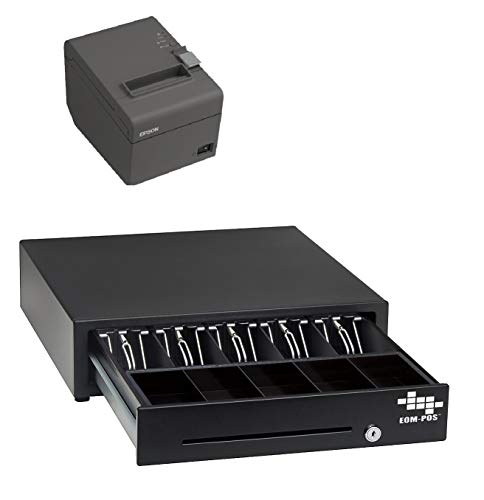
The EOM-POS bundle combines a USB thermal receipt printer with a compatible cash drawer, designed for Square Stand or Square Register. It emphasizes a straightforward plug-and-play setup, autocut function, and reliable performance. The kit includes essential hardware to streamline a compact checkout area, with two-year warranty and ongoing technical support. This option is ideal for businesses seeking an integrated Square-ready solution with minimal setup fuss.
EOM-POS Hardware Bundle for Square – Cash Drawer, Mounting Brackets, Thermal Receipt Printer
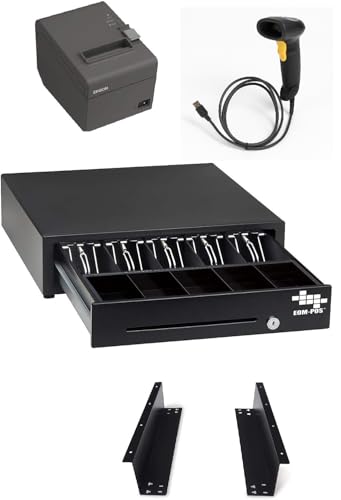
This bundle extends the Square-ready setup by including mounting brackets for flexible installation. It pairs a USB thermal printer with a cash drawer and offers two-year full warranty plus lifetime tech support. It is well-suited for kiosks, counters, or storefronts where space optimization and reliable, fast receipts are priorities.
Star Micronics TSP143IIIU USB Thermal Receipt Printer

This high-speed USB printer delivers up to 43 receipts per minute and features a Drop-In and Print clamshell design for fast paper loading. It supports iOS, Android, and Windows and includes a USB serial number feature so the system recognizes the device across USB ports. The De-Curl function ensures flat receipts, making it a strong general-purpose option for Square-compatible setups that prioritize speed and reliability.
Star Micronics TSP143IIIBi Bluetooth Thermal Receipt Printer

The TSP143IIIBi offers wireless convenience with Bluetooth pairing, enabling simple “Pair and Print” operation across iOS, Android, and Windows. Its clamshell design makes loading paper quick, and the De-Curl function helps ensure consistent, flat receipts. This model is suitable for mobility-enabled Square setups or counters where wireless connectivity is beneficial.
Rongta POS Receipt Printer, 80mm Thermal Printer

The Rongta 80mm printer is a feature-rich option with ESC/POS compatibility and an auto cutter for efficient receipt handling. It supports USB, serial, and Ethernet interfaces, and is designed for Windows, Mac, and Linux systems. While not Square-specific, it can be integrated into broader POS environments where Square is part of a multi-system checkout. The wall-mount design helps conserve counter space in busy environments.
Buying Guide: Key Purchase Considerations for Square-Ready Receipts
- Square compatibility: Confirm that the printer can work with Square Stand or Square Register through USB, USB-Bluetooth, or network connections. Bundled options that explicitly state Square compatibility simplify setup and ongoing support.
- Connection type: USB is common and reliable for stationary setups; Bluetooth provides wireless flexibility; Wi-Fi is useful for networked layouts but ensure security and reliability in busy spaces.
- Auto cutter and paper handling: An auto cutter speeds up checkout and reduces maintenance. Look for a sturdy paper path and features like De-Curl to keep receipts flat and legible.
- Print speed and reliability: Higher receipts per minute reduce queue times in high-volume environments. Check reputable reviews for consistency in speed across long shifts.
- Power supply and installation: Internal power supplies are neat and space-saving; external adapters may clutter counters. Clamshell designs facilitate quick paper loading.
- Warranty and support: A strong warranty and accessible tech support help reduce downtime. Bundle deals often include hardware beyond the printer, such as cash drawers or scanners, which can be cost-effective and simpler to implement.
- OS and ecosystem compatibility: Ensure the printer supports your operating system (Windows, macOS, iOS, Android) and integrates smoothly with Square’s software, including any required drivers or utilities.
- Durability and mounting options: Wall-mount or under-counter mounting can free up counter space. Durable housings reduce wear in high-traffic venues.
- Total cost of ownership: Consider not just the printer price but ongoing consumables (paper), maintenance, and potential expansion needs as your business grows.
- Future-proofing: If you plan to broaden payment ecosystems, choose printers with broad compatibility and easy firmware updates to support new features.