The best solid state drive depends on whether you need portable file storage or an internal upgrade for a computer. The SanDisk Extreme is best for rugged, high-capacity travel storage; the Verbatim Pocket SSD is better for a compact drive with a keyring; and the fanxiang 1TB and SanDisk SSD Plus suit internal SATA upgrades. The fanxiang 128GB is a small-capacity option for a basic computer refresh.
| Drive | Type | Best suited for |
|---|---|---|
| SanDisk Extreme Portable SSD 2TB | External USB-C | Rugged portable storage |
| Verbatim Pocket SSD 1TB | External USB | Compact travel storage |
| fanxiang S101 1TB | Internal SATA | Higher-capacity PC upgrade |
| SanDisk SSD Plus 2TB | Internal SATA | Large-capacity internal storage |
| fanxiang S101 128GB | Internal SATA | Basic, lower-capacity upgrade |
SanDisk Extreme Portable SSD 2TB

Best for: People who need a high-capacity external solid state drive for travel, field work, or moving large files. It combines 2TB of storage with a portable design and a carabiner loop for attachment to a belt loop or backpack.
The drive uses NVMe performance and offers stated read speeds up to 1,050MB/s and write speeds up to 1,000MB/s. SanDisk lists IP65 water and dust resistance and drop protection up to 3 meters. These features make it the most rugged-oriented choice in this selection.
Limitation: Actual transfer speeds can be lower depending on the host device and other factors. Choose this if portability and stated environmental protection matter; avoid it if you need an internal SATA drive.
Verbatim Pocket SSD 1TB

Best for: Travelers, creators, and everyday users who want an external solid state drive that takes up little space. The 1TB drive is described as ultracompact and lightweight, and it includes a keyring and cable holder to keep the drive and cable together.
Verbatim lists read and write speeds up to 1,000MB/s. The product description names PC, Mac, PS5, Xbox, and iPhone among its compatible devices, making it a flexible option for users with several types of equipment. Check the connection and device requirements for your particular setup before buying.
Limitation: Its capacity is 1TB, half that of the 2TB options here. Choose this if a compact form and cable organization matter more than maximum listed capacity.
fanxiang S101 1TB SATA SSD

Best for: Desktop or laptop owners seeking a 1TB internal SATA drive for applications, files, and everyday computer use. The 2.5-inch, 7mm drive uses 3D NAND and lists sequential read speeds up to 560MB/s and write speeds up to 510MB/s.
Its listed features include SLC cache, garbage collection, wear leveling, RAID, ECC, TRIM, and S.M.A.R.T. These are relevant specifications for buyers comparing internal SATA drives, while the stated shockproof design may also appeal to users concerned about physical handling.
Limitation: This is an internal SATA drive, not a portable external SSD. Confirm that your computer supports a 2.5-inch SATA drive before choosing it.
SanDisk SSD Plus 2TB Internal SSD

Best for: Buyers who want 2TB of internal storage in a 2.5-inch, 7mm SATA III drive. SanDisk presents it as an upgrade for faster booting and application launches, with space for applications and large media files.
The listed sequential speeds reach up to 545MB/s read and 515MB/s write for the 1TB and 2TB models. Compared with the 1TB fanxiang drive, this option offers twice the stated capacity, while both use the SATA interface and have similar maximum sequential speeds.
Limitation: It is an internal SATA drive, so it is not the right pick for someone seeking a portable USB SSD. Confirm your computer’s drive size and interface requirements before purchasing.
fanxiang S101 128GB SATA SSD
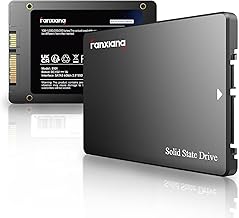
Best for: A basic internal upgrade when a modest amount of storage is enough. This 2.5-inch SATA III drive lists sequential read speeds up to 500MB/s and write speeds up to 350MB/s. Its 3D NAND TLC chips are described as offering longer write lifespan than QLC chips.
The product description says it can help a computer boot faster than an HDD. Its small capacity may work for a limited set of applications or files, but it is not the best match for a large media library or extensive game collection.
Limitation: At 128GB, it has substantially less capacity than the other internal drives in this roundup. Choose it only if that storage amount fits your needs.
Buying Guide: How To Choose A Solid State Drive
Do you need an internal or external SSD?
An internal SATA SSD is designed for installation inside a compatible computer. The fanxiang and SanDisk SSD Plus models in this guide are 2.5-inch SATA drives. External SSDs connect outside the computer and are more convenient for carrying files between devices. The SanDisk Extreme and Verbatim Pocket are external options.
How much capacity should you choose?
Choose capacity based on the files and applications you expect to store. The 128GB drive is the smallest option and is best for limited needs. The 1TB models offer more room for general storage, while the 2TB choices suit buyers who want more space for large files or backups.
How should you compare speed claims?
Compare products within the same drive type and remember that listed figures are maximums, not guaranteed real-world results. The external drives list speeds around 1,000MB/s or higher; the internal SATA models list maximum sequential reads around 500–560MB/s. Actual performance depends on the drive and the connected device.
What should you check before buying?
For an internal drive, verify that the computer supports a 2.5-inch SATA drive and has the required connection and space. For an external drive, check that the device has a suitable port and supports the intended use. Consider whether capacity, compactness, or ruggedness is the priority.
Frequently Asked Questions
What is a solid state drive used for?
A solid state drive stores files, applications, and operating system data. Internal SSDs are installed in compatible computers; external SSDs connect to devices for portable storage and transfers.
Is an external SSD the same as an internal SSD?
No. An external SSD is a standalone drive connected outside a device, while an internal SSD is made for installation inside compatible equipment.
Which drive in this list has the highest capacity?
The SanDisk Extreme Portable SSD and SanDisk SSD Plus each list 2TB of storage.
Which option is best for a small travel drive?
The Verbatim Pocket SSD is described as ultracompact and includes a keyring and cable holder for easier carrying.
Should I choose a 128GB SSD or a 1TB SSD?
Choose 128GB only if your storage needs are limited. A 1TB model provides substantially more room for applications, files, and other data.