The best smart door lock with a camera depends on whether you prioritize always-available video, doorbell-triggered calls, or multiple ways to unlock. The ARPHA model is best for continuous live viewing, while the myQ Secure View stands out for its listed 2K HDR camera and color night vision. The wrydao model offers video when someone rings, but its camera cannot be manually activated for on-demand viewing. One listed fingerprint knob has no camera features, so it is an alternative for keyless entry—not a camera-equipped choice.
| Product | Best For | Camera Feature |
|---|---|---|
| ARPHA WiFi Video Smart Lock | Live viewing and access options | 24/7 live video, 150° view |
| wrydao Video Doorbell Lock | Doorbell-triggered visitor calls | Video call after doorbell press |
| myQ Secure View | Detailed video and night visibility | 2K HDR and color night vision |
| Camcamp Video Smart Lock | Auto-lock and five entry methods | Built-in camera and alerts |
| Fingerprint Door Knob | Keyless entry without listed video | No camera feature listed |
ARPHA WiFi Video Smart Lock With Handle

Best for: Buyers who want a combined lock, handle, camera, doorbell, and several entry methods. Its listed features include a 150-degree camera, 24/7 live video through the Tuya app, two-way intercom, and visitor alerts. The product also supports fingerprint, keypad PIN, app control, and backup mechanical keys.
Choose this model if you want to check the camera feed without waiting for a visitor to press the doorbell. Its anti-peeping virtual password and listed Alexa and Google Assistant voice control add access options. It may suit households, apartments, or rental properties that need to manage guest access.
Limitation: The provided details do not specify video resolution or night-vision capability, so compare those requirements before choosing.
wrydao Smart Lock With Video Doorbell

Best for: Buyers who primarily want to speak with visitors when they ring the doorbell. A doorbell press triggers an app notification and video call, with two-way audio and remote unlocking available through the app. The lock lists five entry methods: fingerprint, password, IC card, app, and backup key.
Its 2.4GHz WiFi connection supports remote unlocking, user management, and temporary access, according to the product details. Choose it if doorbell-triggered interaction meets your needs and you want multiple ways to enter.
Limitation: The camera cannot be manually activated for on-demand viewing. Avoid this option if checking a live feed at any time is essential.
myQ Secure View 3-In-1 Smart Lock

Best for: Buyers who prioritize the camera specifications listed for their entry device. This three-in-one unit combines a smart deadbolt, video doorbell, and 2K HDR camera. The feature list also names a wide-angle lens, color night vision, motion and doorbell alerts, and two-way audio through the myQ app.
Face access is listed alongside fingerprint access, PIN, and app control in the product name. Choose this model if facial recognition and clearer day-or-night video are priorities. Its integrated design combines visitor monitoring and entry control in one device.
Limitation: The supplied details do not state additional entry methods such as a mechanical key or IC card; verify the access options you require before buying.
Camcamp Video Smart Lock With Handle
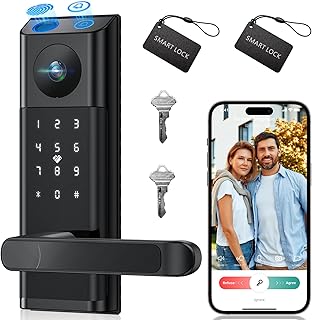
Best for: Households that value automatic locking and flexible entry methods. The product listing says it auto-locks within seconds after the door closes and sends phone alerts using its built-in camera and doorbell. It lists fingerprint, PIN, IC card, app control, and backup key access.
Choose this model if you want a handle-set design and several ways for family members or guests to enter. Its auto-lock feature may also suit buyers who want the door to secure itself after closing.
Limitation: The provided features do not specify video resolution, viewing angle, or whether live viewing is available on demand.
Fingerprint Smart Door Knob

Best for: Buyers seeking a smart knob for keyless entry who do not need a camera. The listed methods include fingerprint, keypad passcode, NFC card, app, and mechanical key. The product also describes 0.5-second fingerprint unlocking and app features for permanent or temporary access, entry logs, and silent mode.
This is included as a comparison option because it is a fingerprint smart knob, but it does not list a camera or video doorbell. Choose it only if entry management matters more than monitoring visitors.
Limitation: No camera capability is listed, so it does not meet a requirement for a smart door knob with video.
Buying Guide: How To Choose A Smart Lock With A Camera
Do you need live viewing or doorbell-triggered video?
Check how the camera activates. ARPHA lists 24/7 live video, while wrydao describes video access after a doorbell press and explicitly says the camera cannot be manually activated. Camcamp lists a built-in camera and alerts, but the supplied details do not clarify on-demand viewing.
Which entry methods matter most?
Compare the listed methods against the people who need access. Fingerprints can suit regular household members, while PINs, app access, cards, and backup keys offer alternatives. Temporary access is specifically listed for the wrydao and fingerprint knob products; ARPHA lists access logs and app control.
What video details should you compare?
Look for resolution, viewing angle, night vision, alerts, and two-way audio. The myQ listing specifies 2K HDR and color night vision; ARPHA specifies a 150-degree camera and two-way intercom. Do not assume a feature is included if the product details do not name it.
Does the lock match your door and connectivity needs?
Review the exact product specifications for door preparation, installation requirements, and network support before buying. The wrydao listing specifies 2.4GHz WiFi; the other supplied descriptions do not provide equivalent network details. Confirm that the listed lock style and handle configuration suit your intended door.
Frequently Asked Questions
Can a smart lock camera show visitors without a doorbell press?
Some models list live viewing without a press, such as ARPHA. The wrydao camera is specifically described as doorbell-activated and cannot be manually started for on-demand viewing.
Which listed model specifies the highest video resolution?
The myQ Secure View listing specifies a 2K HDR camera, along with color night vision and a wide-angle lens.
Do all the listed products include a camera?
No. The fingerprint smart door knob lists keyless entry features but does not list a camera. It is an alternative for access control, not video monitoring.
Are backup keys available on every model?
Backup mechanical keys are listed for ARPHA, wrydao, and Camcamp. Check the product details for other models if a physical key is important.
Can these locks provide temporary access?
Temporary access is listed for the wrydao lock and the fingerprint knob. Other products may have different access-management features; confirm them in their specifications.