If you’re optimizing space or seeking cinematic angles, a sliding or motorized ceiling TV mount can free up floor space while delivering adjustable viewing. This guide highlights five top options, focusing on compatibility, range of motion, and ease of installation. Each product section includes key specs and practical considerations to help you compare at a glance.
| Product | Brand | VESA Range | Max Weight |
|---|---|---|---|
| PERLESMITH PSCM2 | PERLESMITH | 100×100 to 400×400 mm | 110 lbs / 50 kg |
| Perlegear Electric Ceiling Mount | Perlegear | 200×100 to 600×400 mm | 88 lbs |
| WALI Ceiling Mount 65″ | WALI | 100×100 to 400×400 mm | 110 lbs |
| Xyndyx Electric Ceiling Mount | Xyndyx | 75×75 to 200×200 mm | 77 lbs |
| Mount Plus CM344 | Mount Plus | 100×100 to 400×400 mm | 44 lbs |
PERLESMITH PSCM2 Ceiling TV Mount

The PSCM2 is a ceiling pole mount designed for 26–65 inch TVs with VESA patterns from 100×100 to 400×400. It supports up to 110 pounds and offers a substantial ceiling-to-TV distance, extending from 20.47” to 29.92”. The mount allows +10°/-10° tilt and 360° swivel, enabling flexible viewing angles while keeping glare low. It emphasizes stability by recommending wall structures beyond drywall for installation.
Key considerations include checking TV weight and VESA compatibility before purchasing, ensuring mounting on wood studs, concrete, or brick, and confirming the ceiling structure can support the load. The unit’s full motion and level adjustment help fine-tune positioning after installation.
Perlegear Electric Ceiling TV Mount

Perlegear’s motorized ceiling mount supports most 32″–70″ TVs up to 88 lbs, with VESA patterns from 200×100 to 600×400. It installs on wood joists or concrete and can’t be used on sloped ceilings. A 150W motor enables smooth extension, and the unit completes full extension within about 32 seconds. A remote control provides 0°–75° extension adjustment and ±2° leveling for precise alignment after mounting.
The design focuses on reliability and user convenience, with a tested endurance many cycles high. Practical use cases include living rooms and conference spaces where frequent repositioning is needed. Consider ceiling type and room layout to maximize the motorized reach and avoid obstructions above the ceiling.)
TOPSKY Electric Adjustable Ceiling TV Mount

TOPSKY’s fold-down model is designed for 32–70 inch TVs, with a non-rotating, fold-down capability. It supports up to 88 lbs and provides remote-enabled height adjustment. The system recommends two-person installation due to the weight and alignment demands. It’s suitable for both home and office environments, especially where the TV needs to be lowered for viewing and raised for storage.
Considerations include ensuring an appropriate ceiling structure, pairing the receiver and remote control, and confirming the unit can be paired and programmed before use. The fold-down design helps manage space in rooms with limited wall clearance.
WALI Ceiling TV Mount 26-65 Inch
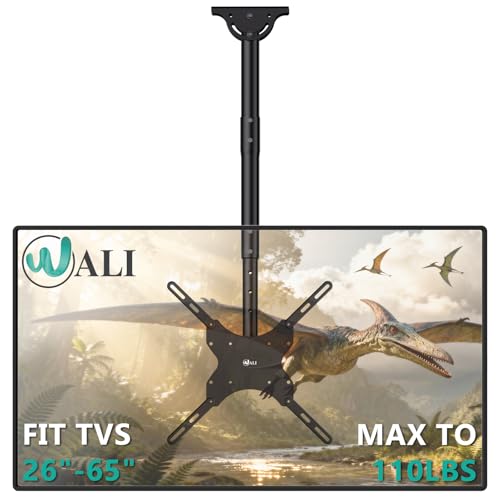
WALI’s ceiling mount supports up to 110 lbs and is compatible with VESA patterns from 100×100 to 400×400. It is built from steel and aluminum for durability and is suitable for flat, sloped, or vaulted ceilings, as long as proper wall mounting is used (wood studs, concrete, or brick). The mount offers a 2-inch incremental height adjustment, a 25° downward tilt, 360° swivel, and 3° rotation to fine-tune viewing angles.
Practical considerations include avoiding drywall-only mounting and verifying VESA compatibility and weight. This model is a solid all-around choice for living rooms, gyms, or outdoor patios where space-saving is a priority and frequent angle changes are desired.
Xyndyx Electric Ceiling Mount

The Xyndyx electric ceiling mount supports 23–55 inch TVs up to 77 lbs with a vertical fold-down range. It uses a high-torque motor delivering quick movement—extending fully in about 16 seconds—and offers ±3° leveling for precise alignment. The remote control supports a long range, up to 164 feet, enabling convenient adjustments from across a room. It is designed for both flat and pitched ceilings and aims to deliver a clean, modern aesthetic for living rooms and offices.
Considerations include motor durability over time, ensuring the ceiling can support the installation, and confirming remote signal reliability through walls or furniture. The extended range adds flexibility for rooms with seating at multiple angles.
Buying Guide: Key Considerations For Sliding And Motorized Ceiling Mounts
- Ceiling type and structure: Confirm whether installation is suitable for wood joists, concrete, or brick, and avoid drywall-only mounting to ensure safety.
- VESA compatibility: Match the mount’s VESA pattern range to your TV’s pattern (e.g., 100×100 to 400×400 mm, or up to 600×400 mm for larger models).
- Weight capacity: Ensure the TV weight falls well within the mount’s maximum rating to prevent sagging or failure over time.
- Motion range: Evaluate tilt, swivel, and extension. A greater extension distance and swivel range offer more viewing flexibility but may require more ceiling clearance.
- Motorized vs. manual: Motorized (remote-controlled) mounts offer convenience for frequent angle changes but may require more maintenance and power considerations. Non-rotating fold-down models save space but limit motion.
- Installation considerations: Some mounts need two people or professional installation, especially heavier or pitched-roof options. Check ceiling height and room layout to ensure safe operation.
- Environmental suitability: Outdoor or patio installations may require weather-resistant finishes or corrosion resistance. Verify that hardware is appropriate for exposure and mounting surfaces.
- Remote control and access: For mounts with remotes, consider range, battery requirements, and compatibility with smart home setups if applicable.
- Future upgrades: If you anticipate upgrading to a larger TV, choose a mount with broader VESA compatibility and higher weight capacity to avoid replacements.
Choosing the right sliding or motorized ceiling TV mount involves balancing mounting surface safety, TV compatibility, and room-specific viewing angles. By comparing the above five options and referencing the buying guide, you can select a model that delivers flexible, space-saving entertainment without compromising safety.