Choosing the right single address label printer can streamline shipping, inventory labeling, and everyday organization. This guide highlights five capable models that balance ease of use, Bluetooth or USB connectivity, and reliable label printing for small businesses, home offices, and schools. Each option emphasizes direct thermal printing to minimize costs and maximize speed.
Below is a quick snapshot of the featured products, including brand, main use case, and connectivity, to help you compare at a glance.
| Product | Brand | Key Use | Connectivity |
|---|---|---|---|
| KNAON Bluetooth Thermal Shipping Label Printer | KNAON | Small business shipping labels, DIY labels | Bluetooth, USB |
| NIIMBOT B1 Label Maker Machine | NIIMBOT | Office and home labeling, organization | Bluetooth, USB |
| Anycash Bluetooth Thermal Label Printer | Anycash | Shipping, marketplace labels (Amazon, eBay, Etsy) | Bluetooth, USB |
| Ponek M100 Label Maker | Ponek | Address, price tags, QR codes, logos | Bluetooth, USB |
| Nelko PM220 Label Maker | Nelko | Labels for home, small business, school | Bluetooth, USB |
KNAON Bluetooth Thermal Shipping Label Printer

The KNAON thermal label printer delivers wireless printing via Bluetooth, with compatibility across iOS, Android, Windows, and macOS systems. It supports a range of devices through the FlashLabel Pro app, making setup accessible for users who prefer mobile printing. A built-in USB option provides a stable alternative for desktop setups. The device library within the app includes thousands of templates, icons, and fonts, enabling DIY shipping labels, barcode labels, name tags, price tags, and more on a variety of thermal papers. This flexibility suits small businesses with diverse labeling needs.
NIIMBOT B1 Label Maker Machine

The NIIMBOT B1 utilizes Bluetooth to pair with iOS and Android devices for quick label creation. A USB driver is available for PC users, and the app supports automatic label size detection, 30+ fonts, borders, and a library of symbols for polished labels. This model emphasizes energy efficiency with a rechargeable battery and is suited for home, office, and small business labeling tasks, including medicine, groceries, and organization labels. The combination of wireless convenience and a robust app makes it a practical choice for ongoing labeling workflows.
Anycash Bluetooth Thermal Label Printer

The Anycash Y812 offers Bluetooth printing for iOS and Android through the FlashLabel app, paired with USB connectivity for desktop use on Windows, Mac, and Chrome OS. It targets major shipping workflows and marketplaces, enabling 4×6 label printing with direct thermal technology to avoid ink or toner costs. The printer supports a fast output rate and is designed for compatibility with marketplaces like Amazon, eBay, Shopify, and Etsy, making it a practical option for multi-channel sellers seeking straightforward setup and dependable performance.
Ponek M100 Label Maker
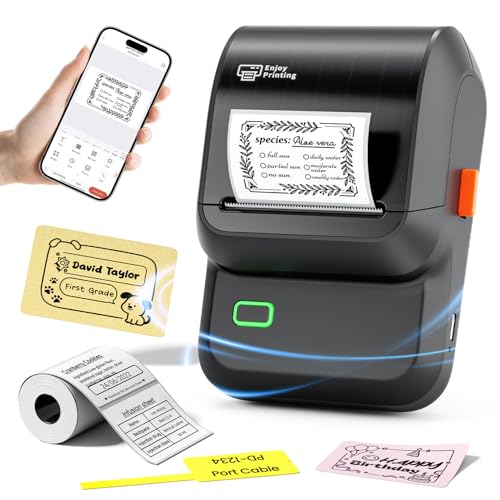
The Ponek M100 is a versatile label printer that supports label widths from 0.78″ to 2″, making it suitable for address labels, price tags, barcodes, logos, and QR codes. It connects via Bluetooth to Android and iOS devices using the Print Master app and offers USB printing for PC users with the corresponding drivers and PC app. The device ships with app templates and a broad font/template library to customize labels, including borders, time stamps, and tables. It is designed for small businesses and home offices needing flexible labeling options.
Nelko PM220 Label Maker

The Nelko PM220 Bluetooth Label Maker is designed for iOS, Android, and PC use. It supports a broad set of templates, fonts, languages, and materials, enabling QR codes, barcode labels, and tables. The device emphasizes ease of use with a dedicated Nelko app, and it provides guidance for driver installation and app setup on PCs. This model targets users who want to create customized smart labels for folders, jars, or classroom labeling while maintaining a compact, portable footprint for small business and home use.
Buying Guide
Key factors to consider when selecting a single address label printer include compatibility with your devices (iOS, Android, Windows, macOS), preferred connectivity (Bluetooth vs. USB), and the types of labels you print (address, shipping, price tags, QR codes). Direct thermal printing reduces ongoing costs and simplifies maintenance, but you should verify label width range to ensure it fits your label stock. App support matters for template variety, fonts, borders, and automation; look for printers with robust template libraries and reputable driver support. If you operate across multiple sales channels, ensure the printer integrates smoothly with major marketplaces like Amazon, eBay, Shopify, and Etsy. For teams, consider battery-powered models for flexibility or USB-only printers for a stationary setup. Finally, check expected print speeds and DPI to ensure legibility on standard shipping labels and barcodes.
Perspective considerations:
- Mobile-friendly workflow: Bluetooth printers paired with a capable label app can speed up on-the-go labeling tasks in a warehouse or storefront.
- Desk-based reliability: USB-connected printers with broad OS driver support are ideal for a fixed labeling station and batch printing.
- Label versatility: A printer supporting multiple label sizes and formats reduces the need to stock different machines.
- Energy and cost efficiency: Direct thermal printing lowers ongoing consumable costs, though initial setup and app familiarity impact total ownership.