Finding the right sign and label printer can streamline wiring identifications, asset tagging, and packaging labels across facilities, shops, and warehouses. This guide highlights five capable models that balance print quality, speed, and versatility. Each option offers robust compatibility with a range of materials and devices, making it easier to manage safety signs, inventory labels, and workplace identifiers in American operations.
| Product | Brand | Key Strength |
|---|---|---|
| Brady S3100 Sign And Label Printer | Brady | Multi-line signs and automatic setup |
| Brady BBP37 Sign And Label Printer | Brady | Color printing on 28+ materials |
| Makeid D50 Industrial Label Printer | Makeid | 2″ print head, efficient cutter |
| NULLTONEX Bluetooth Thermal Shipping Label Printer | NULLTONEX | 4×6, broad device compatibility |
| Brady i7100 600dpi | Brady | Industrial durability, high definition |
Brady S3100 Sign And Label Printer with Workstation Software

The Brady S3100 is a desktop sign and label maker tailored for clear identification of wires, panels, and industrial components. It features automatic label setup to minimize calibration time and sensor adjustments, helping facilities meet safety and labeling standards faster. Compatibility with Brady B30 Series continuous labeling tape enables a variety of styles and widths for diverse labeling needs. This model emphasizes reliability in high-usage environments, where consistent readability matters for maintenance and safety protocols.
Brady BBP37 Sign And Label Printer
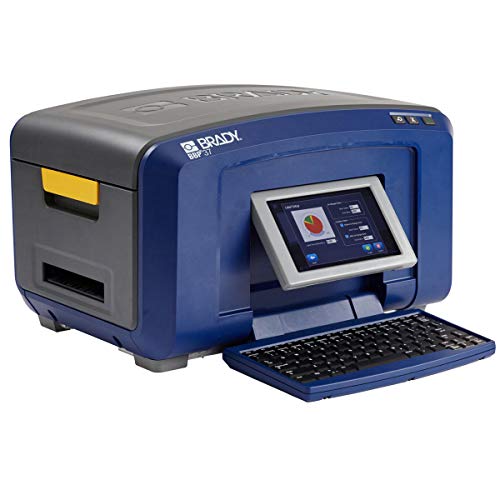
The BBP37 offers multi-color printing to create attention-grabbing safety signs, lockout tags, and warning labels. It supports over 28 industrial-grade materials, including long-lasting vinyl suitable for outdoor conditions. The printer can easily import and export label files, lists, and graphics to a BMP37 printer via USB 2.0 or a USB flash drive, enabling smooth workflow integration in lab or factory settings.
Makeid D50 Industrial Label Printer

The Makeid D50 features a 2-inch print head, broad label applications—from cabling and data labeling to asset and safety identifiers. It uses thermal transfer printing for durable, high-resolution output up to 300 DPI with 5-year longevity. An automatic cutter supports bulk label production, while an integrated label and ribbon cartridge design allows rapid consumable changes in about 5 seconds, boosting workflow efficiency on job sites.
NULLTONEX Bluetooth Thermal Shipping Label Printer

This 4×6 wireless label maker is designed for small businesses and home offices. It supports multiple label sizes (1.57″ to 4.3″ widths) and broad platform compatibility, including iPhone, Android, Windows, and Mac. Although Bluetooth printing is supported with app pairing, some devices require the FlashLabel Pro app. It’s widely used for USPS, UPS, e-commerce marketplaces, and Shopify workflows, offering flexible integration with various shipping platforms.
Brady i7100 600dpi Industrial Label Printer

The Brady i7100 is built for industrial environments, offering a wide material range for signs and labels and printing with high-definition clarity on small label spaces. With 600 dpi precision, this model produces ultra-sharp output for critical identification needs, making it suitable for labeling components, equipment, and safety signs in production lines and warehouses. It’s designed to handle high daily volumes reliably.
Buying Guide
Key purchase considerations help buyers select the best sign and label printer for their operations:
- Print quality and dpi: Higher DPI delivers crisper text and graphics, crucial for safety signs and barcodes. Look for 300–600 dpi depending on label size and content.
- Label material compatibility: Assess whether the printer supports vinyl, polyester, polyimide, and other industrial materials, especially for outdoor or harsh environments.
- Print speed and daily capacity: Industrial settings benefit from faster throughput and durable components designed for thousands of labels per day.
- Connectivity and software: USB, Ethernet, or Wi-Fi options enable flexible workflows. Software compatibility with existing label design programs reduces training time.
- Automatic features: Auto-calibration, automatic cutters, and cartridge-based consumables minimize downtime and simplify maintenance.
- Portability versus desktop use: Job-site labeling may require mobile or battery-powered units; office use favors compact desktop models.
- Color versus monochrome printing: Color label printers help with hazard signaling and differentiation, though monochrome models are often sufficient for asset tracking and standard IDs.
- Reliability and support: Consider brand reputation, warranty terms, and availability of spare parts and media tapes or ribbons for long-term maintenance.
How to choose for your environment
For highly regulated environments or maintenance-heavy facilities, prioritize models with robust material support and high-resolution output. If you need color coding for safety and warnings, a color-capable printer like the BBP37 is advantageous. For compact spaces with modest volumes, a desktop option with automatic cutting and simple media changes can reduce setup time. When labeling on-site or in warehouses, battery-powered or portable units can minimize cable clutter and improve mobility. Finally, assess compatibility with your existing asset tagging and signage workflows to ensure seamless adoption.
Usage scenarios and considerations
Industrial plants benefit from durable labels that withstand chemicals, abrasion, and temperature shifts; select printers with industrial-grade media options. Offices and schools often require simple, legible labels for organization and asset management, where ease of use and quick-batch printing matter most. E-commerce and shipping centers demand fast throughput, reliable connectivity, and compatibility with various label formats to accommodate different carrier requirements. In all cases, verify media availability, maintenance cycles, and user training needs before purchase.
Maintenance and best practices
Regularly clean print heads and sensors to maintain clarity and prevent feed issues. Keep media stocked for uninterrupted runs and store tapes and labels in a controlled environment to prevent degradation. Use recommended label types and avoid incompatible tapes that can affect adhesion or legibility. Back up label templates and ensure firmware is up to date to leverage performance improvements and security fixes. Proper calibration after media changes helps maintain consistent print quality across batches.