The best short throw smart projector depends on your room size, streaming preferences, and setup needs. The KOGATA GC355 is best for buyers who prioritize stated brightness and automatic image adjustment, while the KOGATA 1.1:1 model suits portable viewing in compact rooms. PUTRIMS adds Google TV and a rotating stand, iSinbox combines built-in apps with a stated 1.1:1 ratio, and Goiaey emphasizes audio and flexible positioning.
| Projector | Best for | Standout feature |
|---|---|---|
| KOGATA GC355 | Automated setup | 2000 ANSI claim and TOF focus |
| KOGATA 1.1:1 | Portable small-room viewing | Handle and rotating stand |
| PUTRIMS | Google TV users | Voice control and 360° stand |
| iSinbox | Streaming app access | 1500 ANSI claim and 1.1:1 ratio |
| Goiaey GO2 | Built-in audio and flexible angles | 65W audio claim and 360° stand |
KOGATA GC355 Short Throw Projector
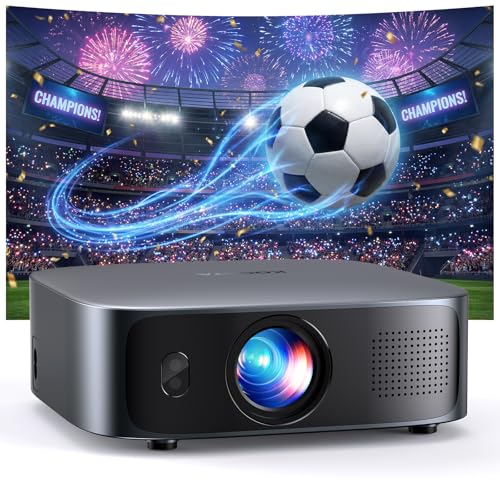
Best for: Buyers who want automated focus and keystone adjustment, plus a projector with a stated 2000 ANSI brightness specification. The listed throw distances are about 4 feet for a 50-inch image, 7.97 feet for 100 inches, and 15.98 feet for 200 inches.
The GC355 includes streaming apps such as Prime Video and YouTube, with support for downloading Disney+ and Apple TV. Its time-of-flight autofocus and image correction are designed to readjust when the projector moves. Obstacle avoidance can also resize or reposition the image around nearby objects.
Why it stands out: The combination of stated throw distances, built-in apps, and automatic adjustments makes it a fit for buyers who frequently move or reposition a projector. Limitation: The listed distance for a 100-inch screen is nearly eight feet, so measure your room before choosing it for a very tight setup.
KOGATA 1.1:1 Portable Projector
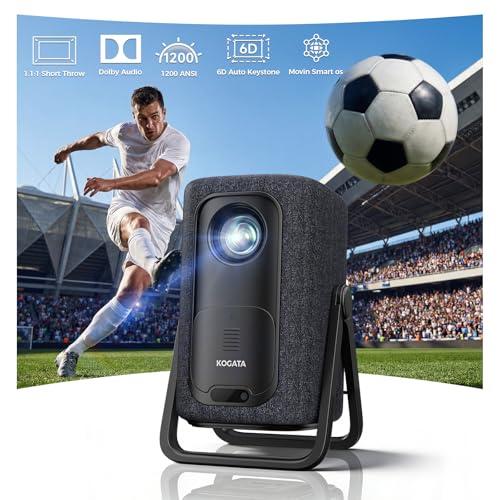
Best for: Apartment, dorm, and bedroom viewers who need a compact placement option. The product lists a 1.1:1 throw ratio and says it can display a 100-inch image from eight feet away.
Built-in apps include Netflix compatibility and support for major streaming platforms. Wi-Fi 6 and Bluetooth are listed for wireless connections. A 360-degree stand base allows tool-free angling, while the integrated handle makes the unit easier to carry between rooms or to an outdoor viewing area.
Why it stands out: It combines a specific short-throw ratio with a carrying handle and adjustable stand, making it better suited to portable use than a fixed installation. Limitation: The stated 100-inch image distance is still eight feet; buyers with less depth should verify the desired image size against the room layout.
PUTRIMS Google TV Projector

Best for: Viewers who want Google TV and a projector that can aim at a wall or ceiling. The listed 1.17:1 throw ratio is intended for tighter spaces, and the built-in 360-degree stand supports different projection angles.
The projector includes Google TV, voice control through Google Assistant, and access to apps and live TV channels as described by the manufacturer. It has native 1080p resolution, 4K decoding support, HDR10, and a stated 500 ISO-standard ANSI brightness. The product listing clarifies that 4K-supported video displays at native 1080p.
Why it stands out: Choose this if built-in Google TV and ceiling projection are more important than a high listed brightness figure. Limitation: Its stated brightness is 500 ISO-standard ANSI, and its 4K support is decoding rather than native 4K resolution.
iSinbox 1.1:1 Smart Projector

Best for: Buyers seeking built-in streaming apps and a stated 1.1:1 ratio for a bedroom, RV, or apartment. The listing says a 100-inch image can be projected from approximately 95 inches, or 7.9 feet.
The projector has native 1080p resolution with 4K and HDR10+ support, and the manufacturer lists 1500 ANSI brightness. It includes Netflix, YouTube, Prime Video, Disney+, and additional downloadable apps. A dual-mode stand is included for different placement arrangements.
Why it stands out: It provides a clear throw-distance reference alongside built-in apps and a stated brightness specification. Limitation: Its 100-inch projection distance is nearly eight feet, and the listing notes that Hulu access is through the Disney+ channel.
Goiaey GO2 Short Throw Projector

Best for: Buyers who prioritize built-in sound and flexible projection angles. The listing states a 1:1 throw ratio, with a 100-inch image from eight feet, and includes a 360-degree rotatable stand.
The GO2 has built-in apps including Netflix, YouTube, and Prime Video, plus Wi-Fi and Bluetooth 5.4. Its listed features include 65W Dolby-supported stereo audio, autofocus, and a claimed 4500 ANSI brightness. The manufacturer says it is intended for dim rooms or outdoor night viewing, rather than fully bright rooms.
Why it stands out: It combines short-throw placement with a rotating stand and substantial stated speaker output. Limitation: The listing warns that brighter operation can produce louder fan noise and does not recommend the projector for a fully lit room.
Buying Guide: How To Choose A Short Throw Smart Projector
How much room do you have?
Compare the throw ratio and the distance required for your preferred screen size. A smaller ratio generally means the projector can create a large image from a shorter distance, but check the manufacturer’s stated measurements rather than relying on the “short throw” label alone. For example, the listed 100-inch distances in this group range from about 7.9 to 8 feet for several models.
Which streaming system do you want?
Check that your preferred apps are available on the projector’s built-in operating system. App availability can differ by model, and “4K support” does not necessarily mean native 4K resolution. PUTRIMS specifies native 1080p with 4K decoding support; read each product’s app and resolution details before purchasing.
Will you use it in a bright room?
Brightness specifications are not always presented using the same measurement standard. Compare the stated figures carefully, and plan to use a darker room for movie viewing. The Goiaey listing specifically says it is not suitable for a fully bright room; PUTRIMS lists 500 ISO-standard ANSI brightness.
Do you need automatic setup or portable positioning?
Autofocus and keystone correction can reduce manual adjustment after moving a projector. For portability, look for a handle or integrated stand. For ceiling viewing, prioritize a rotating stand or a listed mounting option, and confirm that the projection angle works with your intended placement.
Should you rely on built-in speakers?
Built-in audio can simplify a portable setup, but the listed speaker specifications are manufacturer claims. Consider Bluetooth or HDMI audio options if you plan to connect external sound equipment. Also weigh fan noise: the Goiaey listing cautions that higher-brightness operation can make its fan louder.
Frequently Asked Questions
What is a short throw smart projector?
It is a projector designed to create a relatively large image from a shorter distance than a conventional long-throw setup, with smart features such as built-in streaming apps or wireless connectivity.
Can a short throw projector work in a small bedroom?
Yes, if its throw distance matches the available space. Check the image size and distance specifications for the exact model before buying.
Does 4K support mean native 4K resolution?
No. A projector may accept or decode 4K video but display it at a lower native resolution. Check the native resolution in the product specifications.
Can I stream without a separate device?
Some models include streaming apps or a smart TV operating system. Confirm that the services you use are supported on that specific projector.
Are built-in projector speakers enough?
They may suit casual viewing, but audio preferences and room size vary. Check the listed speaker features and available Bluetooth or HDMI audio connections if you want external sound.