Choosing the right screen color calibration tool helps ensure your photos, videos, and graphics look the same on every device. This guide highlights top options from Datacolor and DGK Color Tools, covering monitor calibration, camera-ready color targets, and video-friendly charts. Each tool is designed to simplify color management for professionals and enthusiasts alike, delivering reliable accuracy with straightforward workflows.
| Product | Brand | Overview | Amazon Link |
|---|---|---|---|
| Spyder – Monitor Calibrator | datacolor | Widely used for OLED and LED displays with quick 90-second calibration. | View |
| Spyder X Pro | datacolor | Lens-based engine, room-light monitoring, rapid single-click calibration. | View |
| Spyder Photo/Video Kit | datacolor | Comprehensive color tools for capture through editing. | View |
| Spyder Checkr | datacolor | In-camera white balance and color targets for photography. | View |
| DKC-Pro Color Cards | DGK Color Tools | Professional white balance and color calibration charts with gray references. | View |
Datacolor Spyder Monitor Calibrator
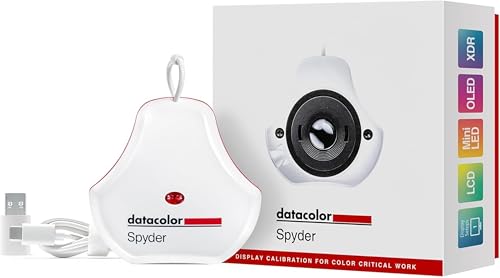
The Spyder Monitor Calibrator is designed for graphic designers, photographers, and content creators who work across OLED and LED displays. It emphasizes color accuracy and reliability across modern screens, including devices with high dynamic range. The device emphasizes a quick workflow, helping users establish an accurate color starting point in about 90 seconds. It also features DevicePreview Beta to simulate how edits will look on other devices, enabling better cross-device consistency. This tool is suitable for professionals who need dependable calibration to maintain true colors in their work.
Datacolor Spyder X Pro – Monitor Calibrator

Spyder X Pro introduces a lens-based color engine for enhanced multi-monitor accuracy and room-light monitoring. It automatically updates profiles as lighting conditions change, preserving precise color, shadow detail, and white balance. Its user-friendliness supports quick, single-click calibration with a guided workflow and predefined targets, making it accessible for beginners while still delivering professional results. The overall calibration process takes just a minute or two, providing a reliable starting point for photo editing, video work, and design tasks.
Spyder Photo/Video Kit

The Spyder Photo/Video Kit provides a complete color management workflow for photographers and videographers. It includes calibrators that ensure consistent color during capture, editing, and output across the latest display technologies. SpyderPro calibration helps establish precise color and matching across devices, while Spyder Checkr Video offers color information for video professionals at a glance. This kit is suitable for studios or on-location shoots where reliable color control is essential for post-production accuracy.
Spyder Checkr – In-Camera Color Target

Spyder Checkr helps photographers achieve accurate color in-camera with a 48-target color chart plus a grey card for proper white balance. By analyzing color results from test shots, the software can instantly generate an HSL preset for editing workflows in Lightroom Classic, Camera RAW, or Hasselblad Phocus. The card set includes diverse color targets to better reproduce skin tones and near-white to deep shadows, aiding color-critical shoots where on-set accuracy matters most.
DKC-Pro Color Cards by DGK Color Tools

DGK Color Tools’ DKC-Pro 5×7″ white balance and color calibration charts come as a set of two with 12% and 18% gray references and 18 color patches. The charts are coated with DGK’s n-Chrome process, delivering higher saturation, luminance, and color accuracy while reducing metamerism. The included frame stand and user guide aid professional workflows, particularly for on-set calibration and post-production color matching across multiple cameras and lighting scenarios.
DGK Color Tools Digital Kolor Pro Charts

DGK Color Tools’ Digital Kolor Pro charts emphasize superior accuracy through professional-grade chips and a 16:9-focused design for video workflows. The cards are built for durability to withstand demanding environments, enabling precise color calibration for video production and broadcast-grade work. The charts help fine-tune color reproduction across monitors and projectors, supporting consistent results across display systems.
Buying Guide: Key Considerations for Color Calibration Tools
- Display compatibility: Check whether the tool supports OLED, LED, mini-LED, and HDR displays to ensure broad coverage for your devices.
- Calibration targets: Consider whether you need simple single-monitor calibration, multi-monitor management, or camera-oriented targets for in-camera color accuracy.
- Workflow integration: Look for software that integrates with your editing tools (Lightroom, Camera RAW, Hasselblad Phocus) to streamline preset creation and color matching.
- Ease of use: If you’re new to color management, prioritize solutions with guided workflows, automatic profile updates, and quick calibration times.
- Portability vs. durability: For on-location work, compact charts with protective cases are beneficial; for studio setups, more extensive kits may be appropriate.
- Color accuracy features: Lens-based engines, room-light monitoring, and automatic profile switching can improve accuracy in varying lighting conditions.
- Video vs. photo emphasis: Video-focused charts optimize for gamma, contrast, and color grading pipelines, while photo-oriented targets optimize skin tones and color reproduction for stills.
- Future-proofing: Consider devices and software that support the latest display technologies and color spaces (sRGB, Adobe RGB, DCI-P3, Rec. 2020) to stay current.
What to Expect Across These Tools
Across the selected products, you will find a mix of dedicated monitor calibrators, camera-oriented color targets, and comprehensive kits that cover capture through editing. For professionals working with multiple displays or HDR content, solutions that monitor room lighting and automatically adjust profiles can maintain color consistency throughout the day. For photographers and videographers who require on-set accuracy, color target charts with grey references simplify white balance and post-production workflows. Each option emphasizes reliability, repeatability, and ease of use, helping users achieve consistent results with minimal setup.
When selecting a tool, align your choice with your primary use case—still photography, video production, or a hybrid workflow—and consider the number of displays you manage, your editing software, and whether you travel between locations frequently. The right calibration solution will provide a reliable baseline, reduce color discrepancies, and improve the overall quality of your digital work across devices.