Finding a reliable rack mount touch screen helps IT teams manage servers, network gear, and surveillance systems more efficiently. This guide reviews five top options designed for DeskPi RackMate series and other standard 19″ racks, balancing display quality, mounting versatility, and rugged build. Each pick is evaluated for clear visuals, responsive interaction, and straightforward installation in demanding rack environments.
| Product | Display (inches) | Resolution | Mount Type | Key Benefit |
|---|---|---|---|---|
| GeeekPi 7.84″ LCD | 7.84 | 1280×400 | 2U Rack | Compact, DeskPi RackMate compatible |
| GeeekPi 9″ LCD | 9 | 1280×720 | 3U Rack | Bright, capacitive touch |
| GeeekPi 6.91″ LCD | 6.91 | 1424×280 | 1U Rack | Slim profile, DeskPi compatibility |
| SEETEC 17.3″ Rack Drawer | 17.3 | 1920×1080 | 1U Drawer | Full HD, broadcast-ready |
| FEELWORLD D71 Plus-H | 7 | 1920×1200 | 3RU | Dual displays, versatile mounting |
GeeekPi 7.84 inch LCD Touch Screen Rack Monitor

The GeeekPi 7.84 inch LCD Touch Screen is a compact 2U rack-mount monitor designed for DeskPi RackMate setups. It offers a 1280×400 resolution, delivering sharp text and controls for server administration. The 10 inch 2U footprint keeps critical rack space available while providing responsive touch to streamline console operations. This model emphasizes easy installation within DeskPi RackMate T0/T1/T2/T0 Plus/T1 Plus/TL1 cabinets, ensuring reliable integration in smaller data centers and network closets.
GeeekPi 9 inch LCD Touch Screen Rack Monitor

The 9-inch GeeekPi model delivers a sharper 1280×720 display with 500 cd/m² brightness and 800:1 contrast for clear workstation visuals. It features a capacitive 10-point touch surface with a robust >95% light transmittance, supporting precise multi-touch interactions ideal for monitoring dashboards and control panels. Its flexible mounting options include wall, desktop, and embedded configurations, making it suitable for mixed environments where a portable console or a fixed rack surface is needed.
GeeekPi 6.91 inch LCD Touch Screen 1U Rack Monitor
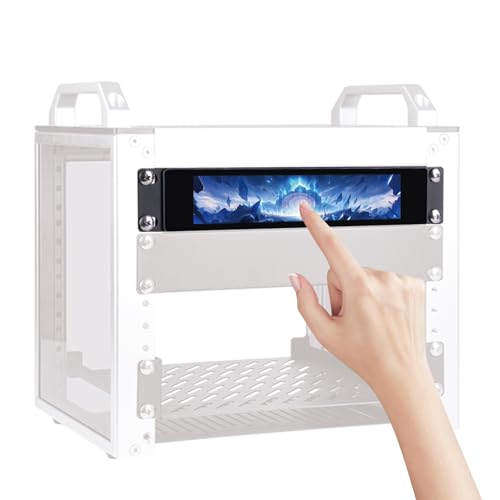
With a compact 1U form factor, the GeeekPi 6.91 inch monitor offers a 1424×280 resolution for crisp data presentation within a tight rack footprint. It is designed for seamless DeskPi RackMate T0/T1/T2/T0 Plus/T1 Plus/TL1 integration and standard 10-inch racks. The device emphasizes a balance of screen clarity and space savings, making it a practical choice for auxiliary consoles, KVM tasks, or dedicated monitoring points in multi-rack environments.
RLCD-FRAME2BK12K1 Rackmount Kit for Monitors
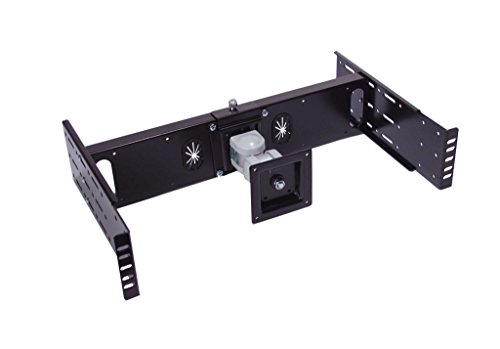
The RLCD-FRAME2BK12K1 kit provides a flexible mounting solution for 15″ to 24″ LCD monitors within 19″ racks. It supports 2-post and 4-post configurations, enabling 2-post to 4-post upgrades as equipment inventories grow. A four-way movement LCD monitor arm allows viewing from multiple directions, including up/down tilting and side-to-side rotation, which is helpful for shared control rooms and production studios requiring adaptable viewing angles.
SEETEC 17.3″ 1U Pull-Out Rack Monitor

The SEETEC SC173-HD-56 delivers a full HD 17.3″ IPS display with 1920×1080 resolution and a versatile input set (HDMI, DVI, VGA, YPbPr, audio, optional 3G-SDI). It is built into a 1U rack-drawer design that folds away for transport or space-saving deployment. This monitor is suitable for broadcast, post-production, or on-set monitoring where a larger display within a compact rack space is advantageous. The built-in features like focus assist and image markers enhance workflow efficiency in demanding environments.
FEELWORLD D71 Plus-H Dual 7″ IPS Rack Monitor

The FEELWORLD D71 Plus-H features two independent 7″ IPS displays at 1920×1200 resolution, enabling simultaneous monitoring of two sources. Its 3RU form factor simplifies installation in broadcast trucks or video walls. Each panel offers true color reproduction and wide viewing angles, while the rugged metal housing provides durability for field and studio use. The dual-display setup supports versatile workflows without requiring additional external splitters or switches.
Tripp Lite 16-Port Rack Console KVM
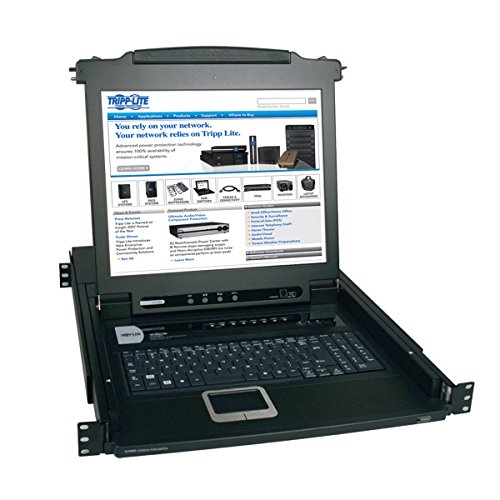
The Tripp Lite B020-016-17 combines a 17″ LCD screen, keyboard, numeric keypad, and touchpad with 16-port KVM in a 1U enclosure. It supports PS/2 and USB computers, enabling centralized control of multiple servers from a single console. This unit is well-suited for data centers and labs where space optimization and consolidated management are priorities, though it is larger than typical small-form monitors and focuses on broad compatibility and versatility.
Yamaha Rack Mount Kit for DM3S, DM3-D

This Yamaha rack mount kit provides mounting options for DM3S and DM3-D devices, with connectivity options including XLR, TRS, and RCA. While not a typical touch screen, it complements rack setups that require secure, flexible mounting for audio and control equipment in professional environments such as broadcast studios and conference rooms. It serves as a practical accessory for systems that prioritize robust audio-visual integration and reliable connectivity.
Buying Guide: Key Purchase Considerations
- Display size and resolution: Choose a screen size that matches your access distance and control needs. For server rooms, smaller displays (6–9 inches) can be sufficient, while broadcast or production environments may benefit from larger, higher-resolution panels (17–21 inches).
- Touch technology and durability: Capacitive touch offers responsive interaction but may be sensitive in dusty or humid environments. Consider displays with reinforced glass or higher hardness ratings for rack installations.
- Rack compatibility and mounting: Ensure the device fits your rack unit (1U, 2U, or 3U) and supports the preferred mounting method (drawer, wall, or embedded). DeskPi RackMate compatibility is a common requirement for many GeeekPi models.
- Input options and video compatibility: Check HDMI, DVI, VGA, and optional SDI inputs to support existing servers and consoles. True color accuracy and viewing angles matter for monitoring dashboards and video feeds.
- Power and cooling: Rack-mounted monitors can contribute to temperature rise in dense racks. Look for models with efficient power usage and consider placement to avoid heat build-up.
- Versatility vs. specialization: Some units emphasize dual displays or multi-angle mounting, which can improve workflows in control rooms. Others focus on compactness for limited spaces. Balance needs with budget.
- Durability and serviceability: In data centers, reliability matters. Favor models with solid housing, straightforward installation, and accessible replacement parts or support.
In choosing a rack mount touch screen, assess your environment—data center racks, broadcast vans, or control rooms—and enumerate the required connections, mount types, and screen real estate. The selections above provide a spectrum from compact DeskPi-friendly monitors to larger, feature-rich broadcast-ready displays, enabling scalable setups as systems grow or as use cases evolve.