The best rear-projection screen depends on whether you need a freestanding setup, a large viewing area, or a lightweight screen you can hang. The Elite Screens Yard Master 2 DUAL is best for a large, purpose-built front-and-rear projection setup. The TOWOND 100-inch screen suits buyers who want a portable stand and a smaller footprint, while the JWSIT and TOWOND 150-inch options offer larger screens for gatherings. The Mdbebbron is a simpler, foldable choice when you already have a way to mount the screen.
| Screen | Best for | Screen size | Setup style |
|---|---|---|---|
| Elite Screens Yard Master 2 DUAL | Large front-and-rear viewing | 150 inches | Freestanding frame |
| TOWOND Portable Screen | Compact portable setup | 100 inches | Tripod stand |
| JWSIT Outdoor Movie Screen | Travel and group events | 120 inches | Frame and detachable legs |
| TOWOND 150-Inch Screen | Large backyard screenings | 150 inches | Foldable stand |
| Mdbebbron Foldable Screen | Flexible indoor or outdoor use | 120 inches | Screen only |
Elite Screens Yard Master 2 DUAL
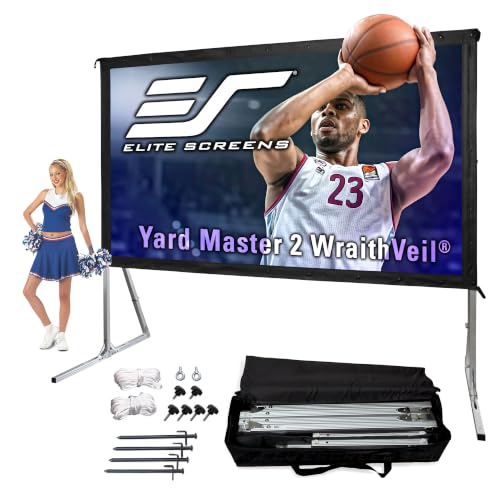
Best for: Buyers who want a large, freestanding screen explicitly designed for both front and rear projection. Its 150-inch diagonal 16:9 viewing area measures 73.5 inches high by 130.8 inches wide.
The Wraith Veil Dual surface has a stated 0.8 gain and 150-degree viewing angle. The screen is listed as ready for 4K Ultra HD, HDR, and active 3D. Its lightweight aluminum frame assembles without tools, and the included padded bag supports transport. The PVC surface can be cleaned with soap and water.
Why it stands out: Unlike a screen-only fabric, this model includes a freestanding frame and specifically supports rear projection. It is also listed as compatible with short-throw and ultra-short-throw projectors.
Limitation: Its large overall dimensions require more storage and setup space than a 100- or 120-inch screen.
TOWOND 100-Inch Screen With Stand

Best for: Smaller rooms, casual backyard movie nights, and buyers who prefer a portable tripod setup. The 100-inch screen uses a 16:9 format and supports front and rear projection.
The listing specifies a 160-degree viewing angle and a polyester milk-silk surface described as thick, foldable, washable, and wrinkle-resistant. The detachable tripod and crossbar are designed for tool-free assembly. Grounding spikes, ropes, and a sandbag are included to help secure the screen outdoors.
Why it stands out: It combines a stand with a comparatively compact screen size, making it a practical pick when a larger frame would be cumbersome. Choose it if portability and quick assembly matter more than maximum image area.
Limitation: At 100 inches, it offers less viewing area than the 120- and 150-inch options in this guide.
JWSIT 120-Inch Outdoor Movie Screen

Best for: Buyers who need a 120-inch screen with a transportable frame for camping, backyard screenings, or events. The product is identified as a rear-projection screen and has a 16:9 aspect ratio.
Its three-layer PVC Cine Grey surface is described as suitable for 4K Ultra HD and active 3D, with a 160-degree viewing angle. Metal snaps attach the screen to the frame, and the detachable legs assemble without tools. A padded carrying bag is included for transporting and storing the lightweight aluminum frame.
Why it stands out: It balances a mid-size screen with a frame-based setup and carry bag. The snap-fastened screen is intended to sit flat against the frame, which can be useful when a taut display is a priority.
Limitation: The listed information does not specify outdoor anchoring accessories, so buyers should consider how they will secure the frame at an exposed location.
TOWOND 150-Inch Portable Screen

Best for: Larger gatherings where a 150-inch image and a portable stand are more useful than a compact screen. The polyester-fiber screen supports front and rear projection and is listed with a 160-degree viewing angle.
The stand is designed to unfold without tools, with an internal elastic cord helping connect the frame. The listing gives the screen a 16:9 format and also mentions a 1:1 format. It states that the unit weighs 11.5 pounds with its carry bag and can be folded for storage or transport.
Why it stands out: It combines a large screen, rear-projection support, and a travel-oriented stand. Choose it if you need more viewing area than the 100- or 120-inch options.
Limitation: A 150-inch screen needs ample space; measure the viewing area and setup location before choosing it.
Mdbebbron 120-Inch Foldable Screen
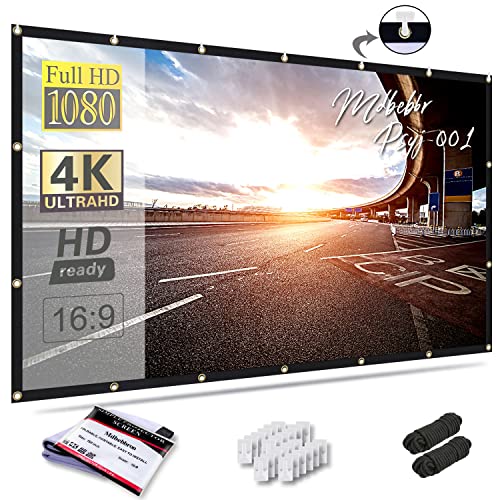
Best for: Buyers who want a lightweight screen they can fold into a small package and mount using their own setup. The 120-inch screen supports double-sided projection and is described as suitable for indoor, outdoor, office, education, and presentation use.
The polyester fabric is described as thick, smooth, and anti-crease, with a lightweight one-piece design intended to fit in a backpack or suitcase. Because it is a screen rather than a stand-and-screen kit, it can suit flexible mounting arrangements.
Why it stands out: It prioritizes compact storage and broad use cases over a supplied frame. Choose it if you already have a suitable mounting method.
Limitation: The listed product details do not include a stand, so it may require separate mounting hardware or another support solution.
Buying Guide: How To Choose A Rear-Projection Screen
What makes a screen suitable for rear projection?
Look for product details that explicitly say the surface supports rear projection or double-sided projection. With rear projection, the projector sits behind the screen and shines through it toward viewers in front. This arrangement can keep the projector and its beam out of the audience’s way, but it requires room behind the screen for the projector.
Which screen size fits your space?
A 100-inch screen is easier to place in a smaller area, while 120-inch and 150-inch models provide more viewing area for groups. Compare the stated diagonal and, when available, the screen’s width and height with your room or outdoor setup. Allow extra space for the frame, stand, and projector placement.
Do you need a stand or a screen-only fabric?
A stand-and-screen kit offers a ready-made frame for portable setups. A foldable screen without a stand can be easier to pack, but you need a dependable way to mount or support it. For outdoor use, check whether the kit includes stakes, ropes, or sandbags, and consider the conditions where you plan to set it up.
What should you compare before buying?
- Projection direction: Confirm that the listing supports rear projection, front projection, or both.
- Aspect ratio: A 16:9 screen is a common choice for widescreen video; check the format against your intended content.
- Surface and care: Compare material descriptions, wrinkle resistance, and cleaning instructions.
- Portability: Check whether a frame, carry bag, and assembly instructions are included.
- Viewing angle: A wider stated angle may help viewers seated off-center, but it does not replace checking the product’s other display specifications.
Frequently Asked Questions
Can any projector screen be used for rear projection?
No. Choose a screen whose listing specifically states rear-projection or double-sided support. The screen must allow the projected image to be viewed from the opposite side.
How much space do I need behind a rear-projection screen?
You need enough space to place the projector behind the screen and aim it at the projection surface. The exact distance depends on the projector and its setup requirements.
Is a stand included with every screen in this guide?
No. The Mdbebbron is described as a foldable screen, and its listed features do not include a stand. The other featured options include or describe a frame or stand.
Is a larger screen always better?
No. A larger screen needs more room and may be harder to transport. Match the screen size to your viewing distance, available setup space, and number of viewers.