A projector can create a much larger image than most TVs, but a large TV is usually the simpler choice for bright rooms and everyday viewing. These five projectors suit different needs: HAPPRUN’s 3000-ANSI model is the brightness-focused pick, WiMiUS G2 emphasizes sports and motion smoothing, and the Boldever H1 adds portability and speaker features. Choose a projector when screen size and flexible placement matter more than consistent performance in daylight.
| Product | Best For | Notable Feature |
|---|---|---|
| HAPPRUN 3000 ANSI | Brighter viewing environments | 3000 ANSI lumens listed |
| WiMiUS G2 | Sports and fast action | MEMC motion smoothing |
| HAPPRUN 2000 ANSI | Flexible setup | Auto focus and obstacle avoidance |
| Boldever H1 | Portable entertainment | Built-in Google TV and speaker mode |
| Roconia 1080P | Basic home and outdoor use | Native 1080p and included screen |
HAPPRUN 3000 ANSI Google TV Projector
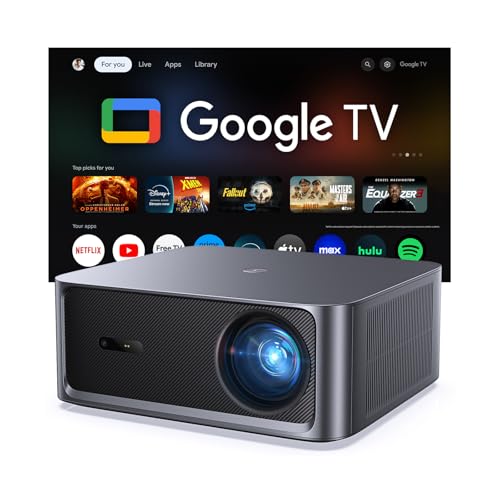
Best for: Buyers who want a large projected image and a listed brightness of 3000 ANSI lumens. The built-in Google TV provides access to streaming apps without a separate TV stick, according to the product information. It also supports 4K decoding and lists HDR10+ and a 20,000:1 contrast ratio.
This is the brightness-focused option among these picks, making it a reasonable choice for a living room or backyard where some ambient light may be present. Auto focus and keystone correction can help simplify setup. Its stated 4K support is decoding support, not a claim of native 4K resolution. Limitation: Projected picture quality still depends on room lighting and the projection surface; a projector does not provide the same dependable daylight image as a TV.
WiMiUS G2 Projector For Sports

Best for: Viewers who prioritize sports and fast-moving content. The G2 lists MEMC motion smoothing, native 1080p resolution, HDR10, and 4K decoding. Its Google TV interface includes streaming apps and live-channel access, while the product description also lists 30W Dolby Audio and Wi-Fi 6.
Choose this model if motion handling and built-in streaming are higher priorities than maximum listed brightness. Its 1100 ANSI brightness rating is lower than the HAPPRUN 3000 and 2000 models here, so it is better suited to controlled lighting than a bright room. Limitation: 4K-supported video displays at the projector’s stated native 1080p resolution.
HAPPRUN 2000 ANSI Auto-Setup Projector

Best for: Buyers who want automatic image adjustments alongside built-in streaming. This model lists 2000 ANSI lumens, Google TV, voice control, auto focus, keystone correction, obstacle avoidance, and screen alignment. It supports 4K content and is described for indoor and outdoor use.
Compared with a large TV, its main advantage is the ability to project a large image without buying a television-sized display. The automatic adjustment features may help when the projector is moved or placed off-center. Limitation: Its 2000-ANSI rating is below the 3000-ANSI HAPPRUN model, and it is still dependent on suitable room conditions and a usable projection surface.
Boldever H1 Portable Google TV Projector

Best for: People who want a portable entertainment device for different rooms or outdoor movie nights. The listed features include a 4.0-pound weight, built-in Google TV, native 1080p resolution, 4K decoding, HDR10, and three brightness modes. Its 20W speaker can also operate in Bluetooth speaker mode.
Compared with a fixed large TV, the H1 is easier to move between viewing locations and can serve as a speaker when not projecting. The product description also lists live channels and voice control. Limitation: The projector’s native resolution is 1080p, so 4K content is decoded and displayed at that native resolution rather than as native 4K.
Roconia Native 1080P Projector

Best for: Buyers seeking a straightforward projector package for home or outdoor use. The listing specifies native 1920 × 1080 resolution, a 30-to-100-inch display range, a screen included, dual-band Wi-Fi, Bluetooth, and built-in stereo speakers. HDMI and auxiliary audio connections are also listed.
This model is a better fit for shoppers who value native 1080p and included accessories over a built-in Google TV system. It can connect to compatible devices by wireless or wired methods, according to the product details. Limitation: The listing does not describe a built-in Google TV interface, so buyers should plan to use a compatible connected source for streaming if needed.
Buying Guide: Projector Or Large TV?
Which works better in a bright room?
A large TV is generally the more practical choice for daytime viewing or rooms with strong ambient light. Projectors rely on reflected light, so image visibility can decrease when the room is bright. If you prefer a projector, compare stated ANSI brightness and consider whether you can darken the space. Lumens figures should not be treated as a guarantee of TV-like performance in daylight.
How important is screen size?
Projectors are worth considering when you want a very large image for movies, sports, or group viewing and have enough space to position the projector. A TV is easier when you want a fixed screen without adjusting projection distance or finding a suitable wall or screen. Check each model’s setup instructions for its supported image size and placement requirements.
What should you compare before buying?
- Resolution: Distinguish native 1080p from 4K decoding support. “4K supported” does not necessarily mean a native 4K image.
- Streaming: Built-in Google TV can reduce the need for a separate streaming device. Confirm that the apps you use are available in the listed system.
- Setup: Auto focus and keystone correction may reduce manual adjustments, but they do not remove the need for suitable placement.
- Audio: Compare listed built-in speakers and Bluetooth options. A TV may be simpler for everyday sound, while some projectors offer external audio connections.
- Use case: For frequent, casual viewing, a TV is convenient. For occasional big-screen movie nights or flexible viewing locations, a projector may be a better match.
Frequently Asked Questions
Is a projector better than a large TV?
Neither is best for every buyer. A projector can create a larger image, while a TV is typically more convenient in bright rooms and for everyday use.
Can a projector replace a TV?
Yes, if its image is clear enough in your room and its streaming or connected-device options meet your needs. Consider lighting, setup, audio, and viewing habits before replacing a TV.
Does 4K-supported mean native 4K?
No. A projector can accept or decode 4K content while displaying it at a lower native resolution, such as 1080p.
Can I use a projector during the day?
It may work in a room with controlled lighting, but ambient light can wash out the image. A large TV is usually the safer choice for bright daytime viewing.
Do I need a screen for a projector?
Not necessarily; a suitable flat, light-colored surface may work. A dedicated screen can provide a consistent projection surface, but check whether one is included with the model.