Choosing the right ceiling-hanging projector setup involves balancing mount compatibility, stability, throw distance, and ease of installation. This guide highlights five top picks that optimize projection quality while offering flexible mounting options for home theaters, classrooms, and outdoor spaces. Each product page includes practical mounting details, ease of use, and durability considerations to help you decide which setup best fits your room layout and projector model.
Summary of Selected Products
| Product | Brand | Type | Key Benefit |
|---|---|---|---|
| ZENY Outdoor Projector Screen Pull Down | ZENY | Ceiling/Wall Mounted Screen | Large 80″ screen with durable casing for indoor/outdoor use |
| YiePhiot Mini Ceiling Wall Projector Mount | YiePhiot | Ceiling/Wall Mount | Universal mini mount with tilt/rotate angles |
| DYNAVISTA Universal Ceiling Mount | DYNAVISTA | Ceiling Mount | Full motion, high load, extendable arm |
| AKia Screens 110-Inch Pull Down Screen | AKIA SCREENS | Ceiling/Wall Mounted Screen | Auto-lock, easy pull-down, front projection |
| WALI Universal Projector Screen Ceiling Mount | WALI | Ceiling Mount Hardware | Supports up to 66 lbs with adjustable wall clearance |
ZENY Outdoor Projector Screen Pull Down 80 Inch Screen

ZENY’s 80-inch screen uses a black-backed, wrinkle-free surface for enhanced contrast and easy cleaning. A robust metal case protects the screen during storage and transport. The screen is compatible with wall or ceiling mounting, making it a versatile choice for portable backyard theaters or office presentations. The built-in mounting brackets and pre-drilled holes simplify ceiling installation for a secure, long-lasting setup.
YiePhiot Mini Ceiling Wall Projector Mount Stand
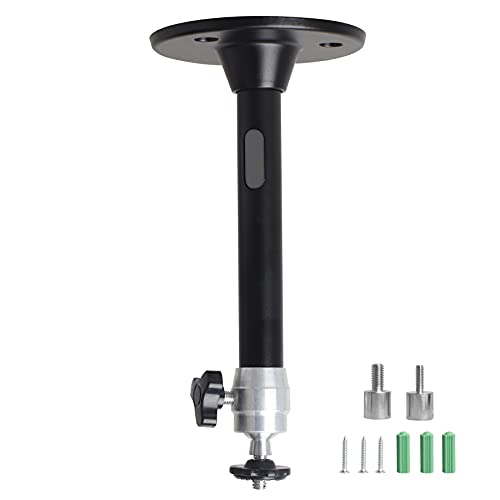
This universal mount supports a wide range of mini projectors and includes three screw adapters in multiple lengths. With a tilt of 90 degrees and 360-degree rotation, it offers flexible positioning for ceiling or wall mounting. A rated load of 5 kg keeps lightweight projectors securely in place, making it ideal for compact setups where adjustability is crucial.
DYNAVISTA Full Motion Universal Ceiling Projector Mount
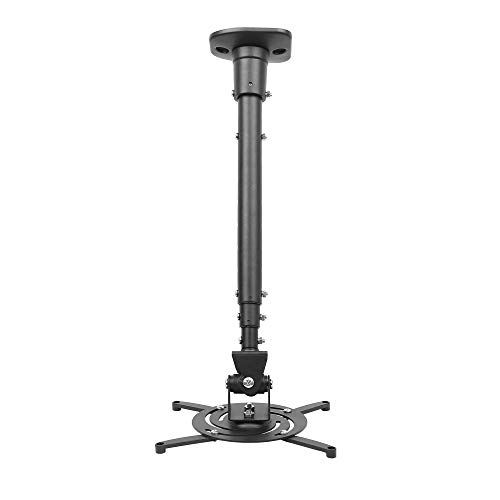
Designed for broad compatibility, this ceiling mount supports most projector brands with standard hole patterns. It features high-grade steel construction and a maximum load of 30 lbs. The mount offers tilt, swivel, and full rotation, plus a 43.6-inch extension that collapses to 23 inches. This combination provides excellent viewing angles while maintaining a compact ceiling footprint.
AKia Screens 110-Inch Pull Down Screen

This 110-inch, 16:9 screen is designed for ceiling or wall mounting with an auto-lock pull-down mechanism. It features fully black backing, a front projection surface, and a 180-degree viewing angle with 1.1 gain. GREENGUARD GOLD certified materials ensure safe indoor air quality. The screen is noted for easy setup and cleaning, combining convenience with high image quality for home theaters or classrooms.
WALI Universal Projector Screen Ceiling Mount

The WALI mount focuses on practical ceiling placement to keep screens properly offset from walls. It supports up to 66 pounds and includes adjustable hooks to set the screen 1.5 to 5 inches from the wall. Its sturdy steel construction and simple alignment make it a reliable option for many screen sizes and projector configurations, especially in rooms with limited ceiling height.
Buying Guide: Key Considerations For Ceiling-Mounted Setups
- Projector compatibility: Confirm the mount’s hole pattern, weight rating, and compatibility with your projector model. Some mounts are optimized for compact mini-projectors, while others support larger units up to 30 pounds.
- Mount type and range of motion: Decide between fixed, tilting, swiveling, or full-motion mounts. Full-motion mounts are ideal for rooms with seating arranged at varied angles or when projector throw distances need adjustment.
- Ceiling type and installation: Validate whether your ceiling is suitable (wood joists vs. concrete). Some mounts require specific mounting brackets or anchors. Consider professional installation if you’re uncertain.
- Distance and throw: Ensure the mount can achieve the necessary throw distance for your screen size and projector. Longer arms may be needed for larger screens or higher ceilings.
- Screen mounting vs. projector mounting: If you’re pairing a ceiling-mounted projector with a pull-down screen, verify whether the screen’s housing interferes with projection alignment and how easily you can pull down or retract the screen.
- Durability and safety: Look for powder-coated steel or solid aluminum frames. Check load ratings and mounting hardware compatibility to prevent sagging or detachment during use.
- Noise and ventilation: Some projectors generate noticeable fan noise. Position the projector away from walls or use sound-dampening mounts if needed, ensuring adequate airflow for cooling.
- Cable management: Plan routes for power, HDMI, and audio cables. Recessed channels or cable raceways help maintain a clean look and reduce trip hazards.
- Certification and safety: GREENGUARD or similar certifications can indicate safer materials for indoor environments, especially in homes with sensitive occupants.
- Budget and installation effort: Balance the upfront cost with the desired flexibility and installation complexity. Higher-end mounts may offer smoother operation and longer service life.
These considerations help compare products across stability, adjustability, and ease of ceiling installation to support long-term, reliable projection experiences in both indoor and outdoor settings.