The best printer with CD printing depends on whether you need occasional disc decoration or automated production. The Epson Stylus Photo R280 is the most directly suited to printing on CDs and DVDs, while the Epson Expression Premium XP-7100 adds all-in-one home features and specialty-media printing. For higher-volume disc work, the Epson Discproducer PP-100III holds up to 100 discs. Printable Verbatim discs and Avery labels are useful alternatives or supplies, but they are not printers.
| Product | Best For | Key Distinction |
|---|---|---|
| Epson Stylus Photo R280 | Direct CD/DVD printing | Prints directly onto discs |
| Epson Expression Premium XP-7100 | Home all-in-one use | Prints on specialty media and DVDs |
| Epson Discproducer PP-100III | Automated disc production | Holds up to 100 discs |
| Verbatim Printable CD-R | Printable disc media | Inkjet-printable CD-Rs |
| Avery Printable CD Labels | Label-based customization | Printable adhesive labels |
Epson Stylus Photo R280

The Epson Stylus Photo R280 is the clearest fit for buyers who specifically want a printer that marks CDs and DVDs directly. Its listed features include direct-to-disc text and image printing, making it more purpose-specific than a general home printer that only supports specialty media.
- Best for: Home users who want personalized CD or DVD surfaces.
- Why it was selected: Direct disc printing is explicitly listed, along with a stated print resolution of 5760 by 1440 dpi.
- Print durability: The product information describes prints as smudge-, scratch-, fade-, and water-resistant.
Limitation: The supplied information does not list wireless, scanning, or copying features. Choose this model for its direct disc-printing purpose rather than as a documented all-in-one option.
Epson Expression Premium XP-7100

The Epson XP-7100 is best for buyers who want a versatile home printer as well as specialty-media capability. Its features include printing on DVDs and specialty paper, plus scanning, copying, an automatic document feeder, and automatic two-sided printing.
- Best for: Households that need documents, photos, and occasional specialty-media printing.
- Why it was selected: The listing specifically mentions DVD printing while also providing all-in-one functions.
- Other uses: It can produce borderless photos up to 8 by 10 inches and supports multiple media feeds.
Limitation: The feature list says DVDs, not CDs. Buyers who need confirmed CD printing should verify supported disc types and the printing process before choosing it.
Epson Discproducer PP-100III
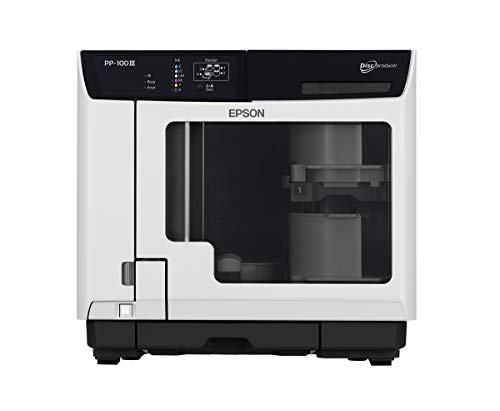
The Epson Discproducer PP-100III is best for organizations or businesses that produce multiple discs in batches. It is a dedicated CD, DVD, and Blu-ray disc publisher and printer, with capacity for up to 100 discs for unattended production and duplication.
- Best for: Users who need automated, repeated disc printing and duplication.
- Why it was selected: It is purpose-built for disc production rather than adapting a general-purpose printer.
- Maintenance details: The listing identifies six high-capacity ink cartridges with low-ink sensors and a field-replaceable waste tank.
Limitation: This is a dedicated disc-production system, not a general document or photo printer according to the supplied product details. Its 100-disc capacity may be unnecessary for occasional home projects.
Verbatim Inkjet Printable CD-Rs

Verbatim’s printable CD-Rs are best for buyers who already have a compatible inkjet printer with direct-to-disc capability. The 100-pack contains non-rewritable 700MB discs with a printable surface described as supporting full-color, edge-to-edge printing.
- Best for: Creating labeled or decorated CD-Rs when a suitable printer is already available.
- Why it was selected: It is a relevant media option for direct inkjet disc printing.
- Capacity detail: The listing states that each disc can store up to 700MB.
Limitation: These are blank recordable discs, not a printer. They are non-rewritable, and the product information does not establish compatibility with every printer.
Avery Printable CD Labels

Avery’s printable labels are best for buyers who want to customize discs without printing directly onto their surfaces. The package includes 40 matte white CD labels and 80 spine labels, and the listing describes online design tools for creating personalized layouts.
- Best for: Organizing media collections or labeling discs with an inkjet printer.
- Why it was selected: It offers a label-based alternative for adding printed titles and designs.
- Organization feature: The included spine labels can help identify stored discs.
Limitation: These are adhesive labels, not printable discs or a printer. Choose direct-to-disc printing instead if you specifically want ink printed on the disc itself.
Buying Guide
Do you need direct-to-disc printing?
Check that the printer’s features explicitly mention printing on CDs or DVDs. A printer that handles specialty paper does not necessarily support direct disc printing. The R280 and PP-100III list direct disc-printing functions; the XP-7100 specifically lists DVD printing.
How many discs will you print?
For occasional projects, a direct-to-disc printer may be enough. For repeated batches, the PP-100III’s capacity of up to 100 discs and unattended production features are more relevant. Match the equipment to your workload instead of choosing a dedicated production system for occasional use.
Would labels meet your needs?
Printable labels provide a different approach from direct-to-disc printing. Avery’s product includes CD labels and spine labels, while Verbatim’s product is a blank inkjet-printable CD-R. Confirm the printer and media support the method you plan to use.
Do you also need everyday printing?
If you need scanning, copying, document feeding, or two-sided printing, consider an all-in-one model such as the XP-7100. A dedicated disc publisher is focused on disc production, while an all-in-one is more suited to mixed household tasks.
Frequently Asked Questions
Can any inkjet printer print on CDs?
No. The printer must support direct-to-disc printing, and the disc must have a compatible printable surface. Check the printer’s listed features before buying.
Does the Epson XP-7100 print on CDs?
The supplied product information specifically says it can print on DVDs. It does not confirm CD printing, so verify supported disc types before purchase.
What is the best choice for printing many discs?
The Epson Discproducer PP-100III is designed for automated disc production and holds up to 100 discs, according to its listed features.
Are printable CD-Rs the same as CD labels?
No. Printable CD-Rs have a surface intended for inkjet printing. CD labels are separate adhesive sheets applied to discs.
Can I use Avery labels instead of direct-to-disc printing?
Yes, labels are an alternative for customizing discs. They do not print directly on the disc, so choose them only if an adhesive label suits your use.