Choosing a plastic ID badge printer involves balancing print quality, ease of use, and the supplies you receive. This guide highlights five reliable, entry-to-mid level options well-suited for schools, small businesses, and organizations issuing on-demand IDs. Each product emphasizes on-demand printing, user-friendly software, and solid color output. The quick-reference table below helps you compare key basics at a glance.
| Product | Brand |
|---|---|
| Badgy100 Color Plastic Card Printer | Badgy |
| Badgy100 Plastic Card Printer with Badge Studio | Badgy |
| Cardholdir ID Easy Badges Solid 210 ID Badge Printer | Cardholdir ID |
| IDP SMART-21S ID Card Simplex Printer Kit | IDP |
| Bodno Seaory S25 Single Sided ID Card Printer | Bodno |
Badgy100 Color Plastic Card Printer
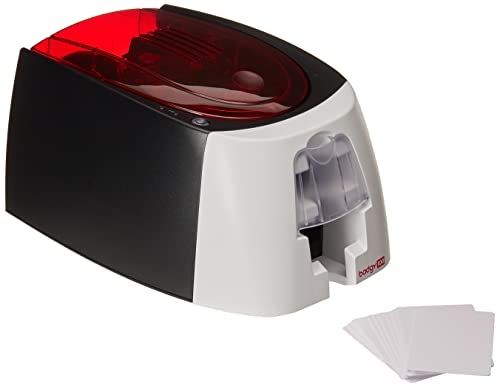
The Badgy100 Color Plastic Card Printer focuses on quick, reliable color card production with beginner-friendly software. It enables near-edge color printing and is designed for fast setup, making it suitable for on-demand badge creation in small to mid-size operations. The included design software supports Mac and Windows platforms, offering templates to speed up badge creation. This model emphasizes speed, usability, and professional-looking results on standard PVC cards.
The printer is optimized for straightforward badge workflows, allowing organizations to issue realistic, colorful ID cards in seconds rather than days. It is well-suited for facilities needing to replace lost or stolen badges rapidly, with templates and online designs that help non-designers produce presentable IDs quickly. The result is consistent, high-clarity output across typical CR80 card dimensions.
Key Features in Brief
- Color printing with Mac and PC design software
- Near-edge printing for efficient use of card space
- Beginner-friendly setup and templates
Badgy100 Plastic Card Printer with Badge Studio

This Badgy bundle centers on on-demand color card printing with Badge Studio software, designed for quick badge creation and customization. It supports tamper-proof badge design and fast production, enabling organizations to issue authentic-looking IDs in seconds. The high-resolution output on quality PVC cards helps ensure professional presentation for employee or visitor badges. The online template library provides ready-made designs to reduce design time and errors.
Practical for organizations that prioritize speed and flexibility, this setup supports rapid replacement of lost or stolen badges without relying on third-party printing services. The combination of a compact printer, easy-to-use templates, and a robust design suite makes it a strong choice for small teams and event access control. The device emphasizes convenience, reliability, and durability for everyday use.
Cardholdir ID Easy Badges Solid 210

The Cardholdir ID Solid 210 is marketed as a simple, single-sided badge printer with beginner software. It ships with a starter kit including 250 full-color ribbons and 200 PVC cards, facilitating quick production of CR80-sized IDs. The printer delivers 300 dpi direct-to-card print quality, which covers most typical organizational needs. Its simple manual feed design is aimed at users who prioritize straightforward operation and predictable results.
With compatibility for PC and Mac, this printer suits classrooms, small offices, and clubs seeking an affordable, low-friction entry into plastic ID issuance. The bundled software enables badge creation from templates, reducing the need for professional designers and helping teams publish on-brand IDs rapidly.
IDP SMART-21S ID Card Simplex Printer Kit

The IDP SMART-21S kit provides a complete entry-level solution, including a printer, PC-only IDesigner software, and a starter set of 100 PVC cards with a YMCKO ribbon. This single-sided printer supports high-resolution color and monochrome output, making it versatile for both student and employee IDs. Windows 10 and 11 compatibility, plus a straightforward control panel, support efficient card issuance workflows.
Most suitable for organizations that want a ready-to-use package with software to design badges quickly, the SMART-21S emphasizes reliability and ease of use. The kit-oriented approach helps new users optimize layouts and templates, delivering consistent results without the need for external graphic design services.
Bodno Magicard 400X Dual Sided ID Card Printer

The Bodno Magicard 400X offers dual-sided printing with a robust feature set in an all-inclusive package. This kit includes a 300-print YMCKO ribbon and a full set of supplies to begin producing high-quality, color IDs right away. Dual-sided printing enables more complex badge designs, which is beneficial for access control, membership programs, and multi-field ID formats. The system is compatible with Windows and Mac, supporting diverse IT environments.
Designed for organizations that require comprehensive badge aesthetics and flexibility, the Magicard 400X supports multiple design templates and efficient batch issuance. The Bronze edition of Bodno software provides an approachable path for teams to create professional-looking cards with minimal training, while maintaining quality and reliability for everyday issuance.
Buying Guide: Key Purchase Considerations
- Print type and scope: Single-sided versus dual-sided printers determine how much information you can fit on a badge and whether you need complex front/back designs.
- Color and resolution: Look for printers that offer high-resolution color output (300 dpi or higher) for sharp text, logos, and photos, especially for employee or student IDs.
- Software and templates: Starter software and template libraries reduce design time and the need for external designers. Check cross-platform compatibility (Windows and macOS).
- Included supplies: Starter ribbons and a card pack speed up initial use; consider ongoing costs for ribbons, cards, and cleaning supplies.
- Ease of use: Simple manual feeding is adequate for low-volume needs, while automatic feed and user-friendly controls help in busy environments.
- Software updates and support: Look for printers with driver and software updates and responsive customer support to ensure long-term usability.
- Warranty and reliability: A longer warranty and robust build quality reduce downtime in school or business settings.
- Compatibility with existing IT: Ensure compatibility with your PCs or Macs and any required network features for centralized badge issuance.
- Turnaround speed: Consider how many cards you need per hour and verify manufacturer claims against real-world usage.
- Security features: For tamper-proof or secure badges, confirm the card stock, encoding options, and lamination capabilities if applicable.
In summary, the best plastic ID badge printer choice depends on your environment, required badge design complexity, and total cost of ownership. If you need quick color badges with templates, options like Badgy and IDP kits provide strong, user-friendly paths. For organizations demanding dual-sided printing or complete starter packages, Bodno’s offerings and Cardholdir’s beginner kit cover a broader range of needs. Compare setup, software, and supply costs to select a system that aligns with your issuing workflow and security needs.