Pixel art LED displays blend art, technology, and interactive decor to transform any room. From compact 16×16 panels to larger 64×64 canvases, these displays let you sketch, animate, and share digital art in real time. This guide highlights five standout options that pair vibrant visuals with easy app-based control, ideal for gaming setups, creative studios, and social media content creation. Each entry includes key features to help you compare at a glance.
| Product | Brand | Key Benefit |
|---|---|---|
| Divoom Pixoo-64 | Divoom | 64×64 panel for large, detailed pixel art |
| Tech Solutions Smart Bluetooth Pixel Frame | Merkury Innovations | Creative 32×32 RGB display with DIY options |
| Divoom Pixoo-Max | Divoom | Advanced pixel display with voice control |
| Divoom TimeBox Evo | Divoom | 16×16 LED display with Bluetooth speaker |
| Divoom Pixoo | Divoom | Compact 16×16 frame for versatile decor |
Divoom Pixoo-64 — WiFi Pixel Frame

The Divoom Pixoo-64 combines a 10.3-inch 64×64 LED panel with WiFi connectivity for cloud-driven art and information. It functions as a pixel clock, social media counter, or score tracker, pulling live data such as followers, game stats, or Twitch data. The accompanying Divoom app provides drawing tools for creating images, animations, and scrolling text, plus access to a large gallery and active community. It is well-suited for gaming rooms, content creators, and fans who want a dynamic display that integrates with online activity.
Key features include WiFi-enabled cloud updates, a robust app for pixel art creation, and social media tracking capabilities. The Pixoo-64 supports real-time performance displays and can be used to celebrate milestones with audiences. This model emphasizes a balance of art creation and practical information sharing, making it ideal for people who want both decorative and functional displays in one device.
Tech Solutions Smart Bluetooth Pixel Frame — 32×32

The 32×32 RGB Pixel Display offers a bright, color-rich canvas for pixel art, animations, and scrolling messages. The built-in app supports drawing, animated designs, and a library of shared creations, enabling quick customization for gaming setups, desks, or wall displays. A compact 7.9-inch panel fits well on desks or shelves and serves as a visually engaging decor piece that can also function as a digital clock or reminder display with reminders and alarms built in.
Divoom Pixoo-Max Pixel Display — 32×32
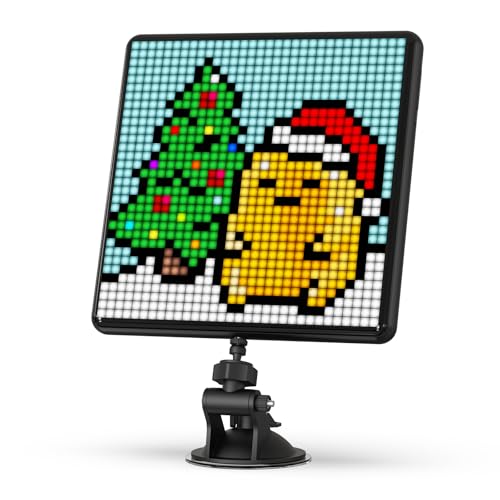
Pixoo-Max expands capabilities with a larger feature set and a voice-control function, enabling hands-free operation while displaying images with pixel-perfect clarity. The 9.6-inch panel retains a 32×32 grid, offering room for complex animations and vivid art. Setup is straightforward with a back stand or wall-hanging option, and the Divoom app supports custom images, animations, and scrolling text. This model emphasizes accessibility and creative freedom, suitable for rooms, offices, or storefronts looking for an engaging visual centerpiece.
Divoom TimeBox Evo — Pixel Art Bluetooth Speaker
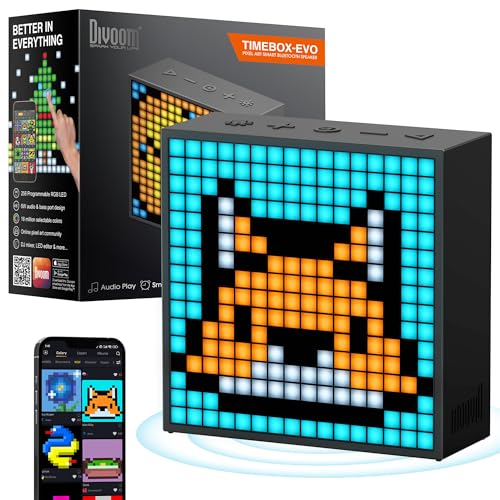
TimeBox Evo combines a retro Bluetooth speaker with a 16×16 LED pixel display. The device offers an alarm clock, planner/calendar, stopwatch, and a variety of pixel art animations. The display supports real-time art creation, enabling users to draw directly on the screen and see updates instantly. It is a compact option for desks or bedside tables where music and pixel art meet, with high-quality audio to complement its visual features.
Divoom Pixoo — Pixel Art Digital Frame

Pixoo is a flexible 16×16 pixel art frame designed for wall or desk use. It can display weather, temperature, and lighting effects, in addition to pixel art and animations created via the Divoom app or downloaded from a community gallery. The device includes a stand and hanging slot for versatile placement, with strong support from a thriving user community and artists who share creations that can be imported into your display. It suits gamers, streamers, and stylists looking for a compact, interactive decorative piece.
Buying Guide: Pixel Art LED Displays
Key purchase considerations help ensure you pick a model that fits your space and use-case goals. Consider display size and pixel density: larger panels with higher resolution deliver finer detail, which matters for complex art and legible text. Connectivity and app ecosystem are crucial: WiFi or Bluetooth support, cloud updates, and a robust art library impact daily usability. The ability to customize with personal artwork, GIFs, and scrolling messages expands creative potential. Sound and additional features—such as built-in clocks, alarms, or speakers—add practicality for desk or bedside placement. Lastly, evaluate mount options, power needs, and whether you prefer wall-mountable or freestanding units for flexible decor.
Depth of art tools matters: some devices prioritize a large community gallery and sharing capabilities, while others emphasize simple, immediate artwork creation. If you plan to sync with streams or gaming stats, ensure the model can pull real-time data and display it clearly. For educators or parents, the 64×64 and 32×32 options offer more room for teaching pixel art concepts and encouraging creativity in a classroom or play area. Finally, compare price-to-feature value across models to identify the display that aligns with your decorating style and tech comfort level.