The best photo booth machine with a printer depends on your setup: the HP Sprocket is suited to compact, app-managed events, while mirror booths from MWE, Enwozp, and QRSTUI offer larger interactive displays. The MWE desktop model is a smaller all-in-one option with a stated 4×6-inch print format. Compare the printer type, paper supply, camera requirements, software, and portability before choosing.
| Product | Best For | Key Print Detail |
|---|---|---|
| HP Sprocket Photo Booth | Compact events and simple operation | 3×4-inch ZINK paper |
| MWE Magic Mirror Booth | Interactive mirror-style setup | USB-connected printer; stated 20-second print |
| Enwozp Mirror Photo Booth | Event rentals with included supplies | Printer and 108 sheets included |
| MWE Portable Desktop Booth | Desktop photo sessions | 4×6-inch paper; 60 sheets included |
| QRSTUI Mirror Photo Booth | Windows-based event operation | Printer and 108 sheets included |
HP Sprocket Photo Booth

The HP Sprocket is best for event hosts who want a self-contained photo booth with a touchscreen, built-in lighting, and app-based controls. Its 10.1-inch display provides a live preview with selected layouts, frames, and filters. The product supports more than 250 frames and lets organizers set guest privileges, print limits, and sharing options.
It prints on 3×4-inch ZINK sticky-backed paper, which does not require ink or toner. The product information states that prints are designed to resist water, smudges, and tears. Guests can also share through a QR code. Choose this model for a relatively straightforward event workflow; avoid it if you need standard 4×6-inch prints or want to use non-HP paper.
MWE Magic Mirror Booth

This MWE model is best for buyers seeking a mirror-style booth with a built-in camera, RGB lighting, and remote or app control. Its listed camera is 1200W pixels with a 76.3-degree viewing angle, and it supports a USB connection to a printer. The listing states that a photo can print within 20 seconds.
The system comes with Android 13 and supports Windows 10 when connected to other Windows system equipment. Its ChackTok software includes photo effects, frames, digital props, stickers, background music, and one-click social sharing; the listing specifies six months of VIP software access. Choose it for customizable mirror-style experiences. Allow for setup and printer connection, since printing uses a connected printer rather than a described built-in printer.
Enwozp Mirror Booth With Printer

The Enwozp booth is best for event planners who want a mirror-style package with a touchscreen, built-in PC, printer, and event accessories. Its listed computer has an Intel i5 processor, 8GB RAM, 256GB storage, and Windows 10. The 15.6-inch capacitive touchscreen lets guests browse photos and add layouts, backgrounds, stickers, or other personalized elements.
The package lists a printer, 108 sheets of photo paper, two ink cartridges, a flight case, props, masks, and a red carpet. Guests can print photos or share them by email and social media. This is a better fit for buyers who value included supplies and a transport case. Check the camera and software details with the seller before purchase, as the supplied information does not specify a camera model or print size.
MWE Portable Desktop Booth

This MWE desktop photo booth is best for buyers who want a compact touchscreen setup with a listed camera and printer. The camera is described as 1200W pixels with a 76.3-degree wide-angle view and fast focusing. The printer uses color printing and supports 4×6-inch paper; the listing says it includes 60 sheets and takes about 50 seconds per print.
Its ChackTok software includes two months of VIP access, with RGB light controls, effects, frames, digital props, stickers, and background music. It also supports one-click social sharing and custom uploaded materials. Choose this model if 4×6 prints and desktop use match your event. Its stated print time is longer than the 20-second figure listed for the MWE mirror model, so consider expected guest volume.
QRSTUI Mirror Photo Booth
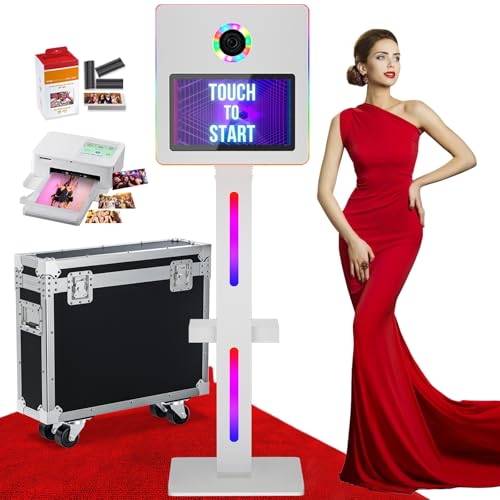
The QRSTUI mirror booth is best for buyers who prefer a Windows-based system with a 15.6-inch touchscreen and included printer supplies. Its built-in PC is listed with an Intel i5 processor, 8GB RAM, 256GB storage, and Windows 11. The package includes a printer, 108 sheets of photo paper, two ink cartridges, a flight case, props, masks, and a red carpet.
Guests can customize photos with layouts, filters, stickers, backgrounds, and signatures. The listing also describes adjustable mirror angles, one-click sharing, and custom digital frames and startup screens. Choose this booth if its Windows 11 configuration and included materials suit your workflow. The supplied details do not state a print size or exact print speed, so confirm those specifications before relying on it for a high-volume event.
Buying Guide: How To Choose A Photo Booth With A Printer
Which print size and paper type do you need?
Start with the physical format guests will take home. The HP Sprocket uses 3×4-inch ZINK paper and does not use ink or toner, but it is compatible only with HP 3×4 ZINK paper. The MWE desktop model lists 4×6-inch prints. Other models in this comparison do not state a print size, so verify the supported paper and ongoing supply requirements before buying.
Should you choose a mirror, desktop, or touchscreen unit?
A mirror booth offers a prominent guest-facing display and interactive styling options. A desktop booth may suit a smaller footprint or more contained photo station. Compare the screen size, lighting, camera description, included accessories, and transport case against the space and staffing available at your event.
What should event operators check?
Confirm whether the printer is included, whether it connects by USB or another stated method, and how much paper and ink or other media come in the package. Review software access periods, sharing methods, guest controls, and operating-system requirements. For frequent events, consider stated print time and whether the booth lets organizers control print limits.
Frequently Asked Questions
Do all photo booth machines include a printer?
No. Product listings vary. Check that the printer is included and determine whether it is built in or connects separately. The MWE mirror model describes a USB-connected printer, while several other options list a printer in the package.
Which option uses ink-free printing?
The HP Sprocket uses ZINK paper, which the listing says prints without ink or toner. It requires compatible HP 3×4 ZINK paper.
Which listed model specifies 4×6-inch prints?
The MWE portable desktop booth lists 4×6-inch printing and includes 60 sheets of paper.
Are cameras included with every booth?
Camera details differ by product. The MWE models list built-in cameras, while some mirror booth descriptions do not clearly identify a camera model. Confirm the camera requirements before ordering.
What matters most for a rental business?
Prioritize clear printer and paper specifications, transportability, guest controls, software needs, and the expected printing pace. Included cases and supplies can also affect how easily a booth is prepared for events.