With the surge of large media libraries, backups, and software-defined storage, choosing a reliable PCIe SATA controller is essential. This guide highlights five trusted options that support multiple SATA drives, enable non-RAID or software-RAID setups, and fit a range of motherboard configurations. Each product is evaluated on compatibility, performance, and cooling to help you expand storage confidently.
Below is a quick overview of the selected products. The table summarizes key details to help you compare at a glance before diving into each item’s specifics and setup notes.
| Product | Brand | Port Count | ||
|---|---|---|---|---|
| GLOTRENDS SA3026-C | GLOTRENDS | 6 | PCIe X4 | High port count, stable LEDs for status, broad OS compatibility |
| ACTIMED PCI-E X1 to SATA 3.0 Controller | ACTIMED | 4 | PCIe X1 | Broad PCIe compatibility, solid heatsink, easy install |
| ACTIMED PCI-E X1 to SATA 3.0 Controller (6-Port) | ACTIMED | 6 | PCIe X1 | Six ports, PCIe 3.0 support, robust cooling |
| IO CREST SI-PEX40137 | IO CREST | 8 | PCIe x4 | High port count, versatile non-RAID use, wide compatibility |
| Internal 5 Port Non-Raid SATA III | IO CREST | 5 | PCIe X4 | Straightforward 5-port expansion, easy system boot options |
GLOTRENDS SA3026-C 6-Port PCIe X4 SATA Expansion Card

The GLOTRENDS SA3026-C expands storage with six SATA III ports, ideal for creating large software-defined storage pools or setting up software RAID in Windows, Mac OS, and Linux. It uses ASM1166 with a PCI Express 3.0 X2 upstream and delivers up to 16GT/s upstream bandwidth. Each downstream port can reach approximately 277 MB/s, balancing speed and capacity. Six integrated LEDs provide at-a-glance drive status, with a steady red indicating normal operation and a flashing light signaling data activity. This card is suitable for NAS builds or desktop storage cabinets where software RAID or JBOD configurations are planned.
Moonqkuses 4 Port SATA 3.0 PCIe Card

The Moonqkuses PCIe SATA card adds four SATA 3.0 connections to your system. It supports non-RAID configurations and can be used to boot as a system disk if your motherboard supports it, though it does not provide hardware RAID. Powered by a Marvell 88SE9215 chipset in many configurations, it emphasizes stability and compatibility, with a heatsink helping to maintain performance under load. This card is well-suited for users needing reliable, card-based expansion without hardware RAID features.
SATA Card PCIE 3.0, 4 Port with 4 Cables

This PCIe 3.0 SATA card provides four SATA 3.0 ports with a low-profile bracket, enabling easy expansion for compact builds. It supports a non-RAID configuration but allows software RAID when your motherboard provides RAID capabilities. The Asmedia 1064 chipset is included for improved stability and compatibility, and it supports port multiplier configurations for expanded storage options. It’s a practical choice for users needing straightforward four-port expansion with good heat management.
IO CREST SI-PEX40137 8 Port Non-RAID PCIe Card
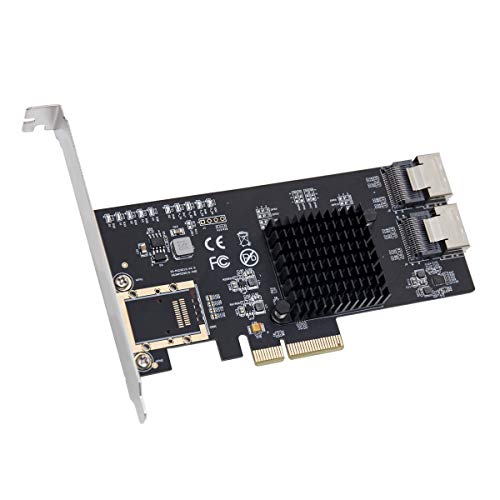
The IO CREST SI-PEX40137 uses an ASM1806 PCIe bridge to maximize per-port bandwidth and reduce dependency on port multipliers. It supports PCIe 2.0 and 4.0 backward compatibility, with individual port speeds up to 6.0 Gbps, 3.0 Gbps, or 1.5 Gbps depending on the link. This 8-port card is ideal for enthusiasts seeking a broad SATA expansion without hardware RAID, suitable for NAS-like setups or large media libraries that favor software-based management.
IO CREST Internal 5 Port Non-Raid SATA III Card
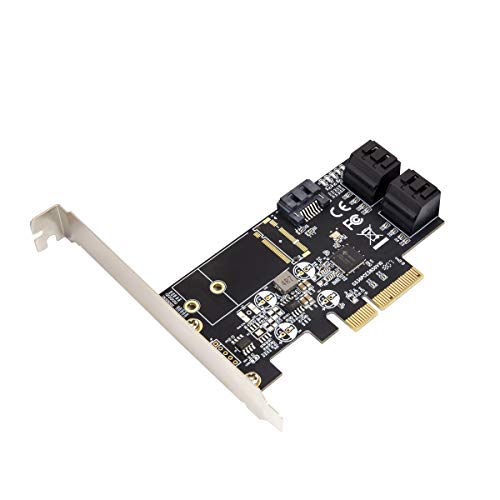
The IO CREST 5-port non-RAID SATA III card offers up to 1700 MB/s throughput across five drives. It is plug-and-play friendly with a low-profile bracket, making it suitable for compact cases. The card is designed for reliable expansion in systems that rely on software RAID or non-RAID configurations, providing a balance of port count and straightforward setup. It does not enable hardware RAID, aligning with many DIY NAS and workstation builds.
ACTIMED PCI-E X1 to SATA 3.0 4-Port Controller

ACTIMED’s four-port PCIe 3.0 SATA controller supports a wide range of PCIe slots, including 1X, 4X, 8X, and 16X. It features the ASM1064 chipset with a heatsink for temperature control, improving stability and performance. It is designed for easy plug-and-play installation and supports hot-swapping. While it supports non-RAID configurations, it can integrate into software RAID environments when applicable. This card is suitable for users who want reliable four-port expansion with good thermal management and broad motherboard compatibility.
Buying Guide: Key Purchase Considerations
- Port count and bandwidth: Determine how many drives you need to connect and whether you require full 6Gbps SATA speeds per port. Higher port counts are great for NAS or large backup systems, but ensure your motherboard and PSU can handle the load.
- RAID vs non-RAID: Most consumer PCIe SATA cards rely on software RAID or non-RAID configurations. Hardware RAID is rare in budget cards. Consider how you plan to manage disks (RAID levels, ZFS, or JBOD) and ensure motherboard support.
- Chipset compatibility: Common chipsets include Marvell 88SE9215/9214, ASMedia 106x series, and ASM106x. Check compatibility with your OS (Windows, Linux, macOS) and driver availability for your motherboard version.
- Bootability: Some PCIe SATA controllers can boot an OS from the connected drives if the motherboard supports it. If you intend to boot from a drive connected to the card, verify boot capability with your motherboard documentation.
- Cooling and form factor: Heatsinks and good airflow improve stability under load. Consider bracket type (full-height vs low-profile) to fit your case or NAS enclosure.
- Firmware and support: Look for well-documented drivers and ongoing firmware updates. Community forums and vendor support can be valuable when troubleshooting.
- Expansion strategy: For very large storage pools, plan for expansion with additional adapters later. Ensure your motherboard has available PCIe lanes and bandwidth to avoid bottlenecks.
- Power considerations: Some cards draw additional power; ensure your PSU can support expansion, especially in NAS or workstation builds with multiple drives.