Choosing the right PCIe capture card can unlock professional-quality streaming, archiving, and live production from a variety of sources. This guide highlights five top PCIe capture cards suited for PC gaming, legacy video devices, and high-resolution captures. Each option balances ease of use, latency, and compatibility across Windows, macOS, and Linux where applicable. Read on to compare features, performance, and real-world use cases to find your best PCIe capture card.
| Product | Brand | Key Use | Resolution & Latency |
|---|---|---|---|
| DigitPro PCIE Video Capture Card | DigitPro | Streaming and retro-source capture | 1080P@30Hz (MJPEG) with ultra-low latency passthrough |
| AVerMedia Live Gamer 4K 2.1 | AVerMedia | 4K60 streaming and recording | Supports up to 240Hz refresh with ultra-low latency |
| NFHK PCIe 1394a Firewire Card | NFHK | Firewire input/output for DV/analog sources | 1394a/b interfaces with multiple ports |
| DigitPro HDMI Capture Card | DigitPro | HDMI capture for streaming and gaming | 1080P@30Hz with pass-through and low latency |
| Blackmagic Design DeckLink Mini Recorder 4K | Blackmagic Design | SDI/HDMI capture for professional workflows | 4K-capable PCIe capture |
DigitPro PCIE Video Capture Card Overview
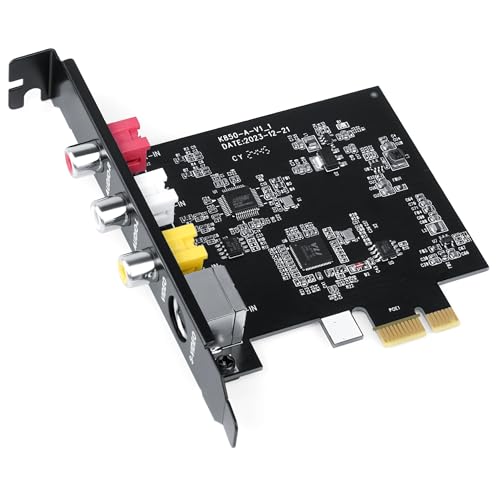
The DigitPro PCIe capture card provides 1080P@30Hz video capture with MJPEG and 720×576@25Hz in YUV422. It is designed to connect legacy devices like cable boxes, VCRs, camcorders, and classic consoles (PlayStation, N64, Sega Genesis). The card is plug-and-play with no drivers needed, simply slotting into a PCIe slot to begin capturing and streaming instantly. Its ultra-low latency passthrough keeps gameplay responsive during live streams or tutorials.
AVerMedia Live Gamer 4K 2.1 Overview

The Live Gamer 4K 2.1 from AVerMedia supports up to 4K60 capture with ultra-low latency and native compatibility with ultra-wide resolutions. It’s designed for peak performance in modern gaming setups, PS5, PS4 Pro, Xbox Series X/S, and Switch gameplay. The card’s hardware support for high refresh rates makes it suitable for competitive streaming and high-fidelity recording, with a focus on minimizing lag during live broadcast and playback.
NFHK PCIe 1394a Firewire Card Overview

Overview
NFHK’s PCIe 1394a Firewire card provides four Firewire ports (three 6-pin plus one 4-pin) and is designed for plug-and-play operation with broad compatibility. It supports devices ranging from DV camcorders to data capture devices and is compatible with Windows and Mac ecosystems. It’s a practical choice for those maintaining archival workflows or connecting legacy peripherals that rely on IEEE 1394 connections.
NFHK and Legacy 1394a Card Overview

Key features include a plug-and-play design with no driver installation required, broad compatibility with CD-ROMs, DVD-ROMs, DV camcorders, scanners, and other devices with 1394 interfaces, and support for multiple operating systems listed by the vendor. This card emphasizes easy integration for users transitioning from older hardware to newer systems, while maintaining reliable FireWire performance.
DigitPro HDMI Capture Card for Streaming and Gaming

DigitPro’s HDMI capture card is designed for streaming and gaming, supporting HDMI video input with pass-through. It recognizes the input signal automatically, including NTSC and PAL formats, and provides a plug-and-play experience without driver installation. Video output supports MJPEG and YUV422, with a maximum capture resolution of 1080P@30Hz, suitable for streaming from modern consoles or high-definition cameras while keeping the capture process straightforward.
Blackmagic Design DeckLink Mini Recorder 4K Overview
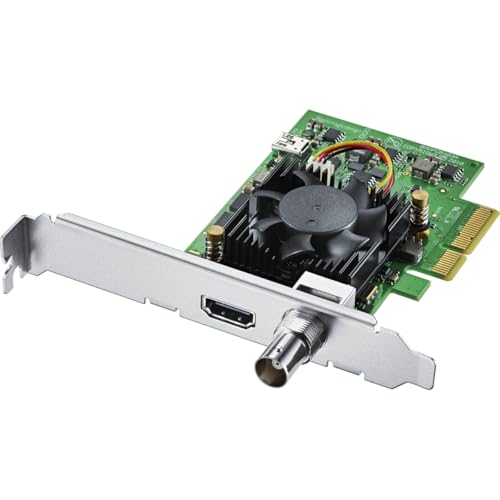
The DeckLink Mini Recorder 4K from Blackmagic Design offers SDI and HDMI capture options with 10-bit video inputs, designed for professional workflows. This PCIe capture card supports high-resolution formats, enabling robust integration into broadcast setups, post-production pipelines, or live production environments. It is positioned as a compact, rack-friendly option suitable for users seeking reliable, broadcast-grade capture capabilities within a PCIe form factor.
Buying Guide: Key Purchase Considerations
When evaluating PCIe capture cards, consider how you plan to use the device—gaming, legacy devices, or professional editing and broadcasting. Important factors include resolution and frame rate support, latency, driver needs, and system compatibility.
- Resolution and Frame Rate: For gaming and streaming, prioritize cards that offer USB-C or PCIe pathways for 4K60 or 1080p60 with low latency. If you’re capturing vintage sources, ensure support for standard-definition formats and appropriate color spaces (NTSC/PAL).
- Latency: Low-latency passthrough is essential for live gameplay and interactive tutorials. Look for cards that advertise near-zero latency or real-time streaming capabilities.
- Compatibility: Verify operating system support (Windows versions, macOS, Linux) and software compatibility with your editing or streaming tools (OBS Studio, VLC, etc.).
- Interfaces: HDMI capture is common for modern devices; FireWire (IEEE 1394) remains relevant for older DV camcorders and archival workflows. Ensure the card provides the right connectors for your sources.
- Ease of Use: Plug-and-play designs reduce setup time. Consider whether you need drivers, software bundles, or robust SDKs for integration into custom pipelines.
- Form Factor and Cooling: PCIe cards vary in size and cooling needs. Ensure your PC case has space and adequate airflow, particularly for high-end 4K capture cards.
- Reliability and Support: Look for reputable brands with regular firmware updates, solid customer support, and clear warranty terms.
In choosing among the options, weigh the balance between capturing legacy sources, achieving high-end modern playback, and your workflow requirements. For broadcasters and editors, a card like the DeckLink Mini Recorder 4K can deliver broadcast-grade inputs, while gaming-focused models emphasize ultra-low latency and 4K/60-capable pipelines. If you work with older devices, a FireWire-based card remains a practical connector. Finally, consider the overall ecosystem—software compatibility, hardware acceleration, and long-term driver support—to ensure a stable streaming or recording setup.