For PC speakers with optical input, the H1 Computer Speakers are best for a desktop setup that also needs USB-C, AUX, and Bluetooth, while Saiyin’s powered bookshelf speakers suit buyers who want optical and coaxial connections in a two-speaker design. The Logitech Z625 is a better fit for people seeking a 2.1 system with a separate subwoofer. Compare these options by connection type, speaker format, desk space, and the other audio sources you need to connect.
| Speaker | Best For | Optical Input | Other Noted Connections |
|---|---|---|---|
| H1 Computer Speakers | Flexible desktop setups | Yes | USB-C, AUX, Bluetooth |
| Saiyin Sound Bar | Compact screen-side audio | Yes | Bluetooth, AUX, sub out |
| Saiyin Bookshelf Speakers | Stereo listening and input choice | Yes | Coaxial, RCA, 3.5mm, Bluetooth |
| Logitech Z625 | 2.1 sound with subwoofer | Yes | 3.5mm, RCA |
| FUNLOGY Speaker | Simple, compact desk audio | No | USB power, 3.5mm |
H1 Computer Speakers

Best for: PC owners who want optical input alongside several ways to connect other devices. The H1 is a powered 2.0 stereo system rated at 60W output. Its listed inputs include optical, USB-C with a 24-bit DAC, and 3.5mm AUX; Bluetooth 5.3 provides a wireless option.
Dual 3-inch carbon-fiber woofers, dual 1-inch silk-dome tweeters, and a rear bass-reflex port are listed features. This combination makes the H1 a versatile pick for buyers balancing wired computer audio with music streaming from a Bluetooth device. The product information lists a 40Hz–20kHz frequency range and at least 95dB signal-to-noise ratio. Limitation: It is a 2.0 system, not a setup with a separate subwoofer.
Saiyin 11.7-Inch Sound Bar
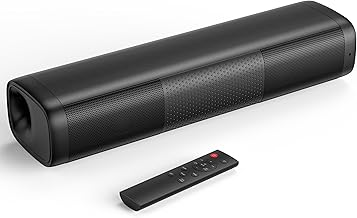
Best for: Buyers who want a compact speaker under a monitor or screen. This powered sound bar measures 11.7 by 3.5 by 2.5 inches and lists optical, Bluetooth, and 3.5mm AUX connections. Its 48W peak-power specification and tuned bass and treble are aimed at movies, music, and gaming.
A dedicated subwoofer output lets buyers connect a powered subwoofer for a different bass setup. That makes this a space-conscious choice with an expansion option. Limitation: Its bar-shaped design is different from a left-and-right bookshelf speaker pair, and the listed power figure is peak power rather than a stated RMS rating.
Saiyin Powered Bluetooth Bookshelf Speakers

Best for: Listeners who need optical input plus coaxial and analog connections. These powered bookshelf speakers also list Bluetooth 5.3, 3.5mm, and dual RCA input options. A remote and top-mounted buttons provide control of volume, mute, and input selection, including optical, coaxial, line-in, and Bluetooth modes.
The active speaker connects to the other speaker using speaker wire, so this option suits buyers who want a two-speaker layout rather than a single sound bar. The listed dimensions for the active speaker are 5.3 by 6.3 by 8.6 inches. Limitation: A turntable with only PHONO output requires a preamplifier; Bluetooth turntable use also requires a transmitter/output.
Logitech Z625 2.1 Speaker System

Best for: Buyers who want optical connectivity in a 2.1 system with a separate subwoofer. Logitech lists 200W RMS and 400W peak power, plus optical, 3.5mm, and RCA inputs. The product information says up to three compatible devices can be connected, such as a computer, television, and game console.
Choose this system if having a subwoofer and multiple input types matters more than choosing a compact sound bar or simple stereo pair. Limitation: A 2.1 system includes a separate subwoofer, so plan for more components and placement space than a single-bar option.
FUNLOGY Compact PC Speakers

Best for: Buyers who prioritize a compact, straightforward desktop speaker and do not require optical input. This USB-powered stereo model lists 14W total output, dual 48mm full-range drivers, passive radiators, and a 30-degree upward tilt. It connects through included USB and 3.5mm cables, with no driver installation or Bluetooth pairing required.
Its small size and volume dial make it a practical alternative for users connecting a PC, laptop, monitor, smartphone, or gaming console through the listed connections. Limitation: It does not list optical input, so avoid this model if an optical connection is essential.
Buying Guide: How To Choose PC Speakers With Optical Input
Does the speaker actually have optical input?
Check the connection list before choosing. The H1, Saiyin sound bar, Saiyin bookshelf speakers, and Logitech Z625 list optical input. FUNLOGY lists USB power and 3.5mm audio, but not optical. If your PC or another source uses optical output, confirm that it can connect directly to the speaker’s optical input.
Which speaker format fits your desk?
A sound bar can fit beneath a screen, while bookshelf speakers need room for two separate units. The Z625 adds a subwoofer to the setup. Consider available desk and floor space, as well as whether you prefer a single bar, stereo pair, or 2.1 arrangement.
Which other inputs do you need?
For multiple wired sources, compare the listed connections: H1 adds USB-C and AUX; Saiyin’s bookshelf pair adds coaxial, RCA, and 3.5mm; Logitech lists RCA and 3.5mm; and the sound bar includes Bluetooth and AUX. Choose based on the devices you plan to connect, not just the optical port.
Do you want wired or wireless playback?
The H1 and Saiyin models list Bluetooth. The FUNLOGY speakers use USB for power and a 3.5mm cable for audio, without Bluetooth pairing. Optical and Bluetooth serve different connection needs, so choose a model with the option that matches your typical listening setup.
Frequently Asked Questions
Can I connect PC speakers with optical input to a computer?
Yes, if the computer has a compatible optical audio output. Check the port and audio-output specifications on both devices before buying.
Which listed speaker has optical and coaxial inputs?
The Saiyin Powered Bluetooth Bookshelf Speakers list both optical and coaxial inputs, along with Bluetooth, 3.5mm, and dual RCA options.
Which option includes a separate subwoofer?
The Logitech Z625 is a 2.1 speaker system with a separate subwoofer. The Saiyin sound bar also has a sub out for connecting a powered subwoofer.
Are all five products suitable if optical input is required?
No. Four products list optical input: H1, the Saiyin sound bar, Saiyin bookshelf speakers, and Logitech Z625. FUNLOGY does not list optical input.
Is optical input the same as Bluetooth?
No. Optical is a wired audio connection, while Bluetooth is wireless. Some products in this list offer both, but they are separate connection options.