Discover top wall mounts designed to free desk space while delivering instant, ergonomic viewing angles. This guide highlights five reliable options across different weight capacities and VESA patterns, helping you pick a wall-mounted monitor arm that fits your setup—whether you need a single-arm solution for a 13–32 inch screen or a dual-monitor system for multitasking. Each pick includes key features and practical use cases to support informed decisions.
| Product | Brand | Screen Size Range | VESA Pattern | Weight Capacity |
|---|---|---|---|---|
| MOUNT PRO Single Monitor Wall Mount | MOUNT PRO | 13″–32″ | 75×75, 100×100 | Up to 19.8 lbs |
| AVLT Dual 13″-32″ Monitor Wall Mount | AVLT | 13″–32″ | 75×75, 100×100 | Up to 17.6 lbs per arm |
| MOUNT PRO Dual Monitor Wall Mount | MOUNT PRO | 13″–32″ | 75×75, 100×100 | Up to 19.8 lbs per monitor |
| HUANUO 22″-35″ Wall Mount | HUANUO | 22″–35″ | 75×75, 100×100, 200×200 | Up to 26.4 lbs |
| UPGRAVITY Monitor Wall Mount | UPGRAVITY | 17″–32″ | 75×75, 100×100 | Up to 17.6 lbs |
MOUNT PRO Single Monitor Wall Mount
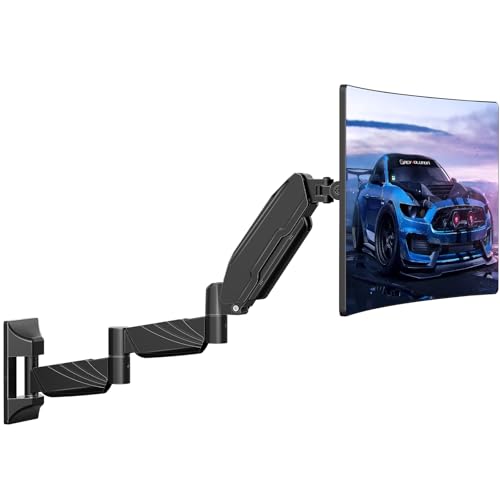
The MOUNT PRO single-arm wall mount supports 13–32 inch screens with VESA patterns 75×75 and 100×100. Its long arm extends up to 25.67 inches, allowing flexible positioning, and retracts to 3.17 inches for compact spaces. A 360° rotation plus +90°/-45° tilt and +/-90° swivel enable landscape and portrait viewing, ideal for gaming or productivity tasks. Pneumatic springs adapt to weight changes for easier height adjustment, while integrated cable management keeps cords organized. This model is well-suited for corner setups or rooms where desk surface is at a premium.
MOUNT PRO Dual Monitor Wall Mount

The dual-monitor wall mount from MOUNT PRO accommodates two screens, each between 13 and 32 inches with 75×75 or 100×100 mm patterns. It provides full motion adjustments including +90° to -90° tilt, 180° swivel, and 360° rotation. Each arm can extend up to about 20.4 inches, helping you achieve optimal viewing angles for multitasking. The design emphasizes space-saving benefits and features a cable management system to reduce desk clutter. It’s compatible with a wide range of monitors under the stated weight limit and is designed to free up desk space for a cleaner workstation.
HUANUO 22″-35″ Wall Mount

HUANUO’s wall mount supports 22″ to 35″ screens with weights up to 26.4 pounds. It offers tilt (-30° to +35°), swivel (180°), and rotation (360°) for versatile viewing. The mount supports VESA patterns 75×75, 100×100, 100×200, and 200×200, enabling compatibility with many modern monitors. A space-saving design keeps the profile close to the wall, with an extension up to 18.31 inches and a tidy cable management system to maintain an organized workspace. The unit is suited for users needing a flexible, tall mounting solution for larger displays.
UPGRAVITY Monitor Wall Mount

UPGRAVITY offers a universal 17″–32″ wall mount with a maximum weight of 17.6 pounds and VESA patterns 75×75 or 100×100. It uses a gas-spring system for height adjustment and effortless movement, with the arm retracting to 3 inches when not in use. The mount supports up to 11 inches of vertical range and up to 20 inches of horizontal extension, enabling precise screen placement for work or gaming. Integrated cable management helps hide cords for a clean setup, and compatibility notes advise using a VESA adapter if your monitor lacks standard mounting holes.
Buying Guide: Key Considerations And Comparisons
Purpose and setup: Choose a mount that matches your primary use—single monitor for simple setups or dual mounts for multitasking. If you work in tight spaces or corners, a longer arm that retracts compactly can maximize usable desk space.
- Weight capacity: Ensure the mount supports your heaviest monitor with a comfortable safety margin. Exceeding weight limits can reduce movement precision and shelf life.
- VESA compatibility: Most mounts list 75x75mm and 100x100mm patterns; some also support 200x200mm or larger. Check your monitor’s back pattern before buying.
- Range of motion: Look for tilt, swivel, and rotation features to achieve ergonomic viewing angles. Full-motion arms enable easy screen sharing and posture adjustments.
- Extension and clearance: If you need reach or want to place the monitor at eye level, compare maximum extension and how far the arm can retract.
- Cable management: A built-in channel or clip system helps maintain a tidy workspace and reduces cord clutter behind the monitor.
- Installation surface: Some mounts rely on wall materials (wood, concrete, brick). Confirm compatibility with your wall type and whether studs or anchors are required.
- Aesthetics and footprint: Consider the wall mount’s profile and finish to match your room design. Slim profiles are ideal for minimalistic spaces.
Overall, single-arm models from MOUNT PRO and HUANUO provide reliable flexibility for mid-size monitors, while the AVLT and UPGRAVITY options offer balanced performance for dual and larger configurations. When evaluating, prioritize ease of installation, robust motion, and the amount of desk space you want to reclaim. For users with atypical mounting needs, verify VESA patterns, weight limits, and wall compatibility to ensure a secure, long-lasting setup.