Choosing the right laser cutter or engraver for paper, cardstock, and similar materials involves balancing power, safety, bed size, and software compatibility. The following selections highlight machines well-suited for paper-based projects, from precise engraving on cardstock to intricate cutouts for cards, scrapbooks, and gifts. Each option offers strong performance, clear safety features, and reliable support for hobbyists and small businesses alike. This guide compares capabilities, so you can pick a model that aligns with your material focus and workflow.
| Product | Brand | Bed Size | Power | Key Benefit |
|---|---|---|---|---|
| Creality Laser Engraver Machine | Creality | 17″ x 16″ | 10W | High precision engraving with robust build |
| ACMER S1 Laser Engraver | ACMER | 130×130mm | 6W | Compact desktop design with detailed output |
| Longer Laser B1 | Longer | 450 x 440 mm | 40W | Large work area and strong speed |
| Brother ScanNCut SDX125E | Brother | Built-in scanner | — | Integrated scanning and cutting for sticker and card projects |
| Woxcker 20W Laser Engraver | Woxcker | 300 x 300 mm | 20W | High power with enclosed safety design |
Creality Laser Engraver Machine

The Creality Laser Engraver integrates a robust all-aluminum frame and precise motion guides designed for accurate cuts and clean engravings on paper, cardstock, and thin materials. It includes a 0.06×0.06 mm spot focus for fine detail and a stable bed suitable for small to medium paper projects. With a focus on safe operation and consistent results, this model balances capability with user-friendly controls, making it a strong option for scrapbookers and stencil makers who require repeatable accuracy and dependable performance across a range of paper types.
ACMER S1 Laser Engraver
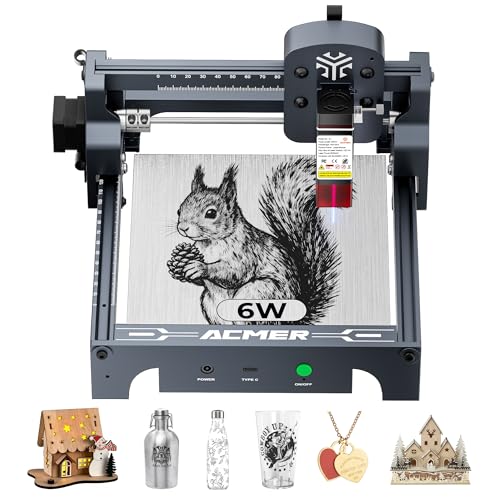
The ACMER S1 focuses on compact, precise engraving with a 0.04 mm laser spot, powered by a 6,000 mW diode. Its design prioritizes ease of use for DIY thins like paper cards, decorative cutouts, and small signage. The included AcmerTool software and compatibility with other engraving programs support a flexible workflow. Its small footprint is ideal for desks and classrooms, while the fine resolution helps produce intricate text and patterns on lighter substrates such as paper and leather-like papers, enabling detailed card designs without large investments.
Longer Laser B1 With Automated Air Assist

The Longer B1 offers a large work area and powerful output, suitable for broader paper projects that require more expansive material handling. The air-assist system improves cutting quality by clearing debris and reducing charring, which is particularly helpful for detailed cardstock work and layered card designs. With a focus on efficiency and precision, the B1 supports rapid cuts and high-quality engravings on various paper types, making it a strong choice for serious paper crafters who need more space and dependable results.
Brother ScanNCut SDX125E

Brother ScanNCut SDX125E combines a built-in scanner with a cutting engine, enabling direct scanning of hand-drawn designs or printed patterns onto a cutting mat. This capability is especially useful for creating custom stickers, greeting cards, and intricate paper crafts without the need for separate imaging steps. The device includes a 5″ touchscreen and access to 682 built-in designs, with easy USB/Wi-Fi connectivity for expanding patterns. It emphasizes convenience and adaptability for makers who want to work with physical drawings and digital files alike.
Woxcker 20W Laser Engraver

The Woxcker model delivers higher power with 20W output, enabling deeper engravings and faster material processing. Its 300 x 300 mm bed supports a variety of paper-based projects, from thick cardstock to layered designs. The enclosure enhances safety by limiting exposure to laser light and containing fumes, while the advanced safety features help prevent accidental operation. This option suits paper crafters who require faster throughput and a more protective workspace for consistent, reliable results on paper and lightweight materials.
Buying Guide: Key Considerations for Paper-Oriented Laser Machines
- Materials and compatibility — For paper-focused work, prioritize machines that handle cardstock and lightweight papers cleanly. Look for machines with precise laser spots (0.04–0.06 mm) and stable beds to reduce miscuts and fuzz on paper edges.
- Bed size and workspace — If you plan larger cards, posters, or multi-layered cards, choose a model with a bigger bed or easy work-area expansion. Compact units are suitable for small desks and classrooms, while larger units suit a dedicated workshop.
- Safety features — Enclosed enclosures, eye protection, auto-shutoff on tilt or flame detection, and shielded laser modules are important for hobbyists and students working with paper dust and adhesives.
- Software and workflow — Software compatibility (AcmerTool, LightBurn, or other popular programs) influences ease of use. Built-in scanners (as with Brother ScanNCut) can streamline original artwork to cuts for paper projects.
- Print quality vs. speed — Higher power machines deliver faster cuts and deeper engravings, but may require more space and ventilation. For delicate paper cutting, balance power with fine focusing to avoid overdosing heat on thin materials.
- Maintenance and consumables — Consider the availability of replacement blades, lenses, and service support. Some units include spare blades and parts; plan for regular maintenance to maintain precision.
- Safety and training resources — Look for reputable brands with tutorials, community support, and clear safety guidelines. This helps new users optimize settings for paper-based crafts and school projects.
- Budget and future-proofing — Entry-level units are suitable for learning and small projects, while higher-powered devices offer versatility for thicker substrates and more complex designs, albeit at a higher cost and maintenance demand.
Across these options, the best pick depends on your intended scale, material range, and workspace. For card makers and scrapbook enthusiasts, compact laser engravers with strong software support deliver precise cuts and delightful detail. For teachers and studios that need larger sheets or frequent batch work, larger beds with robust safety enclosures provide efficient throughput. When evaluating, consider both current project needs and potential growth in material types and project complexity.