The best note-taking tablet with a pen depends on whether you want a screen-based tablet, a focused digital notebook, or handwriting captured from real paper. The Lenovo Idea Tab with 8 GB of memory is best for students who want more listed memory and storage; its 4 GB version suits buyers seeking the same core features with less capacity. Kindle Scribe is a writing-focused option, while the XPPen Note Plus syncs notes written on paper to a phone. XPPen Magic Note Pad is best for people who want a color Android tablet with a paper-like screen.
| Product | Best For | Key Difference |
|---|---|---|
| Lenovo Idea Tab, 8 GB | Multitasking students | 11-inch display, pen, and folio case |
| Lenovo Idea Tab, 4 GB | Everyday study notes | Same listed display and processor with less memory and storage |
| Kindle Scribe, Like-New | Writing and reading | Focused notebook with built-in note tools |
| XPPen Note Plus | People who prefer real paper | Handwriting syncs to a phone |
| XPPen Magic Note Pad | Color-screen note taking | Android LCD tablet with three display modes |
Lenovo Idea Tab With 8 GB Memory
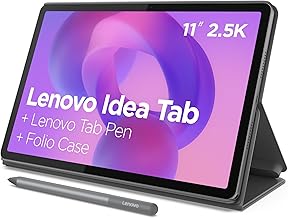
Best for: Students who want a general-purpose tablet for handwritten notes, study tasks, and entertainment. It includes an 11-inch 2.5K IPS touchscreen with a 90 Hz refresh rate, a MediaTek Dimensity 6300 processor, 8 GB of memory, 256 GB of storage, a Tab Pen, and a folio case.
The listed Circle to Search feature lets users circle an item with the pen or a fingertip to search or translate without switching apps. Lenovo also describes AI-powered apps and all-day battery life, though battery performance can vary by use. This model was selected for combining a pen and case with the larger memory and storage configuration.
Limitation: Choose the 4 GB version instead if you do not need the extra listed memory and storage; the product information does not specify how much storage is available to the user after setup.
Lenovo Idea Tab With 4 GB Memory
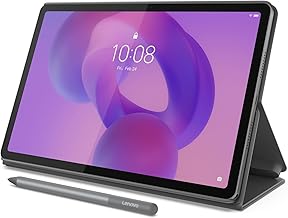
Best for: Buyers who want a pen-ready Android tablet for everyday study and note taking, without choosing the higher-capacity configuration. It has the same listed 11-inch 2.5K IPS display, 90 Hz refresh rate, MediaTek Dimensity 6300 processor, Tab Pen, and folio case as the 8 GB model, but lists 4 GB of memory and 128 GB of storage.
Circle to Search can be used with the pen or a fingertip, and the tablet is described as supporting AI-enhanced multitasking. Its shared screen and accessory setup make it a close alternative to the 8 GB version for students who want to annotate, search, and use a single device for study and media.
Limitation: It has half the listed memory and storage of the other Idea Tab configuration, so the 8 GB model is the better fit if you expect to keep more files or juggle more tasks.
Like-New Kindle Scribe With Premium Pen

Best for: Readers and writers who want a dedicated device for books, documents, and handwritten notes. This 32 GB Like-New model includes a Premium Pen and built-in AI tools that can convert handwriting into readable text, summarize notes, and adjust their length and tone.
Amazon describes the Scribe as a digital notebook without notifications or social media, which may suit people who want fewer distractions while writing or reading. It was selected for its note-focused features and integrated note-processing tools, rather than broad tablet use.
Limitation: This listing is for a refurbished Like-New device, not a new unit. The product information says it is tested and certified to look and work like new and includes the same limited warranty as a new device; packaging may be generic.
XPPen Note Plus Digital Notebook

Best for: People who prefer writing on paper but want a digital copy of their notes. The Note Plus uses real A5 paper and a dedicated ink pen; writing syncs to a phone through Bluetooth 5.3. The listing also cites EMR technology and 8,192 pressure levels for capturing pen strokes.
This is a different approach from writing directly on a tablet screen. It was selected for paper-first note takers who want lecture notes, meeting records, or sketches to appear on a phone without scanning each page.
Limitation: The listed writing surface is real paper, not an electronic screen, and the product uses its matching ink pen. Choose a conventional tablet if you want to write directly on a display.
XPPen Magic Note Pad Color Tablet

Best for: Buyers who want color and a paper-like writing experience on a tablet screen. This 10.95-inch Android tablet has a 6 GB memory and 128 GB storage configuration, a battery-free X3 Pro Pencil, a magnetic folio, and a shortcut key for switching between monochrome LCD, light color, and nature color modes.
The listing describes an anti-glare AG nano-etched display with TCL NXTpaper 3.0 technology, a 90 Hz refresh rate, and support for 16.7 million colors. It was selected for people who want to write, read, or study on a color LCD rather than a monochrome writing device.
Limitation: This is not an E Ink tablet. Its etched-glass LCD may look and feel different from E Ink, so avoid it if an E Ink display is a requirement.
Buying Guide: How to Choose a Note-Taking Tablet With Pen
Do you want to write on a screen or on paper?
Choose a screen-based tablet, such as either Lenovo Idea Tab or the XPPen Magic Note Pad, if you want handwriting directly on a display. The XPPen Note Plus is the paper-first option: it uses A5 paper and sends handwriting to a phone. Check which writing method fits your lectures, meetings, and daily routine before comparing other features.
How much memory and storage do you need?
The two Lenovo models share their listed screen size, processor, pen, and folio case, but differ in capacity: one has 4 GB of memory and 128 GB of storage; the other has 8 GB and 256 GB. The Magic Note Pad lists 6 GB and 128 GB. Consider how many files and apps you plan to keep, and whether you expect to multitask.
Is a focused writing device or a general tablet a better fit?
The Kindle Scribe is presented as a writing and reading device with no notifications or social media and includes tools for transforming notes. The Lenovo and XPPen Magic Note Pad models are described as Android tablets, making them options for buyers who want a broader tablet format. Compare the product’s stated purpose with the other tasks you need it to handle.
What should you check before buying?
Confirm the included pen, case, storage configuration, and display type in the specific listing. The Kindle Scribe here is Like-New, and the XPPen Magic Note Pad uses LCD rather than E Ink. For the Note Plus, remember that handwriting syncs to a phone and is made with its dedicated ink pen on paper.
Frequently Asked Questions
Which option is best for college notes?
The Lenovo Idea Tab is a strong match for students who want an 11-inch touchscreen, a Tab Pen, and a folio case. The 8 GB model lists more memory and storage; the 4 GB version has the same listed core display and processor features.
Can the XPPen Note Plus write directly on a screen?
No. The listed Note Plus uses real A5 paper and a matching ink pen. Its handwriting syncs to a phone through Bluetooth.
Is the XPPen Magic Note Pad an E Ink tablet?
No. Its product information explicitly describes it as a normal Android tablet with an LCD display, not an E Ink tablet.
Can Kindle Scribe notes be converted into text?
Yes. The listed built-in AI tools can convert handwriting into readable font, summarize notes, and change their length and tone.
Which product is best for avoiding distractions?
The Kindle Scribe is described as a digital notebook for writing and reading without notifications or social media, making it the most focused option among these listings.