The best network cable label printer depends on how you identify cables: choose the MakeID P31S for app-based customization and batch labeling, the Brother PT-E310BTBP for contractor-focused cable and patch-panel keys, or the Brother P-touch PTH111 for straightforward handheld labeling. The Vixic and VolenGo E1000 models are worth considering when you need cable-wrap, flag, or heat-shrink options. Compare label types, connection methods, and included supplies before choosing.
| Printer | Best suited for | Standout feature |
|---|---|---|
| MakeID P31S | Custom and batch labels | App templates, barcodes, and QR codes |
| Brother PT-E310BTBP | Contractors and mid-size jobs | Patch-panel and cable application keys |
| Brother PTH111 | Simple portable labeling | One-touch cable-wrap and flag keys |
| Vixic E1000 | Industrial cable identification | Laminated tapes and cable modes |
| VolenGo E1000 | Heat-shrink and flexible labels | Both tape types included |
MakeID P31S Industrial Label Printer

The MakeID P31S is best for network technicians who need customized labels, repeated layouts, or batches of identifiers. Its software supports mobile and PC use, 48 templates, more than 80 symbols, and 20 fonts. It can create barcodes and QR codes and supports bulk data import, which can help organize labeling work across many cables or equipment locations.
The printer offers up to 30 label sizes, including self-laminating, nylon, PET all-weather tapes, and heat-shrink tubing. Its 300-dpi resolution and 1-inch print head support text up to eight lines. The product listing states a 2,600-mAh battery can provide up to 90 days of use per charge and printing speeds of up to 100 labels per minute. It comes with one roll of label material, so confirm the required supplies for your labeling plan.
Brother PT-E310BTBP Contractor Kit

Choose the Brother PT-E310BTBP if your work includes patch panels, punch blocks, faceplates, and cable runs. Dedicated quick-application keys handle cable wraps, cable flags, patch-panel labels, punch-block labels, and faceplates. The printer supports laminated labels and heat-shrink tubes from 3.5 mm to 18 mm, making it a versatile choice for technicians who need several identification formats.
This contractor kit includes five tapes, a carrying case, a lithium-ion battery, wrist strap, ruler, and USB-C cable. Bluetooth and USB-C provide connection options, and the printer can add QR codes and linear barcodes. It is better suited to users who will use the dedicated application keys and included accessories; the listed product details do not specify print resolution.
Brother P-touch PTH111 Pro

The Brother PTH111 is best for buyers who want a portable, button-operated printer for regular cable identification without app-based design features. Its one-touch keys include cable wrap, cable flag, faceplate, and serialize functions. Three fonts and more than 300 symbols offer options for distinguishing network cables and labeling nearby equipment.
Brother describes its labels as durable and laminated for uses including electrical panels and cables, as well as general workspace organization. The lightweight unit has a detachable wrist strap. It runs on six AAA batteries or an AC adapter, but both power options are sold separately. Choose this model for simple handheld operation; consider another printer if you need stated QR-code, barcode, or batch-import features.
Vixic E1000 Cable Label Maker

The Vixic E1000 is best for technicians who need quick cable-wrap, cable-flag, and fixed-length labels from a handheld machine. Its one-touch keys are designed to simplify those formats. The included four 12-mm laminated tape packs are described as waterproof, fade-resistant, and resistant to smearing from moisture, oil, sunlight, and chemicals. Those features make it a relevant option for network installations where labels may encounter demanding conditions.
The printer also works with heat-shrink tube label tapes, but those tapes are sold separately. A built-in mirror-mode shortcut is intended for heat-shrink printing; the feature should be turned off for laminated tape. Choose it if laminated supplies and simple cable modes fit your workflow, but account for the separate heat-shrink tape requirement.
VolenGo E1000 Heat-Shrink Label Maker
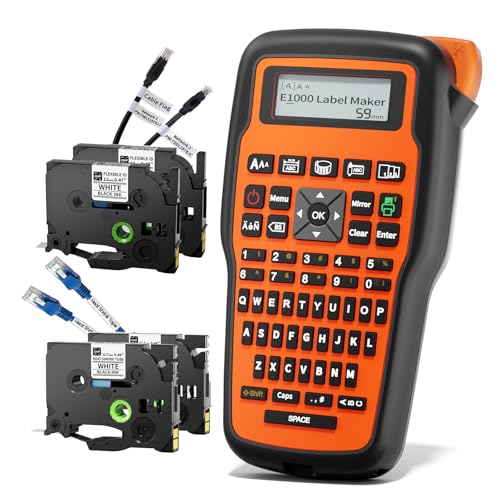
Choose the VolenGo E1000 if your network cable labeling plan calls for both heat-shrink identification and flexible wrap or flag labels. The package includes two 12-mm heat-shrink tapes and two flexible-ID tapes. The heat-shrink tape has a stated 2:1 shrink ratio; its listed specifications include 300V, 125°C (257°F), and VW-1. The flexible tapes are described as laminated and resistant to water, oil, abrasion, and fading in extreme temperatures.
Three cable modes support different wire-label formats, making this model a practical choice for mixed labeling tasks. Its strongest distinction in this lineup is the included combination of heat-shrink and flexible cable tapes. If you need app-based barcode creation or bulk data import, the listed product features do not identify those capabilities.
Buying Guide: How To Choose A Network Cable Label Printer
Which label format fits the installation?
Use cable-wrap or flag formats when you need visible identifiers on installed cables. Heat-shrink tubing is another option when you want a label that fits around a wire after shrinking. Check the printer’s supported materials and whether the required tape is included or sold separately.
Do you need app-based design or direct controls?
Printers with mobile or PC software can offer templates, symbols, barcodes, QR codes, or batch import. Handheld models with one-touch keys may be simpler when you mostly print common cable formats at the job site. Match the controls to the complexity and volume of your labeling work.
What should you check about label durability?
For cables exposed to moisture, oil, abrasion, sunlight, or temperature changes, compare the manufacturer’s stated tape properties. Laminated tapes and heat-shrink supplies serve different labeling needs, so check the material details rather than assuming all tapes have the same resistance or application method.
How important are included supplies and power?
Review the box contents before buying. Some models include several tapes, while others require separately purchased materials or power accessories. If you work away from a desk, consider portability, battery details, and whether the printer includes a case or charging cable.
Frequently Asked Questions
Can a network cable label printer make patch-panel labels?
Some models are specifically described with patch-panel keys or labeling features. The Brother PT-E310BTBP includes a dedicated patch-panel application key.
Are laminated labels the same as heat-shrink labels?
No. Laminated labels are printed on tape, while heat-shrink labels use tubing designed to shrink around a cable. Choose based on the material and application your installation requires.
Which option supports QR codes?
The MakeID P31S supports QR-code creation through its app, and the Brother PT-E310BTBP lists QR-code and linear-barcode capabilities.
Do all these printers include heat-shrink tape?
No. The Vixic E1000 works with heat-shrink tapes sold separately, while the VolenGo E1000 listing states that two heat-shrink tape packs are included.
What is a cable flag label?
A cable flag label is a format that creates a projecting label area for identification. Several listed models provide cable-flag modes or dedicated application keys.