The best NAS hard disk drive depends on how much storage you need, how many drive bays your system has, and whether you prioritize capacity or a lower entry point. The Seagate IronWolf 4TB is suited to smaller multi-user setups, while the WD Red Plus 8TB offers more listed capacity. The 4TB WD Red Plus is a compact option, and the 14TB MDD is for buyers considering a renewed, high-capacity drive. The UGREEN DXP4800 Plus is a NAS enclosure, not a hard drive, and is included only as a system-building companion.
| Product | Best suited for | Key detail |
|---|---|---|
| Seagate IronWolf 4TB | Smaller multi-user NAS | NAS-focused, CMR, 3.5-inch SATA |
| WD Red Plus 8TB | More capacity | CMR, 5640 RPM, 256MB cache |
| WD Red Plus 4TB | Smaller RAID NAS | CMR and continuous-operation design |
| MDD 14TB Renewed | High-capacity storage | 7200 RPM, 256MB cache, renewed |
| UGREEN DXP4800 Plus | Buyers who need a NAS enclosure | Four-bay, diskless NAS system |
Seagate IronWolf 4TB NAS Drive

Best for: Home users and small teams who want a NAS-oriented 4TB drive for a multi-user setup. Its listed specifications include a 3.5-inch SATA interface, CMR recording, 5400 RPM, and a 64MB cache.
Seagate describes IronWolf drives as purpose-built for NAS enclosures and suited to systems with up to eight bays. The product information also emphasizes reduced wear, noise, and vibration, plus file-sharing performance. These features make it a relevant choice for storage that stays in use rather than a drive intended only for occasional desktop transfers.
Limitation: Its 4TB capacity is less than the 8TB and 14TB options here, so buyers with large media libraries may need multiple drives or a higher-capacity model.
WD Red Plus 8TB NAS Drive

Best for: NAS owners who want more capacity per drive than a 4TB model. The listed WD Red Plus specifications are 8TB, CMR recording, 5640 RPM, a 256MB cache, and a 3.5-inch SATA 6 Gb/s interface.
Choose this drive if capacity is a priority and its specifications suit your enclosure and storage plan. CMR is a useful detail to check when selecting drives for a RAID-based NAS, but RAID behavior and compatibility depend on the NAS system and configuration.
Limitation: The supplied product information does not include further details about supported bay count or continuous-operation design. Confirm the drive fits the NAS maker’s requirements before purchasing.
WD Red Plus 4TB NAS Drive

Best for: Buyers assembling a smaller RAID-optimized NAS or adding moderate capacity. The listing specifies 4TB, 5400 RPM, CMR, 128MB cache, and a 3.5-inch SATA 6 Gb/s connection.
WD identifies this Red Plus model as designed for continuous operation and RAID-optimized NAS systems with up to eight bays. Its lower capacity relative to the 8TB and 14TB options can suit a smaller storage plan or a system where drive count and array configuration determine total capacity.
Limitation: At 4TB, it provides less space per drive than the larger options. Check the NAS enclosure’s supported drive specifications before choosing it.
MDD 14TB Renewed NAS Drive

Best for: Buyers who need high capacity in a single 3.5-inch SATA drive and are willing to consider a renewed product. Its listed specifications are 14TB, 7200 RPM, and a 256MB cache.
The larger capacity may reduce how many drives are needed for a given raw storage target. The faster listed rotational speed distinguishes it from the 5400 RPM and 5640 RPM models in this comparison.
Limitation: This listing is for a renewed drive, not a new one. Buyers should review the seller’s current condition and return information, and verify NAS compatibility before ordering.
UGREEN DXP4800 Plus NAS Enclosure
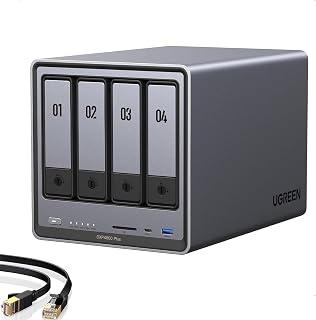
Best for: Families, creators, or small teams who need the NAS system that houses hard drives. This is a four-bay NAS enclosure, not a hard disk drive; the listing identifies it as diskless.
It is included as a related option for buyers who are building a complete network-storage setup rather than replacing a drive. Because it is diskless, the buyer selects and installs compatible drives separately.
Limitation: This product does not provide hard-drive storage by itself. Do not choose it if you only need a replacement 3.5-inch NAS drive.
Buying Guide: How To Choose A NAS Hard Disk Drive
How much capacity should you choose?
Estimate the space needed for files, backups, and expected growth, then compare drive capacity with the NAS’s bay count. A higher-capacity drive can provide more raw storage per bay, but the usable capacity depends on the chosen RAID or storage configuration. RAID can help maintain availability in some setups, but it is not a substitute for a separate backup.
Why does CMR matter?
CMR means conventional magnetic recording. Several drives here explicitly list CMR, which helps buyers compare recording technologies when selecting a NAS drive. Confirm your NAS vendor’s drive guidance and the exact model specifications; do not assume every product variant under a product family has identical features.
Should you prioritize RPM or cache?
RPM and cache are listed specifications, but they do not alone establish real-world NAS performance. Network speed, NAS hardware, workload, and drive configuration also affect transfers. Compare the stated specifications, but avoid treating a larger cache or higher RPM as a guarantee of faster file sharing.
What should you check before ordering?
- Confirm the drive form factor, interface, and capacity work with your NAS enclosure.
- Check the system’s supported drive count and model guidance, especially for RAID use.
- Decide whether you prefer a new drive or are comfortable evaluating a renewed listing.
- Keep a separate backup of important data, even when using a multi-drive NAS.
Frequently Asked Questions
Can I use a regular desktop hard drive in a NAS?
Some desktop drives may physically connect, but NAS-focused models are designed for NAS use. Check the NAS manufacturer’s compatibility guidance before selecting a drive.
Is a NAS hard drive the same as a NAS enclosure?
No. A hard drive stores data; a NAS enclosure connects storage to a network. A diskless enclosure requires separate drives.
Does a larger drive increase usable RAID capacity by its full size?
Not necessarily. Usable capacity depends on the RAID or storage layout and may be lower than the combined raw drive capacity.
Is a renewed drive the same as a new drive?
No. The MDD listing is identified as renewed. Review the listing’s condition details and seller terms before choosing it.