The best multi-page scanner printer has an automatic document feeder (ADF), which lets you scan or copy a stack of pages without placing each sheet on the glass. For home and hybrid work, the Canon PIXMA TR8620a combines scanning with fax capability; the Epson WorkForce Pro WF-3823 offers a 35-page ADF; and the HP LaserJet Pro 3101fdw is designed for teams that mainly print in black and white. The Brother MFC-L3720CDW suits color laser workflows, while the HP DeskJet 4355 is a home option with a 35-sheet feeder.
| Printer | Best for | ADF information |
|---|---|---|
| Canon PIXMA TR8620a | Home office with fax needs | Auto document feeder |
| Epson WorkForce Pro WF-3823 | Higher-volume mixed printing | 35-page ADF |
| HP LaserJet Pro MFP 3101fdw | Small teams and monochrome pages | Automatic document feeder |
| Brother MFC-L3720CDW | Office color laser workflows | 50-sheet ADF |
| HP DeskJet 4355 | Basic home printing and scanning | 35-sheet ADF |
Canon PIXMA TR8620a

Best for: Home offices that need printing, scanning, copying, and faxing in one device. The TR8620a is a wireless 4-in-1 printer with an auto document feeder, making it a practical fit for scanning or copying multi-page documents without feeding each page manually.
It also supports Alexa-related low-ink notifications and optional smart reordering, according to the listed features. Choose this model if fax capability and an ADF matter alongside everyday home-office tasks.
Limitation: The supplied product details do not specify the ADF’s page capacity or scanning speed, so compare those requirements before choosing it for frequent large batches.
Epson WorkForce Pro WF-3823
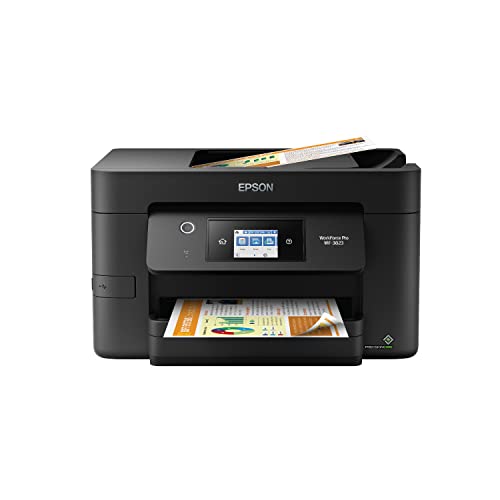
Best for: Small offices that scan and print regularly and want a specified feeder capacity. This wireless all-in-one has a 35-page ADF, a 250-sheet paper tray, and automatic two-sided printing. Those features make it better suited to recurring document work than a basic flatbed-only printer.
Epson lists print speeds of up to 21 pages per minute for black and 11 for color, plus PrecisionCore Heat-Free Technology and instant-dry pigment inks. Choose it if a larger paper tray and a 35-page feeder fit your workflow.
Limitation: Epson says the printer is designed for genuine Epson cartridges and that non-genuine ink could cause damage not covered under its limited warranty.
HP LaserJet Pro MFP 3101fdw

Best for: Small teams that scan, copy, fax, and print mostly black-and-white documents. The printer includes an ADF for multi-page scan and copy jobs, along with automatic two-sided printing. HP describes it as suitable for teams of up to seven people.
Its listed print speed is up to 35 black-and-white pages per minute for single-sided printing. Intelligent Wi-Fi is designed to seek a strong connection. Choose this model when office documents matter more than color output.
Limitation: This is a black-and-white printer, so it is not the right choice for color documents or photos.
Brother MFC-L3720CDW

Best for: Offices that want color laser output and a larger ADF for batch scanning. This wireless all-in-one prints, scans, copies, and faxes. Its 50-sheet ADF, 250-sheet adjustable paper tray, and automatic duplex printing are useful for repeated office workflows.
Brother lists print speeds up to 19 pages per minute and dual-band wireless networking, Wi-Fi Direct, and USB 2.0 connectivity. Choose it if the 50-sheet feeder is a priority and color laser printing suits your documents.
Limitation: Its listed print speed is lower than the HP monochrome model’s, and the product details do not provide a scan-speed figure.
HP DeskJet 4355

Best for: Home users who need basic color printing and occasional multi-page scanning or copying. The DeskJet 4355 has a 35-sheet ADF, a 60-sheet input tray, and wireless and mobile printing. Its listed uses include everyday documents such as letters, recipes, and lists.
HP also describes an AI feature for adjusting the formatting of web pages and emails to remove unwanted content. Choose this model if home-focused features and a 35-sheet feeder match your needs.
Limitation: The 60-sheet input tray is smaller than the 250-sheet trays listed for the Epson and Brother models, so frequent printing may require more paper refills.
Buying Guide: How To Choose A Multi-Page Scanner Printer
How large is the ADF capacity?
Match the feeder capacity to the size of your typical document batches. A 50-sheet ADF, as listed for the Brother, can hold more pages at once than the 35-page Epson or 35-sheet HP DeskJet feeders. The Canon and HP LaserJet listings confirm an ADF but do not state capacity. Check the exact capacity if batch size is important.
Do you need color, black-and-white, or fax?
Choose a color model if your documents need color output. The Brother is a color laser option, while the Canon, Epson, and HP DeskJet are listed as color printers. The HP LaserJet Pro 3101fdw is black and white, which suits text-focused office documents. For faxing, the Canon TR8620a, HP LaserJet, and Brother list fax capability.
Will you print in high volumes?
Compare the paper tray, print speed, and ink or toner requirements as well as the ADF. The Epson and Brother each list a 250-sheet tray; the HP DeskJet lists a 60-sheet input tray. The Epson and HP LaserJet provide stated print-speed figures, but they use different printing technologies and output types, so consider the kind of work you do.
Do you need automatic two-sided scanning?
An ADF does not by itself confirm that a printer scans both sides of a sheet automatically. The supplied product details identify automatic duplex printing for several models, but do not consistently specify duplex scanning. If you regularly scan double-sided originals, verify that capability and whether it uses single-pass scanning before buying.
Frequently Asked Questions
What does an ADF do on a printer scanner?
An automatic document feeder holds multiple pages and feeds them through the scanner for a multi-page scan or copy job. It reduces the need to place each page on the scanner glass manually.
Which listed printer has the largest stated ADF?
The Brother MFC-L3720CDW has the largest stated feeder capacity in this selection: a 50-sheet ADF.
Can an ADF scan both sides of each page automatically?
Not necessarily. ADFs can feed pages, but automatic two-sided scanning is a separate feature. Check the model’s specifications for duplex scanning or single-pass duplex scanning.
Which option is designed for black-and-white office printing?
The HP LaserJet Pro MFP 3101fdw is a black-and-white laser all-in-one with scanning, copying, faxing, an ADF, and automatic two-sided printing.
Is a multi-page scanner printer useful for home use?
Yes. A home user can use an ADF to scan or copy multi-page forms, school documents, and work paperwork with fewer manual steps than a flatbed-only workflow.