Finding a reliable mouse that works seamlessly with macOS can boost productivity, comfort, and precision. The following picks are optimized for Apple devices, offering Bluetooth or USB-C connectivity, quiet clicks, long battery life, and smooth tracking on multiple surfaces. Each option is selected to balance performance with macOS compatibility, whether you use a MacBook, iMac, iPad, or a hybrid setup.
Product Summary
| Product | Brand | Connectivity | Key Benefit |
|---|---|---|---|
| MX Master 3S for Mac | Logitech | Bluetooth | Mac-optimized, MagSpeed scrolling |
| M240 Silent Bluetooth Mouse (Off White) | Logitech | Bluetooth | Silent clicks, long battery life |
| PEIBO Bluetooth Wireless Mouse | PEIBO | Bluetooth + 2.4G USB Receiver | Dual-mode versatility, DPI options |
| M196 Bluetooth Wireless Mouse | Logitech | Bluetooth | Compact travel design, cross-surface use |
| Normdecos Bluetooth Mouse | Normdecos | Bluetooth + USB-C receiver | Multi-mode with USB-C |
Logitech MX Master 3S for Mac
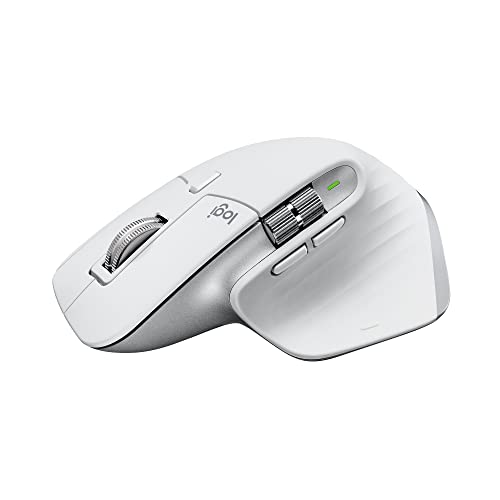
The MX Master 3S is Remastered for Mac, offering optimized macOS compatibility and smooth operation with iPadOS. It features an 8K DPI track-on-glass sensor and ultra-quiet clicks, making it suitable for quiet environments. MagSpeed scrolling delivers high-precision navigation with speed and accuracy, particularly useful for long documents or design work. This model is designed to deliver enduring performance with precise control on glass surfaces and other challenging materials. It is ideal for professionals who require both speed and accuracy in a Mac ecosystem.
Logitech M240 Silent Bluetooth Mouse (Off White)

This compact, quiet mouse pairs quickly via Bluetooth with macOS devices and offers up to 18 months of battery life thanks to an energy-efficient auto sleep feature. The 90% quieter clicks reduce noise without sacrificing the familiar click feel, making it suitable for shared workspaces or late-night sessions. Its low-profile design makes it easy to slip into a bag for on-the-go macOS users who value portability as well as performance.
PEIBO Bluetooth Wireless Mouse

PEIBO offers a dual-mode wireless experience with Bluetooth 5.2, Bluetooth 3.0, and a 2.4G USB receiver plus a USB-C adapter. This dual-mode design supports macOS, iPadOS, Windows, Linux, and Chrome OS, giving flexibility across devices. The auto energy-saving sleeping mode preserves battery life, and three adjustable DPIs (800/1200/1600) support various tasks from precision editing to everyday navigation. It is a practical pick for mixed-device ecosystems in a Mac-focused workflow.
Logitech M196 Bluetooth Wireless Mouse

The M196 is a compact, portable Bluetooth mouse designed for laptops and tablets. It connects quickly via Bluetooth with a reliable pair-and-play setup, eliminating the need for a dongle. Its ambidextrous, travel-friendly form fits well in a bag for on-the-go Mac users. It holds up well on diverse surfaces with precise optical tracking, making it versatile for remote work, classrooms, or coffee-shop setups.
Normdecos Mouse for MacBook

Normdecos presents a versatile option with multiple working modes, including Bluetooth 5.2/3.0 and a 2.4GHz USB receiver, plus USB-C compatibility. The 4-mode design allows easy switching between devices, making it suitable for users who alternate between Mac, Windows, tablets, and laptops. With DPI up to 1600 and advanced optical tracking, it balances responsiveness with battery efficiency for prolonged macOS sessions.
Buying Guide: Key Purchase Considerations
When choosing a mouse for Mac, consider these critical factors to ensure compatibility, comfort, and efficiency:
- Connectivity: Bluetooth vs. USB-C/USB receiver. Mac users often prefer Bluetooth for clean desks; however, USB receivers can be more reliable on some Macs or in environments with Bluetooth interference.
- Mac optimization: Some mice are marketed as Mac-ready with macOS-specific features and better gesture support. For extended macOS use, options with quiet clicks and high-precision sensors are advantageous.
- Battery life: Look for energy-saving features and long-lasting batteries. A device that lasts several months between charges reduces downtime and maintenance.
- Ergonomics: Consider hand size, grip style (palm, claw, or fingertip), and weight. Comfort matters for long sessions, especially for designers and developers.
- DPI and precision: Higher DPI benefits high-resolution displays and precision tasks, such as photo or video editing. Some models offer adjustable DPI settings for flexibility.
- Multi-device use: If you work across multiple devices, a mouse with cross-device compatibility and easy mode-switching can streamline workflows.
- Surface compatibility: Track-on-glass performance is valuable if you frequently work on glass-topped desks or glossy surfaces.
- Price-to-feature balance: Consider whether advanced features justify the price. For many Mac users, a reliable, quiet, and ergonomic performer suffices.
How To Choose For Your Setup
Mac users often prioritize quiet operation, reliable Bluetooth pairing, and seamless macOS integration. If you work with multiple devices or require precise scrolling, a model with MagSpeed or high-DPI sensors can significantly boost productivity. For travelers or students, compact mice like the M196 or M240 offer excellent portability without sacrificing performance. For professionals in design or development, MX Master 3S delivers robust features and ergonomic support, though it comes at a premium. Balance your needs for connectivity, comfort, and cross-device compatibility to identify the best Mac-friendly mouse for your setup.
All listed options provide macOS compatibility, with variants spanning quiet clicks, long battery life, multi-mode connectivity, and ergonomic design. Whether you prioritize silent operation, portability, or multi-device versatility, these mice offer solid performance for American users in a range of professional and personal contexts.