Maximizing desk space while keeping your displays at optimal viewing angles is essential for productivity. This guide highlights top wall-mount monitor solutions and related PC mounting options that fit a range of screen sizes from 13 to 32 inches, plus a few under-desk and CPU mounting options. The selection prioritizes full-motion functionality, VESA compatibility, and robust load capacity to accommodate everyday office and gaming setups. Each product includes practical features to help you decide which mounting approach best fits your workspace.
| Product | Brand | Key Benefit |
|---|---|---|
| MOUNT PRO Single Monitor Wall Mount (Black) | MOUNT PRO | Full motion, 13–32″ compatibility, up to 19.8 lbs |
| WALI Computer Monitor Wall Mount (GSWM001) | WALI | Gas-spring arm, 19.3″ extension, versatile tilt and swivel |
| MOUNT PRO Monitor Wall Mount (Black) | MOUNT PRO | Long reach, full motion, 13–32″ screens, up to 17.6 lbs |
| VIVO Under Desk And Wall PC Mount | VIVO | Under-desk or wall mounting for PC cases, 44 lbs capacity |
| StarTech Wall Mount CPU Holder | StarTech | Open-frame, adjustable width, 22 lbs capacity |
Best MOUNT PRO Single Monitor Wall Mount (Black)

Designed for 13 to 32 inch screens, this wall mount supports VESA 75×75 and 100×100 patterns and holds up to 19.8 lbs. It provides full motion with +90° to -90° tilt, 180° swivel, and 360° rotation, and extends up to 21.6 inches. The unit helps declutter desks while delivering ergonomic viewing angles and improved visual reach for multitasking. It also features a detachable cable management system to route cords neatly behind the display.
WALI Monitor Wall Mount (GSWM001)

Supports monitors up to 32 inches with 75x75mm or 100x100mm VESA patterns and holds up to 22 lbs. The gas-spring arm extends up to 19.3 inches and retracts, with +70°/-45° tilt and +90°/-90° swivel for flexible viewing. A 360° rotation enables easy landscape-to-portrait transitions, making it suitable for office tasks, design work, and dual-monitor setups. The wall plate is compatible with both brick and wood walls for versatile installation.
MOUNT PRO Monitor Wall Mount (Long Arm, Black)
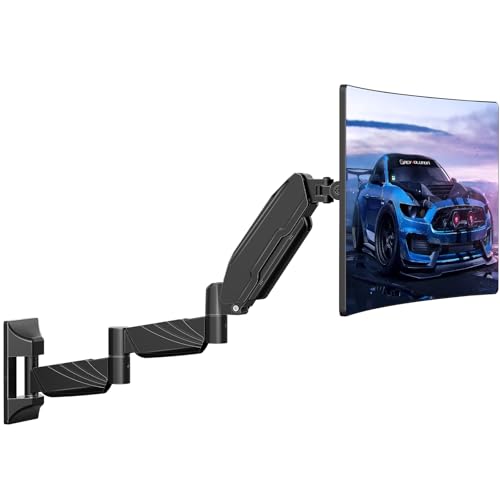
This long-arm wall mount extends up to 25.67 inches and retracts to 3.17 inches, offering flexible positioning, ideal for corner desks or rooms with constrained layouts. It provides 360° rotation, +90°/-45° tilt, and +/-90° swivel for landscape and portrait viewing. The pneumatic springs allow smooth height changes, helping you find the most comfortable angle for gaming or productive work. It also includes integrated cable management to keep cables tidy.
VIVO Under Desk And Wall PC Mount (MOUNT-PC01L)

Designed to hold PC cases under desks or on walls, this mount supports width from 8.3″ to 13″ and height from 14.6″ to 25.2″, enabling more desk space and easier accessibility. A 135° swivel adds flexible cable and port access. It’s a practical solution for compact workstations or gaming rigs needing streamlined hardware placement.
StarTech Wall Mount CPU Holder (CPUWALLMNT)

The open-frame, adjustable-width CPU wall mount fits desktops from about 4.8″ to 8.3″ wide and up to 22 lbs. It keeps the computer accessible while freeing desk space, ideal for organized workstations or shared workspaces that require quick hardware access and clean cable routing.
MOUNT PRO Dual Monitor Wall Mount (Black)

Designed for dual 13–32 inch displays, each arm supports 4.4–19.8 lbs with full motion including +90° to -90° tilt, 180° swivel, and 360° rotation. Extends up to 20.4 inches per arm for ergonomic viewing, while a built-in cable management system keeps cords neat and out of sight. It’s a strong choice for multi-display setups in office, design, or development environments.
MOUNT PRO Single Monitor Wall Mount (White)

This white variation offers the same full-motion capability for 13–32 inch screens with VESA 75×75/100×100 compatibility, up to 19.8 lbs. It extends 21.6 inches and rotates 360 degrees, enabling versatile positioning. A cable management system helps keep work areas tidy, making it a suitable option for open-plan offices and creative studios.
Buying Guide: Key Purchase Considerations
- Screen size and weight compatibility: Confirm the mount supports your monitor’s size (often 13–32 inches) and weight (check the specified lbs).
- VESA pattern: Verify VESA mounting patterns (75x75mm or 100x100mm are common) to ensure a secure fit.
- Motion range and ergonomics: Look for full-motion arms with tilt, swivel, and rotation to achieve optimal viewing angles.
- Mount type and orientation: Decide between wall-mount, under-desk, or dual-arm options based on desk layout and space needs.
- Cable management: An integrated cable routing system helps keep cords tidy and reduces desk clutter.
- Install considerations: Check wall material compatibility (brick, wood, drywall) and the required mounting hardware.
- Multiple display needs: For multi-monitor setups, ensure each arm supports your display specs and that the mount offers sufficient extension.
- Load capacity: Ensure the mount’s weight rating aligns with the combined weight of your PC components or monitor pair.
- Future-proofing: If you may upgrade to larger or heavier displays, choose a mount with higher weight limits and longer extension.
Overall, wall-mounted solutions can dramatically increase desk space and provide ergonomic flexibility for home offices, studios, and workplaces. The selections above emphasize strong build quality, versatile motion, and broad monitor compatibility to cover a range of needs from single to dual displays and PC mounting scenarios.