Looking for compact, inkless or inkjet-style mini sticker printers that deliver quick, clean prints for notes, journals, and DIY gifts? This guide highlights five top portable sticker printers with color and monochrome options, focusing on size, connectivity, ease of use, and paper compatibility. Each pick offers reliable performance for students, crafters, and busy professionals who want personalized stickers and photos on the go.
| Product | Brand | Type | Paper/Print Type |
|---|---|---|---|
| ETIKEZ PM290C | ETIKEZ | Inkless Bluetooth Sticker Printer | 54mm×3.2m white adhesive thermal paper (black & white) |
| Memoking T02 | Memoking | Bluetooth Sticker Printer | Sticker print pods (thermal, black & white) |
| Anycash Printpods Mini | Anycash | Bluetooth Sticker Printer | 3-roll sticker paper included (color/black and white options) |
| XenGro AHM2 | XenGro | Bluetooth Inkless Mini Printer | Self-adhesive sticker and paper rolls (black & white) |
| KODAK Step | KODAK | Instant Smartphone Photo Printer | ZINK 2×3” paper (color prints via zero-ink technology) |
ETIKEZ PM290C Portable Mini Printer

ETIKEZ offers a compact, portable sticker printer designed for school, home, or office use. It ships with three rolls of white adhesive thermal paper (54mm×3.2m) for quick sticker creation. The device supports Bluetooth connections via the Labelnize app on iOS and Android, enabling wireless printing from mobile devices. Note that the PM290C prints only in black and white. The app unlocks intelligent features for study notes, memos, and templates, making it a practical tool for students and professionals seeking portable organization. It is not intended for computer printing. The device emphasizes ease of setup: load paper, connect via Bluetooth, and print.
Memoking Mini Printer – T02 Sticker Printer

Memoking’s T02 is a pocket-sized Bluetooth sticker printer designed for instant print pods. It pairs with the Phomemo app, offering a quick connection on iOS and Android without computer printing. The printer emphasizes high-definition monochrome output on sticker paper and supports a variety of fonts, filters, and templates through its app. It’s positioned as a versatile option for students, teachers, and DIY enthusiasts who need a reliable, portable device for notes, study aids, and small crafts. The printer is intended for mobile use with a focus on creative printing rather than desktop workflows.
Anycash Sticker Printer – Printpods Mini

Anycash’s Printpods Mini Printer is a compact, portable thermal printer designed for on-the-go sticker printing. It features Bluetooth connectivity and ships with three rolls of sticker paper, enabling quick sticker creation for notes, labels, and small crafts. The device markets itself as ideal for iPhone users and emphasizes portability for everyday tasks, making it a convenient tool for students, hobbyists, and professionals seeking a lightweight, travel-friendly sticker solution. The emphasis is on pocket-sized printing with simple app-based control for templates and text.
XenGro Mini Sticker Printer AHM2

XenGro presents the AHM2 as an all-in-one mini sticker printer with Bluetooth connectivity and a built-in tearing edge for clean, straight cuts. It uses thermal printing to deliver crisp black-and-white prints and works with adhesive sticker paper and regular thermal paper, including colorful rolls. The device is designed for a wide range of uses, from organizing to journaling and DIY projects. The companion app includes features such as OCR, templates, and text tools, enabling users to customize prints on the go. It’s positioned as a versatile tool for students, creators, and professionals seeking a compact printing solution with smart app control.
KODAK Step Instant Smartphone Photo Printer
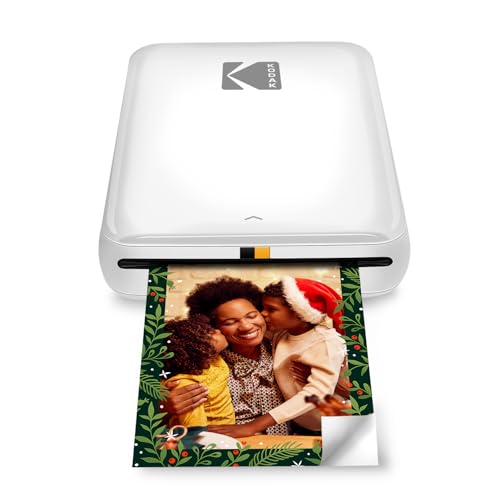
The KODAK Step Instant Photo Printer uses zero-ink technology to produce 2×3″ sticky-back photos from iOS and Android devices. It offers a full editing suite via the KODAK app, including filters, borders, stickers, and text for customization. The device is a color-capable option within a compact form factor, ideal for scrapbooking, journaling, and sharing memories. It includes a micro-USB charging cable and a starter pack of ZINK photo paper. The Step printer emphasizes durability of prints and ease of sharing, with a focus on mobile-first workflows and creative personalization.
Buying Guide
- Print technology: Decide between inkless thermal printing (no ink, quick prints) and color/photo inkjet-style options. Thermal printers excel in portability and low maintenance, while color photo printers offer richer tones for images.
- Paper compatibility: Check the available paper types and sizes (54mm labels, 2×3” photo paper, etc.). Ensure you can source rolls or packs locally and that the adhesive backing suits your projects.
- Connectivity: Consider Bluetooth versus app-based ecosystems. App capabilities (OCR, templates, fonts) can significantly impact how you create stickers or notes.
- Portability vs. features: The smallest devices maximize portability but may have fewer features. Larger mini printers often provide more templates, more robust apps, or color printing options.
- Intended use: For school notes and organization, monochrome outputs may suffice. For crafts and journaling, color capability or photo printing is advantageous.
- Battery and charging: If you need on-the-go use, verify battery life and whether USB charging is sufficient for your setup.
- Software compatibility: Ensure the printer’s app works with your device’s OS (iOS/Android) and offers useful features like templates or OCR if you rely on digital-to-print workflows.
- Reliability and support: Look for printers with well-documented setup guides, customer support, and readily available replacement paper.