Finding a compact gaming PC that combines serious performance with portably-friendly size is easier than ever. This guide highlights five standout mini gaming PCs that balance processing power, memory, storage, and display support, all in small form factors. Each model is suitable for gaming, content creation, and multitasking on the go, with triple 4K display support and modern connectivity. Explore the top picks below to identify a compact system that fits your needs and budget.
| Product | CPU / GPU Power | RAM / Storage | Display / IO |
|---|---|---|---|
| KAMRUI Hyper H2 Mini Gaming PC | Intel Core i9-11900H | 32GB / 1TB SSD | Triple 4K, USB-C, HDMI, DP |
| ACEMAGIC Matrix Mini M1 | Intel Core i9-13900HK | 32GB / 1TB SSD | USB4, HDMI/DP, Wi-Fi 6E |
| KAMRUI Hyper H1 | AMD Ryzen 7 6800H | 32GB / 1TB SSD | Triple 4K, WiFi 6, BT 5.2 |
| BOSGAME P3 | Ryzen 7 7840HS | 32GB / 1TB SSD | Triple 4K, USB-C, 2.5GbE |
| GMKtec M6 Ultra | Ryzen 5 7640HS | 32GB / 512GB SSD | Triple 4K, USB4, DP, HDMI |
KAMRUI Hyper H2 Mini Gaming PC

The KAMRUI Hyper H2 pairs a high-end 11th Gen Intel Core i9-11900H with 32GB of RAM and a 1TB PCIe NVMe SSD, delivering desktop-like performance in a compact chassis. The system supports triple 4K displays and includes six USB 3.2 ports plus a USB-C and multiple video outputs for expansive workstation or gaming setups. Treated as a versatile unit for home office and lounging areas, it emphasizes multitasking capability and high-load performance in a small footprint.
Key features include a turbo capable i9-11900H up to 4.9GHz, 24MB L3 cache, and robust connectivity with WiFi 6 and BT 5.2. The design emphasizes a metal build and a space-saving profile, making it a practical choice for users who need speed without sacrificing desk space.
ACEMAGIC Matrix Mini M1
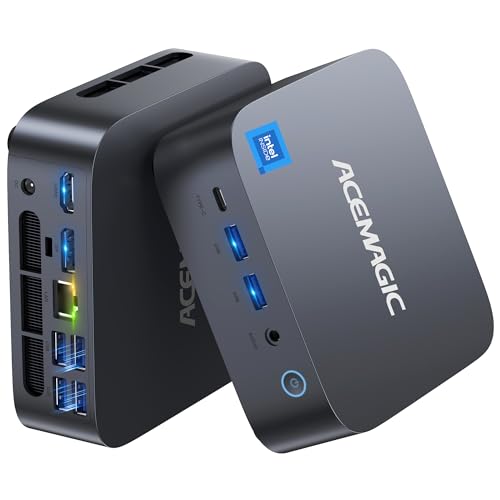
The ACEMAGIC Matrix Mini M1 is driven by the Intel Core i9-13900HK, a top-tier 13th Gen processor with 14 cores and 20 threads, capable of turbo boosting up to 5.4GHz. This mini PC ships with 32GB of DDR4 RAM and 1TB NVMe SSD, with expansion support up to 64GB and 4TB. It targets power users who demand strong multitasking, 4K editing, and gaming performance in a compact unit. The system emphasizes high throughput, creative workloads, and reliability in a small form factor.
For graphics and display, it offers flexible output options including USB4, HDMI, and DisplayPort, along with Wi-Fi 6E for fast wireless connectivity. The Matrix M1 is positioned for creators and professionals who need notebook-like portability without sacrificing desktop-grade performance.
KAMRUI Hyper H1 Mini Gaming PC

The KAMRUI Hyper H1 centers on the Ryzen 7 6800H processor with 32GB RAM and a 1TB NVMe SSD, offering solid performance for multitasking and gaming. It supports triple 4K displays and features WiFi 6 and Bluetooth 5.2 for robust wireless connectivity. The 8-core/16-thread design with up to 4.7GHz boosts productivity in creative tasks, software development, and demanding workloads, all within a compact mini PC chassis.
Expandable memory and fast storage, plus multiple display outputs, make the Hyper H1 a capable option for users who want desktop-like performance in a small footprint without sacrificing display versatility.
BOSGAME P3 Mini Gaming PC

The BOSGAME P3 combines a Ryzen 7 7840HS processor with 32GB of DDR5 RAM and a 1TB PCIe 4.0 NVMe SSD, delivering performance suitable for AAA gaming, 4K video editing, and heavy multitasking. The AMD Radeon 780M integrated GPU supports modern graphics workloads, including AV1 encoding/decoding, in a compact desktop form. Triple 4K displays are supported, along with dual Gigabit Ethernet and AX210 Wi-Fi 6E for fast network connections.
Storage upgradability and flexible RAM expansion make the P3 a strong choice for enthusiasts seeking a balanced blend of gaming and content creation capabilities in a small footprint.
GMKtec M6 Ultra

The GMKtec M6 Ultra targets value and performance with an AMD Ryzen 5 7640HS CPU and 32GB DDR5 RAM, plus a 512GB NVMe SSD. The Radeon 760M iGPU supports moderate gaming and HW-accelerated video encoding/decoding. With triple 4K display support, USB4, and Bluetooth 5.2, this mini PC is positioned as a versatile option for home offices or entertainment setups that require multi-monitor support and flexible connectivity in a compact package.
Buying Guide: Key Considerations For Mini Gaming PCs
- CPU and GPU balance: Look for models with mid-to-high tier mobile CPUs (e.g., 12th- to 13th-gen Intel or Ryzen 6K/7K series) paired with capable integrated or discrete graphics for smooth gaming at 1080p or 4K via external displays.
- RAM and storage: Aim for 32GB RAM as a baseline for multitasking and future-proofing; ensure fast NVMe SSD storage (1TB or more) with expansion options if you anticipate large game libraries or media projects.
- Display and ports: Check triple 4K support if you plan multi-monitor setups. Verify the availability of HDMI, DisplayPort, USB-C/USB4, and network interfaces (Wi‑Fi 6/6E, Bluetooth 5.x, Ethernet) for stable peripherals and downloads.
- Thermals and acoustics: Compact desktops can throttle under load. Review cooling solutions, noise levels, and chassis design to ensure sustained performance during gaming or content creation.
- Upgradeability: Consider RAM and storage expansion options. Some mini PCs offer dual M.2 slots and memory upgradability, which can extend the device’s lifespan as software demands grow.
- Connectivity and ecosystems: If you rely on external peripherals, ensure ample USB ports, fast networking, and compatibility with your existing keyboards, mice, controllers, and headsets.
- Operating system and software: Windows 11 Pro provides advanced management features for professionals. Verify preinstalled software and driver support for your preferred games and apps.
- Price-to-performance balance: Compare core components, expandability, and display capabilities across models to identify the best value for your intended use, whether gaming, streaming, or productivity on the go.