To copy a MiniDV tape onto VHS, play it in a MiniDV camcorder and connect the camcorder’s video output to a VCR that can record. The products below are alternatives for recording or converting video, not a MiniDV-to-VHS adapter: the listed VHS-C adapter specifically does not work with MiniDV tapes. Choose a recorder for a direct VHS copy, or a USB or standalone capture device if a digital file is your goal.
| Product | Best suited for | Output or use |
|---|---|---|
| Portta VHS to Digital Converter | Standalone digital capture | MP4 recording |
| Portta VD20P | Capture with a built-in viewing screen | MP4 recording |
| USB Video Capture Device | Computer-based capture | USB video capture |
| RCA to USB VHS Converter | RCA-to-USB capture | Digital conversion |
| VHS-C Cassette Adapter | VHS-C playback in a VCR | Not compatible with MiniDV |
Portta VHS To Digital Converter

This standalone video-to-digital recorder is best for MiniDV owners who want a digital file rather than a VHS cassette. Its listed formats include MiniDV, VHS, VCR, DVR, DVD, Hi8, and gaming consoles, and it includes a remote. The product description says a VCR, VHS/DVD player, or camcorder is required, so it is not a playback device for MiniDV tapes on its own. Choose it if you have a camcorder that can play the tape and want to record its output digitally. It does not make a direct VHS copy.
Portta VD20P Converter With Screen

The VD20P is best for buyers who want to monitor playback on the recorder itself while capturing MiniDV footage as an MP4 file. Its listed features include a 5-inch HD screen and compatibility with MiniDV, VHS, VCR, DVR, DVD, Hi8, and gaming consoles. As with the other standalone converter, it requires a separate camcorder or player to play the tape. Choose this model over a basic converter if its built-in screen suits your setup; avoid it if your goal is specifically to create a VHS cassette.
USB Video Capture Device
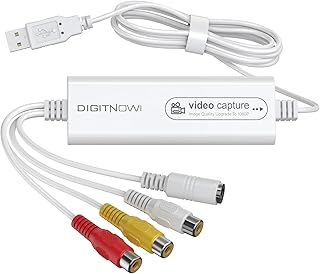
This USB capture device is best for people who want to use a computer-based workflow. Its product description lists VHS, VCR, Hi8, MiniDV, and DVD conversion, and names Mac OS, Android, Windows, PC, TV, and OBS among its intended contexts. You still need a playback device and a suitable video connection from the camcorder. Choose it if you want to capture video through USB rather than use a standalone recorder. The listing does not specify detailed connection requirements or software, so check those before purchase.
RCA To USB VHS Converter

This RCA-to-USB converter is best for buyers seeking a basic path from an analog video source to a computer. The product name lists VCR, Hi8, MiniDV, and 1080P. For MiniDV, the tape must first be played in a camcorder or compatible deck with an output that works with the capture device. The listing provides fewer workflow details than the other options, so verify the included connections and computer requirements. It is a digital-conversion option, not equipment for recording directly onto VHS.
BECBOLDF VHS-C Cassette Adapter

This motorized cassette adapter is best only for someone with VHS-C tapes who wants to play or record them using a standard VHS VCR. Its listed features include motorized insertion and VHS-C playback or recording capability. It was selected because VHS-C is often confused with MiniDV, but the product description explicitly says it is not compatible with MiniDV, 8mm, or Hi8 tapes. Avoid this adapter for MiniDV footage; it cannot convert a MiniDV cassette into VHS.
Buying Guide: Choosing A MiniDV Transfer Method
Do you want a VHS tape or a digital file?
For a VHS copy, use a working MiniDV camcorder or deck to play the tape and a VCR to record its video output onto a blank VHS cassette. A digital converter instead saves a digital recording; it does not create VHS media. Decide on the desired format before choosing equipment.
What equipment do you already have?
Check that the camcorder can play your MiniDV tape and identify its available video outputs. Then confirm that the VCR or capture device accepts a matching connection. A converter described as compatible with MiniDV generally still needs a separate playback device; it does not read the cassette by itself.
Should you choose standalone or USB capture?
A standalone recorder can suit buyers who prefer capturing without a computer. A USB capture device is more appropriate when the goal is computer-based transfer. Compare the listed operating-system support, ports, and required software against your own setup. The product listings do not establish that every connection or software arrangement will work with every camcorder.
How can you avoid buying the wrong adapter?
MiniDV, VHS-C, and 8mm/Hi8 are different tape formats. A VHS-C adapter places a VHS-C cassette into a VHS-style shell; it does not convert MiniDV. Read the exact supported formats and check the product’s stated exclusions before buying.
Frequently Asked Questions
Can I put a MiniDV tape into a VHS VCR?
No. MiniDV cassettes have a different format and cannot be inserted into a standard VHS VCR. Play the tape in a MiniDV camcorder or deck.
How do I record MiniDV onto VHS?
Connect the playing camcorder’s video output to a VCR’s input, load a blank VHS cassette, and record while the MiniDV footage plays. Confirm that the devices have compatible connections.
Does a VHS-C adapter work with MiniDV?
No. The listed VHS-C adapter explicitly excludes MiniDV. It is intended for VHS-C tapes and a standard VHS player or recorder.
Can I convert MiniDV directly to a digital file?
Yes, with a capture device and a MiniDV camcorder or deck that can play the tape. The capture device records the playback signal; it does not replace the tape player.
Is digital conversion the same as copying to VHS?
No. Digital capture creates a computer or recorder file, while a VHS copy requires a VCR recording onto a VHS cassette.