This guide spotlights five top desk-mount microphone stands designed to hold a range of USB and XLR mics with solid stability and easy positioning. Each option includes a weighted base, robust arm, and compatible adapters to fit popular mics. Read on to compare build quality, adjustability, and ease of use so you can select the right desk stand for recording, streaming, or podcasting tasks.
| Product | Brand | Key Strength | Compatibility Notes |
|---|---|---|---|
| InnoGear Adjustable Desk Microphone Stand | InnoGear | Heavy base, adjustable height | 3/8″ to 5/8″ thread adapters |
| InnoGear Studio Mic Stand | InnoGear | Heavy-duty stability, two adapters | 3/8″ to 5/8″ and 3/8″ to 1/4″ |
| BILIONE Multifunctional Desktop Mic Stand | BILIONE | All-in-one with pop filter and shock mount | 5/8″ to 3/8″ adapter included |
| InnoGear Desktop Microphone Stand | InnoGear | Heavier base and extended height | 5/8″ to 3/8″ adapter |
| FIFINE Desktop Microphone Stand | FIFINE | Sturdy, low-profile with cable management | 5/8″ to 3/8″ adapter |
Each stand combines stability with flexible positioning to accommodate vocal, instrument, and podcast setups. The following sections break down five standout options, noting how they perform in practice and what to consider when choosing your own desk stand.
InnoGear Adjustable Desk Mic Stand With Weighted Base

The InnoGear Adjustable Desk Microphone Stand features a heavy, powder-coated base with a rubber gasket to minimize vibration transfer. The extendable boom arm supports up to 4.4 lbs when extended, making it suitable for heavier mics such as Blue Yeti and Blue Snowball. A 3/8″ to 5/8″ adapter is included for broad compatibility. Height adjustment from 11″ to 15.8″ via a clutch mechanism ensures you can set the microphone at the optimal level for voice or instrument recording. This combination of stability and versatility makes it a solid all-around choice for desk setups.
InnoGear Studio Mic Stand With Heavy Base

This stand emphasizes stability and durability for heavier mics and devices. The steel construction and a weighted base connect a robust, low-vibration platform with 270-degree positioning flexibility. It ships with universal adapters (3/8″ to 5/8″ and 3/8″ to 1/4″), expanding compatibility beyond traditional USB mics. Two pivot points and a 270-degree angle range enable precise mic placement, while the included Allen wrench helps secure adjustments. It is well-suited for content creators needing a dependable, professional-grade desk mount for long sessions.
BILIONE All-in-One Desktop Mic Stand

The BILIONE package provides an all-in-one recording solution, including an adjustable mic stand, shock mount, double-layer pop filter, microphone clip, and adapter. The upgraded weighted base and thicker metal rod improve stability, supporting heavier microphones. A dual pop-filter setup helps reduce plosives, making it a practical choice for vocal work and streaming. While comprehensive, users should verify space on the desk to prevent interference with monitors or keyboards during use.
InnoGear Desktop Mic Stand With Mic Clip
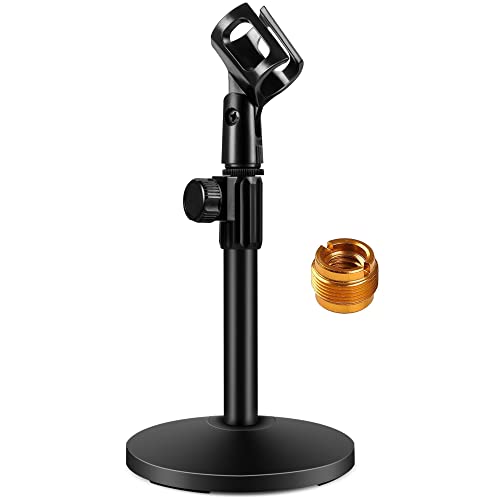
This InnoGear model features a larger base (5.12 inches) and a weight of 1.85 pounds, delivering strong stability with four non-slip pads. The height range from 10.6″ to 15.4″ provides solid vertical flexibility, and a 3.3-pound maximum load capability ensures reliable support for medium-to-heavy microphones. The design emphasizes a secure, quiet positioning experience ideal for on-camera work, voiceover, and home studio use where desk space is at a premium.
FIFINE Desktop Mic Stand With Low Profile Boom

The FIFINE BS1 desk stand is built for stability with a heavy, all-metal construction and a 5.12-inch base. Its low-profile design minimizes desk clutter, and the included cable management system keeps cords tidy. The adjustable height range and solid clamp help keep heavier microphones in place without wobble. Four non-slip pads provide floor protection, making it a strong option for gamers, podcasters, and streamers who want a tidy, reliable setup.
Buying Guide: Key Purchase Considerations
When selecting a microphone stand with a desk mount, consider how it will fit into your space and workflow. The following points help compare options across build quality, compatibility, and usability:
- Stability: A weighted base and anti-slip feet reduce desk movement. Heavier stands generally perform better with larger microphones and dynamic vocal work.
- Weight Capacity: Check the maximum load the boom can safely hold. Heavier mics like Blue Yeti or Shure SM7B require sturdier arms and bases.
- Adjustability: Look for 360-degree arm rotation, height range, and 270-degree/bi-directional pivots to position microphones optimally for speaking, singing, or instrument mics.
- Compatibility: Adapters (3/8″ to 5/8″, 3/8″ to 1/4″) expand compatibility with a wide range of mics and devices.
- Accessories: Built-in pop filters, shock mounts, and clips simplify setup and reduce extra purchases. Ensure the kit includes what you need.
- Space and Aesthetics: A low-profile boom and compact base help preserve desk space. Consider cable management features if you have a busy workstation.
- Durability and Longevity: All-metal construction and robust springs support long-term use, especially in frequent-use environments like podcasts or livestreams.
In practice, choosing a stand depends on your mic weight, desk space, and how often you reposition during sessions. For heavier USB or XLR mics, prioritize stands with heavy bases and solid boom arms. If you value an all-in-one setup, a package including a pop filter and shock mount can streamline your workflow. Finally, verify that adapters are included to fit your current mic lineup or future upgrades.