The best machine to make labels depends on how you plan to design and print them. The SUPVAN E11 suits buyers who want a built-in keyboard and app control, while the Brother PT-D210 is a straightforward choice for portable, button-operated labeling. For wider custom labels, consider the SUPVAN T50M Pro; for detailed app designs, the Phomemo D30; and for colorful personal labels, the Brother PT-N20.
| Product | Best For | Printing Approach |
|---|---|---|
| SUPVAN E11 | Flexible home and office use | Keyboard or Bluetooth app |
| Brother PT-D210 | Simple, portable labeling | Built-in controls |
| SUPVAN T50M Pro | Wider labels and small business | Bluetooth app |
| Phomemo D30 | Detailed app-made labels | Bluetooth app |
| Brother PT-N20 | Colorful personal labels | Built-in controls |
SUPVAN E11 Keyboard And Bluetooth Label Maker

The SUPVAN E11 offers two ways to create labels: type directly on its keyboard or connect to the app through Bluetooth for customized designs. Its listed app features include more than 30 fonts and 660 icons. This makes it a flexible choice for households and offices that want quick text labels as well as more decorative designs.
Best for: Buyers who want a portable machine for pantry items, school supplies, office files, and garage tools. The product weighs 0.5 pounds, measures 5.7 by 2.9 by 1.3 inches, and has a 1,200 mAh rechargeable battery. The manufacturer states that a charge can provide up to one month of use.
Why it stands out: Minimal-margin printing uses a listed 0.2-inch margin, which can reduce unused material. Limitation: App-based design requires a Bluetooth connection, and the battery-use estimate may vary with printing habits.
Brother PT-D210 Easy-To-Use Label Maker

The Brother PT-D210 is a portable, keyboard-operated option for common organizing tasks. One-touch keys provide access to fonts, symbols, frames, and templates, while the display lets users preview a label before printing. It supports Brother tape widths of 3.5, 6, 9, and 12 millimeters.
Best for: Buyers who prefer to compose labels on the machine instead of designing them in a phone app. It can be used for file folders, supplies, and clothes storage. The listed tape selection includes laminated options described as water- and fade-resistant, as well as specialty tapes for different uses.
Why it stands out: The display preview and direct controls make it easier to check a label before printing. Limitation: Six AAA batteries are required and sold separately. An optional AC adapter and carrying case are also listed, but are not included in the stated bundle details.
SUPVAN T50M Pro Bluetooth Label Maker

The SUPVAN T50M Pro prints labels from 3/4 inch to 2 inches wide, making it the wider-format option in this group. Its app supports customization with more than 30 fonts, 50 frames, and 660 icons. Users can also add images from a phone, tablet, or PC, according to the product details.
Best for: Small-business owners and home organizers who need room for product information, addresses, QR codes, barcodes, or logos. It is also described for organizing bottles, jars, food containers, school supplies, and office materials.
Why it stands out: The broad listed label-width range is useful when narrow identification strips are not sufficient. The app’s image-processing features are intended to produce clear output. Limitation: This model relies on app-based editing, so it is a less direct fit for someone who wants a built-in typing keyboard.
Phomemo D30 Bluetooth Mini Label Printer
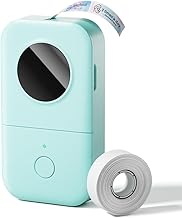
The Phomemo D30 is a compact thermal label printer that works with both continuous tape and fixed-length labels. Its Print Master app includes tools for text, icons, tables, logos, barcodes, QR codes, images, and templates. The listed options also include spreadsheet batch import, document scanning, OCR text extraction, timestamps, and voice input.
Best for: Buyers who want extensive app-based customization for household sorting, school projects, or small-business price labels. The printer uses direct thermal printing at a listed 203 DPI and does not require ink, toner, or ribbons.
Why it stands out: It combines multiple label formats with a large selection of app design tools. Limitation: The printer outputs black text; colorful effects come from using patterned color label tapes, not colored printing.
Brother PT-N20 Personal Desktop Label Maker

The Brother PT-N20 is designed for personal labeling in places such as dorm rooms, studios, homes, and workshops. Its built-in options include three fonts, seven font styles, 15 frames, and 250 symbols. It can print up to two lines of text, with a combined text height of 9 millimeters per label.
Best for: Buyers who want to create expressive labels for belongings, reminders, and personal projects without using an app. The machine prints on Brother P-touch Btag tape, which comes in listed 12-millimeter width and 13.1-foot length options, with 17 color choices described.
Why it stands out: Its built-in styles and colorful tape options suit simple creative labeling. Limitation: It works exclusively with Brother P-touch Btag tapes, so it is not the flexible choice for buyers who want to use other tape types or widths.
Buying Guide
Do you want a keyboard or an app?
Choose a keyboard model if you want to type and print directly on the machine. The SUPVAN E11 offers both keyboard and app workflows, while the Brother PT-D210 and PT-N20 are better fits for built-in controls. App-based models such as the T50M Pro and D30 provide more design features, but require a compatible connected device for app editing.
What label size and format do you need?
Check tape width and format before choosing a machine. The T50M Pro lists support for labels from 3/4 inch to 2 inches wide. The PT-D210 supports specified narrow tape widths, while the PT-N20 is limited to 12-millimeter Btag tape. The D30 supports continuous and fixed-length labels, which can help when label length needs vary.
Is color printing important?
Do not assume a label maker prints colored text. The D30 prints black text, with color supplied by patterned tape. The PT-N20 offers colorful tape options and built-in styles. Check whether the machine’s tape system and available design features match the appearance you need.
What should you check about power and supplies?
Compare included supplies, power needs, and replacement tape requirements. The E11 is rechargeable; the PT-D210 requires six AAA batteries, sold separately, or an optional adapter. Confirm tape compatibility before buying refills, especially for machines with a restricted tape system.
Frequently Asked Questions
What is the best machine to make labels for home organization?
The SUPVAN E11 is a flexible home option because it supports direct keyboard entry and Bluetooth app designs. The Brother PT-D210 is another fit for buyers who prefer built-in controls and tape choices in several widths.
Which label maker is best for small-business labels?
The SUPVAN T50M Pro is described for small-business uses such as product information, addresses, barcodes, QR codes, and logos. Its listed label width range is 3/4 to 2 inches.
Do thermal label makers need ink?
The Phomemo D30 uses direct thermal printing and does not require ink, toner, or ribbons. Its output is black text, with color effects created by patterned tape.
Can these machines print labels without a phone?
The Brother PT-D210 and PT-N20 have built-in controls for creating labels. The SUPVAN E11 also has a keyboard, while its app functions require a Bluetooth-connected device.