Choosing a Mac-focused mechanical keyboard means prioritizing Mac layout keys, seamless multi-device pairing, and a comfortable typing experience for long sessions. The following selections span 75% to 100-key formats, offering Bluetooth and wired connectivity, Mac-friendly keycaps, and sturdy gasket or plate designs. Read on to compare compact, full-size, and hybrid boards that work well with macOS, Windows, and Linux setups.
| Product | Brand | Layout | Connectivity |
|---|---|---|---|
| Keychron K4 (Version 2) 96% | Keychron | 96% (100-key) | Bluetooth 5.1 / USB-C wired |
| Keychron C2 Full Size | Keychron | 104 Key Full Size | Wired USB-C |
| EPOMAKER X Aula F75 MAX | EPOMAKER | 75% with TFT display | Bluetooth / USB-C |
| Keychron C2 Full Size 104 Keys (Second) | Keychron | 104 Key Full Size | Wired USB-C |
| YUNZII B75 PRO | YUNZII | 75% with knob | Bluetooth / 2.4G / USB-C |
Keychron K4 96% Keyboard (Brown Switch)

The Keychron K4 Version 2 features a compact 96% layout with a number pad, designed for productivity without sacrificing desk space. It supports up to three Bluetooth devices, allowing quick switching between a Mac, iPad, and PC. The Broadcom Bluetooth 5.1 chipset ensures broad compatibility and reliable wireless connections, with an USB-C wired mode available for stable power and latency-sensitive tasks. The keyboard retains a Mac-specific layout with essential Mac function keys, while including extra Windows keycaps for seamless cross-OS use.
Keychron C2 Full Size Wired Keyboard

The C2 is a full-size wired mechanical keyboard built for Mac and Windows. It uses a Mac-optimized layout with multimedia and function keys, and extra Mac/Windows keycaps are included. The USB Type-C wired connection provides steady power, and the keyboard features an inclined bottom frame with two adjustable feet for comfortable typing. While designed for home and light gaming, its reliability and dedicated macOS keys make it a solid macOS-friendly option for productivity and typing tasks.
EPOMAKER X Aula F75 MAX

The EPOMAKER X Aula F75 MAX is a compact 75% wireless keyboard with an integrated TFT display and a volume knob. It features hot-swappable switches and gasket-mounted construction for a softer, quieter typing feel. The keyboard includes RGB backlighting and silicone/foam padding to reduce echo and improve acoustics. Its battery, multi-device connectivity, and adjustable typing angles enable productive use across PC, Mac, and Linux setups while preserving a premium typing experience.
Keychron K4 96% Version 2 (Red Switch)

Another Keychron K4 variant, this model keeps the 96% footprint with a white LED backlight and Bluetooth 5.1 or USB-C wired connection. It supports multi-device pairing and Mac layout features, with extra keycaps for Mac and Windows to ensure compatibility. The K4 version 2 aims at home, office, and light gaming, delivering a balanced typing experience across operating systems.
YUNZII B75 PRO 75% With Knob
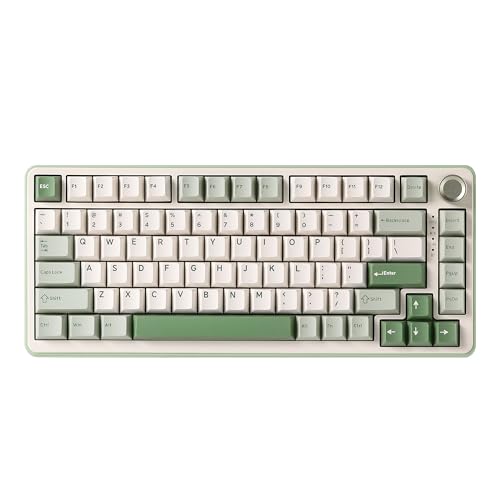
The YUNZII B75 PRO is a 75% gasket-mounted keyboard with a multifunction knob. It uses a three-mode connection: Bluetooth, 2.4G wireless, and wired USB-C. The gasket structure and five-layer padding improve typing acoustics, delivering a “creamy” and satisfying thocky sound. It includes pre-lubed switches and supports switching between gaming and office modes via the knob, supporting long sessions with efficient power management on battery. This board balances compact size with essential controls for macOS and Windows users.
Buying Guide: Key Purchase Considerations
When selecting a Mac-layout mechanical keyboard, consider the layout size, connectivity, keycap compatibility, and switch feel. Mac-oriented keyboards should include dedicated macOS function keys and Cmd/Option keys that align with Apple conventions. If you switch between Mac and Windows, ensure extra Mac/Windows keycaps are included and that the layout preserves essential shortcuts.
Connectivity is another crucial factor. Bluetooth versions (preferably 5.x) improve range and stability across desks and multiple devices. A reliable wired option (USB-C) helps for gaming or heavy typing sessions where latency must be minimized. Battery life matters for wireless keyboards; see whether the board uses a large-capacity battery and whether you can dim the backlight to extend life between charges.
Build quality and acoustics influence typing comfort. Gasket-mounted or foam-filled designs reduce echo and provide a plush keystroke. If typing feel is important, consider whether the switches are pre-lubed or hot-swappable, allowing you to tailor the feel to your preferences. Finally, look for pages with Mac-specific keycaps, reliable firmware support, and compatibility with your daily software suite.