The best low-profile projector screen depends on whether you want a retractable design, a compact installation, or a larger viewing area. The DINAH 120-inch screen is best for buyers who want remote-controlled operation, while the VIVOHOME 100-inch and Elite Screens 100-inch models suit manual pull-down setups. For flexible aspect ratios, the VIVOHOME 120-inch 1:1 screen is a practical choice. Compare screen dimensions and mounting space before choosing.
| Screen | Best For | Format |
|---|---|---|
| DINAH 120-inch Electric | Remote-controlled operation | Motorized, 120-inch |
| VIVOHOME 100-inch | Standard widescreen viewing | Manual, 16:9 |
| Elite Screens Manual B | Detailed screen specifications | Manual, 16:9 |
| VIVOHOME 120-inch 1:1 | Square-format projection | Manual, 1:1 |
| Pyle 72-inch | Smaller rooms and workspaces | Manual, matte white |
DINAH 120-Inch Electric Projector Screen

Best for: Viewers who want a large screen that lowers and retracts using a remote. The motorized operation avoids the need to pull the screen down by hand, making it a suitable option for a room where the screen is not always in use.
The 120-inch screen is described as supporting 4K, 3D, and HD projection. Its large diagonal size can suit movie viewing or presentations, provided the room has adequate viewing distance and installation space. It is the most convenient choice in this group for buyers prioritizing remote operation.
Limitation: The supplied product details do not specify the screen’s aspect ratio or overall case dimensions. Confirm that its dimensions and format suit your setup before buying.
VIVOHOME 100-Inch 16:9 Pull-Down Screen
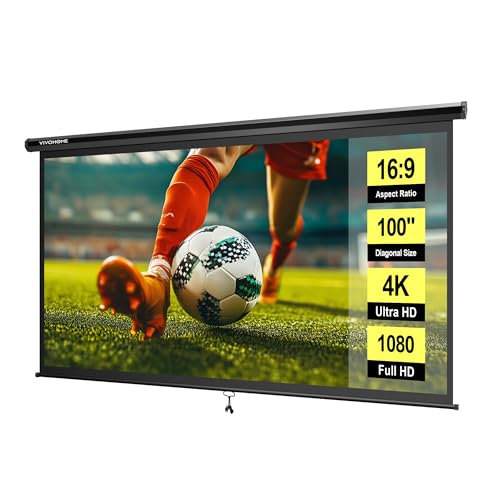
Best for: Buyers seeking a standard widescreen screen with manual retractable operation. Its 100-inch diagonal display measures 87 by 49 inches, with a 16:9 format suited to widescreen viewing.
The screen pulls down and uses a self-locking mechanism to hold at different heights. It can be mounted on a wall or ceiling and rolled up for storage. The listing suggests a viewing distance of 9.2 feet, a useful reference when planning a room layout.
Limitation: The overall size is 92 by 59 inches, so allow enough space for the complete unit rather than just the visible image. Screws and an L-bracket are not included.
Elite Screens Manual B 100-Inch Screen

Best for: Buyers who want clearly listed viewing dimensions and screen material specifications. This manual pull-down screen has a 100-inch diagonal, a 16:9 aspect ratio, and a viewable area measuring 49 inches high by 87.2 inches wide.
The MaxWhite 2 material is listed for 4K, 8K, and active 3D front projection. A 180-degree viewing angle and 1.1 gain are also specified. Its auto-lock mechanism offers height settings at two-inch intervals, making it a useful option when viewers need to adjust the drop.
Limitation: The overall screen size is 62.6 by 93.5 inches, larger than the viewable area. Measure the mounting location to account for the full case and screen.
VIVOHOME 120-Inch 1:1 Pull-Down Screen

Best for: Buyers who need a square 1:1 projection surface rather than a typical widescreen format. Its 120-inch diagonal display area measures 84 by 84 inches, which can fit uses that call for a square image.
The manual pull-down screen has a self-locking mechanism for holding it at a selected height. It can be mounted on a wall or ceiling, and its roll-up design supports storage when not in use. The listing gives 7.5 feet as a suggested viewing distance.
Limitation: A 1:1 screen is not the standard 16:9 shape used for many widescreen presentations and videos. Check the projector’s output and intended content before selecting this format. Screws and an L-bracket are not included.
Pyle 72-Inch Manual Pull-Down Screen

Best for: Buyers who want a smaller manual screen for a home theater or office. Its matte white surface is paired with black masking borders, and the auto-lock mechanism lets the screen stay at a preferred height.
Dual mounting options allow wall or ceiling installation. The product information lists a screen size of 42.5 by 56.6 inches and describes the surface as suitable for HD viewing in low or ambient lighting. Choose this model when a 100- or 120-inch screen would take up too much room.
Limitation: At 72 inches, it offers less viewing area than the larger options above. The listed dimensions are not identified as diagonal measurements, so verify how they correspond to your available space.
Buying Guide: How to Choose a Low-Profile Projector Screen
Should you choose a manual or motorized screen?
A manual pull-down screen is a straightforward option if you are comfortable lowering and retracting it by hand. A motorized model such as the DINAH adds remote-controlled operation. Compare convenience with the installation requirements and available mounting space before deciding.
What screen size fits your room?
Measure the wall or ceiling area before choosing a diagonal size. Check both the viewable image dimensions and the product’s overall dimensions, which include the case or border. Suggested viewing distances in the listings can help with planning, but your room layout and seating position also matter.
Which aspect ratio do you need?
A 16:9 screen is a common choice for widescreen content. A 1:1 screen is square and may suit specific projection needs, but it is a different shape. Confirm the intended content and projector format to avoid choosing a screen that does not match your use.
What installation details should you check?
Confirm whether the screen is designed for wall mounting, ceiling mounting, or both. Check what hardware is included: the VIVOHOME manual listings state that screws and an L-bracket are not included. For a retractable screen, also make sure the case and lowered screen will clear lights, trim, furniture, and other obstacles.
Frequently Asked Questions
What does low profile mean for a projector screen?
It generally refers to a screen that can be retracted or stored out of the way when it is not being used. Check the model’s case dimensions and mounting position to determine how it will fit your room.
Is a 16:9 screen suitable for movies?
A 16:9 format is a common widescreen shape. Check the projector’s output and the content you watch to ensure the format is appropriate.
Can a pull-down screen be mounted on a ceiling?
Some products in this list specify wall or ceiling installation. Confirm the individual model’s mounting options and hardware requirements before installation.
Does a larger screen always work better?
No. A larger screen needs more mounting space and may require viewers to sit farther away. Match screen size to the room and seating distance.