No standard home router in this list promises dependable WiFi across 500 meters. Distance depends on buildings, interference, device capabilities, and the frequency band, so a large property may need an outdoor access point or multiple network nodes. For home coverage, the TP-Link BE6500 is best for newer devices and high throughput, while the Archer AX21 is a practical WiFi 6 router. The two Cyseed listings are extenders for filling dead zones, and the Archer A6 is a dual-band alternative with gigabit ports.
| Product | Best suited for | Key stated feature |
|---|---|---|
| TP-Link BE6500 BE400 | Newer WiFi 7 devices and busy homes | Up to 2,400 sq. ft. stated coverage |
| TP-Link Archer AX21 V5 | WiFi 6 home networking | AX1800 dual-band WiFi 6 |
| Cyseed WiFi Extender listing 1 | Extending an existing router’s signal | Four external antennas |
| Cyseed WiFi Extender listing 2 | Another listing for the same extender model | Claims support for 65+ devices |
| TP-Link Archer A6 | Wired connections and basic dual-band use | Four gigabit LAN ports |
TP-Link BE6500 BE400 WiFi 7 Router

Best for: Households with newer WiFi 7 devices, multiple active users, and high-throughput needs. This dual-band router advertises up to 6.5 Gbps total bandwidth, six streams, six high-performance antennas, and beamforming. Its stated maximum coverage is up to 2,400 square feet for as many as 90 devices.
WiFi 7 features include Multi-Link Operation, Multi-RUs, and 4K-QAM. Choose this model if you want newer wireless technology and have compatible devices to benefit from it. The coverage figure is not a 500-meter guarantee; walls and other obstacles can reduce signal range, and the product is dual-band rather than 6 GHz tri-band.
TP-Link Archer AX21 V5 WiFi 6 Router

Best for: Buyers seeking a dual-band WiFi 6 router for everyday streaming, gaming, and downloads. Its AX1800 rating combines stated maximum speeds of up to 1,200 Mbps on 5 GHz and 574 Mbps on 2.4 GHz. OFDMA is designed to help the router communicate with multiple devices simultaneously.
This is a better fit for a typical home network than a 500-meter point-to-point link. The product information notes that a separate modem is required. Actual performance varies with distance, obstacles, and conditions, so do not treat its speed figures as guaranteed speeds throughout a property.
Cyseed WiFi Extender With Four Antennas

Best for: People who already have a router and want to extend its signal into areas with weak reception. The listing describes four external antennas, 2.4 GHz operation, compatibility with most WiFi routers, and support for more than 65 devices. It also advertises coverage up to 10,000 square feet.
Choose an extender when the router’s signal reaches partway to a dead zone; placement where the existing signal is still usable matters. The 10,000-square-foot claim does not establish reliable 500-meter coverage. The stated feature information identifies 2.4 GHz operation, so buyers needing specific bands or throughput should verify those details before choosing.
Cyseed WiFi Extender Listing With 1-Tap Setup
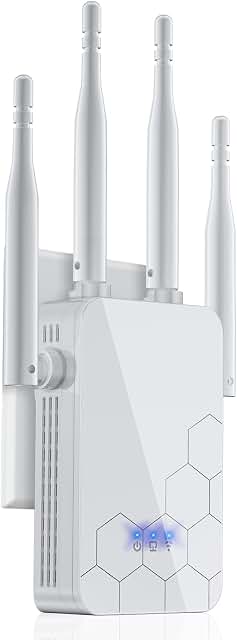
Best for: Buyers comparing another listing of the Cyseed extender described above. The supplied product information repeats the claims of four external antennas, 2.4 GHz operation, support for 65 or more devices, and compatibility with most routers. It is presented as a way to improve signal in home dead zones.
The features match the other Cyseed listing, so compare the listing details carefully rather than assuming it is a different model or a higher-performance option. It remains an extender, not a standalone replacement for a modem or router. Its stated range claim does not confirm service at a 500-meter distance.
TP-Link Archer A6 AC1200 Router

Best for: Buyers who want a dual-band router with wired gigabit connections. The Archer A6 lists up to 1,200 Mbps combined wireless speed, four gigabit LAN ports, and four external antennas with beamforming. Gigabit ports are useful for connecting compatible wired devices directly to the router.
Choose it if wired connectivity and basic dual-band WiFi are priorities. It is an older AC1200-class option compared with the WiFi 6 and WiFi 7 routers in this list. Its antenna and beamforming features do not establish a 500-meter wireless range, and actual coverage depends on the environment.
Buying Guide: Choosing WiFi for Long Distances
Can a home router cover 500 meters?
Do not assume a consumer router will provide dependable 500-meter coverage. A product’s advertised coverage area is not the same as a guaranteed radius, and indoor walls, trees, terrain, and interference can weaken signals. For a long outdoor link, investigate purpose-built outdoor access points or a point-to-point wireless system, and confirm local installation requirements.
Should you buy a router or an extender?
A router creates the local WiFi network and typically connects to a modem. An extender receives an existing WiFi signal and rebroadcasts it. An extender can help with a nearby dead zone, but it cannot make a weak source signal strong simply by being placed far away. Position it where the original network still has usable reception.
Which WiFi band matters most?
In general, 2.4 GHz can be useful for reaching farther than 5 GHz, while 5 GHz can provide more bandwidth at shorter distances. The products here vary in WiFi generation and stated bands. Check the device requirements and intended placement; obstacles and interference can change real-world results.
What should you check before buying?
- Confirm whether the product is a router or an extender and whether you need a separate modem.
- Compare the stated coverage, bands, WiFi generation, and wired ports against your needs.
- Plan for multiple access points or an outdoor system if you need coverage across a large property.
- Treat advertised speeds and coverage as conditional claims, not guaranteed performance at every location.
Frequently Asked Questions
Which product here is best for WiFi 7?
The TP-Link BE6500 BE400 is the WiFi 7 option in this list. Its features include Multi-Link Operation and a stated maximum coverage of up to 2,400 square feet.
Will either Cyseed extender provide WiFi at 500 meters?
The supplied information does not verify reliable 500-meter coverage. Its advertised area claim should not be interpreted as a confirmed 500-meter connection.
Do I need a modem with the Archer AX21?
Yes. The product information says the Archer AX21 requires a separate modem.
Which router has the most gigabit LAN ports listed?
The TP-Link Archer A6 lists four gigabit LAN ports. The supplied details for the other routers do not specify their port counts.
Are the two Cyseed products different extenders?
The supplied names and feature descriptions are essentially the same, but they have separate product listings. Compare the listing information before selecting one.