Finding a reliable long range presentation remote is essential for fluent, professional talks in large classrooms, conference halls, and hybrid settings. The following selection focuses on devices with extended wireless ranges, robust battery life, versatile controls, and easy plug-and-play setup. Each option below is evaluated for practical features, compatibility, and ease of use in real-world presentations.
Quick overview of chosen products:
| Product | Brand | Range | Connection | Notable Feature |
|---|---|---|---|---|
| Norwii N76 Rechargeable Presentation Clicker (Green) | Norwii | 328 feet | Wireless + USB receiver | Rechargeable battery, customizable keys |
| DinoFire USB Type C Wireless Presenter Remote | DinoFire | 98-165 feet (range); 328 feet laser pointer range | USB-A & USB-C, Plug and Play | Red laser pointer, versatile for Mac/PC |
| Logitech Spotlight Presentation Remote | Logitech | Up to 30 m (approx. 98 feet) | Bluetooth | Advanced highlighting, cursor control |
| Norwii N76 Rechargeable Presentation Clicker (Black) | Norwii | 328 feet | Wireless + USB receiver | Rechargeable, customizable keys |
| Wireless Presentation Clicker PowerPoint Presenter Remote (Type C) | VILNIU | 98 feet to 328 feet depending on mode | USB-A & USB-C | Dual interface, red laser, ergonomic design |
Norwii N76 Rechargeable Presentation Clicker (Green Light)

The Norwii N76 Green Light model combines a long wireless range with a rechargeable battery designed for extended sessions. Its 328-foot control radius supports large rooms and lecture halls where presenters must move freely while advancing slides. The built-in 360 mAh battery can be fully charged in 2–3 hours and provides weeks of operation between charges. The device accommodates PowerPoint hyperlinks and volume control, and its customizable keys can be reconfigured via Norwii’s presenter software to match individual presentation styles. This flexibility helps both novice and experienced speakers tailor the device to their workflow.
Key advantages include a robust range, rechargeable power, and customization that can reduce on-screen navigation time, helping presenters maintain eye contact with the audience. When collaborating with assistants or using complex multimedia, the ability to map functions to preferred buttons can streamline transitions and emphasis.
DinoFire USB Type C Wireless Presenter Remote

The DinoFire remote emphasizes broad compatibility with both USB-A and USB-C devices, making it suitable for modern laptops, tablets, and computers. Its feature set includes page forward/backward navigation, volume control, screen switching, and hyperlink support, with a bright red laser pointer to highlight points from a distance. Its wireless range supports large rooms, and the device is designed for plug-and-play use, which minimizes setup steps. Mac users may require a brief initial setup, but no drivers are needed for most systems, contributing to quick onboarding for presenters who travel with minimal gear.
For audiences in larger venues, the ability to present without being glued to the computer improves interaction. The red laser pointer helps direct attention in brighter environments, though it may be less effective on highly reflective screens or in extremely bright auditoriums. The 98–165 feet practical range plus the laser range of 328 feet provides a versatile balance of pointing precision and room coverage.
Logitech Spotlight Presentation Remote

Logitech Spotlight stands out for its advanced highlighting and cursor control. The device integrates with the Logi Options+ app to enable screen highlighting and precise cursor interactions, making it suitable for high-visual presentations that require quick navigation through media, documents, and web content. It supports multiple modes for in-person and hybrid settings, and its smart time management features alert presenters as time runs short. The Bluetooth connection adds flexibility when room layout makes USB receivers cumbersome, and the design emphasizes ergonomic handling for comfortable long sessions.
This remote is ideal for presenters who emphasize dynamic visuals, live annotations, and interactive content. While it comes at a premium, the ability to magnify and highlight directly on screen can reduce the need for verbal explanations and help audiences follow complex demonstrations more easily.
Norwii N76 Rechargeable Presentation Clicker (Black)
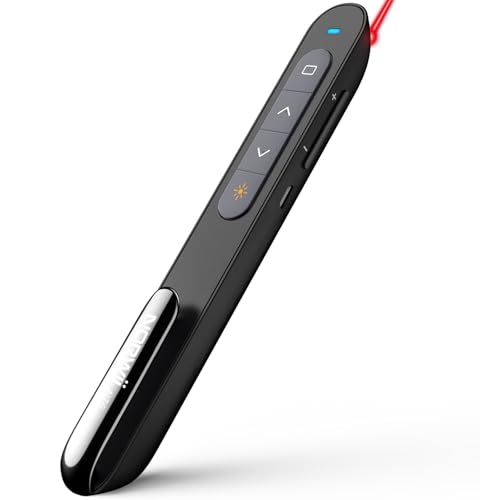
This version mirrors the green model’s long-range capability and rechargeable design, targeting users who need dependable performance in large spaces. The 328-foot wireless control range supports dynamic movement across stages or lecture halls, while PowerPoint hyperlink and volume control provide practical convenience. Customization through Norwii’s software gives presenters the option to tailor button mappings to their workflow, reducing interruptions and enabling smoother transitions between slides, videos, and interactive content.
The device is constructed to withstand frequent use in classrooms and conference environments, offering a balance of durability, range, and user-friendly configuration for everyday teaching and speaking engagements.
Wireless Presentation Clicker PowerPoint Presenter Remote (Type C) by VILNIU

The VILNIU Type C wireless presenter offers USB-C and USB-A compatibility, minimizing setup friction for mixed device environments. It features a red laser pointer and a long-range presentation control capability that reaches up to 328 feet in certain modes, enabling presenters to move across large spaces while still controlling slides. The ergonomic design helps reduce hand fatigue, and plug-and-play functionality means most users can begin presenting with minimal configuration. This device is particularly attractive for environments that mix modern notebooks with older PCs or conference systems.
For teams that require quick onboarding and cross-device flexibility, the dual interface design reduces compatibility concerns. The red laser and emphasis on range support make it a practical option for lecture halls, training sessions, and corporate briefings where mobility and clarity are crucial.
Buying Guide: Key Purchase Considerations
- Range and reliability: Consider the maximum effective distance in your typical rooms. Large lecture halls and convention spaces benefit from ranges around 100–328 feet, with some models offering robust signals through walls and furniture.
- Battery life and charging: Rechargeable batteries reduce ongoing costs and downtime. Look for models with quick charge capabilities and long standby times.
- Compatibility: If you use multiple devices, prioritize USB-A and USB-C compatibility, or Bluetooth-enabled options for flexible connections to laptops, tablets, and Macs.
- Button customization: Customizable keys can streamline workflows, especially for presenters who rely on complex multimedia or hyperlink navigation.
- Pointer type: Red laser pointers are common and effective on most screens; some models offer highlights or magnification on-screen for enhanced emphasis.
- Setup and software: Plug-and-play devices are ideal for quick setups. When software is involved, ensure it’s compatible with your operating system and can be updated easily.
- Ergonomics and build quality: A comfortable grip and tactile buttons reduce fatigue during long sessions and minimize accidental presses.
- Hybrid work considerations: For classrooms that blend in-person and virtual audiences, consider remotes with features like on-screen highlighting and cursor control to facilitate remote demonstrations.